How to create barcodes using C# or VB.NET and Barcode Professional for WPF that must fit a given size or area
Product Barcode Professional for WPF Published 12/13/2007 Updated 12/13/2007
Requirements
Neodynamic Barcode Professional for WPF (any version)
Microsoft .NET Framework 3.0 or greater
Microsoft Visual Studio 2008 (Optional)
Microsoft Visual Basic 2008 Express Edition (Optional)
Microsoft Visual C# 2008 Express Edition (Optional)
It's very common to need to create a barcode in order it fits a given area, for instance: The barcode must fit an area of size 1.5 inch x 1 inch.
Barcode Professional for WPF was designed keeping this requirement in mind. Barcode Professional for WPF package includes two classes for barcode generation in WPF applications/scenarios, BarcodeProfessional and BarcodeBuilder.
Brief summary of BarcodeProfessional and BarcodeBuilder classes:
- BarcodeProfessional is a WPF FrameworkElement - derived class intended to be directly used in a WPF Window or Page. BarcodeProfessional provides full design-time support in Microsoft Visual Studio 2008 product lines including Express Editions.
- BarcodeBuilder is a lightweight .NET class intended to be used in WPF applications for barcode generation. It does not provide design-time support in Microsoft Visual Studio as BarcodeProfessional class does.
Independently of the Barcode Professional for WPF class you opt for, both classes let you to create barcodes fitting a given area by just setting up the FitBarcodeToSize property.
Examples
Fitting barcode to a given size by using BarcodeProfessional class
You want to encode the data 1234567890 in Code 128 and the barcode must fit an area of size 1.5 inch x 0.75 inch
Follow these steps:
- Open Visual Studio 2008 or Express Editions
- Create a WPF Application
- Ensure you have installed Barcode Professional for WPF
- Drag & Drop BarcodeProfessional control from VS Toolbox onto the default Window
- Select the BarcodeProfessional control and set the following properties:
- Symbology to Code128
- Code to 1234567890
- BarcodeUnit to Inch
- FitBarcodeToSize to 1.5, 0.75 (1.5 for Width and 0.75 for Height)
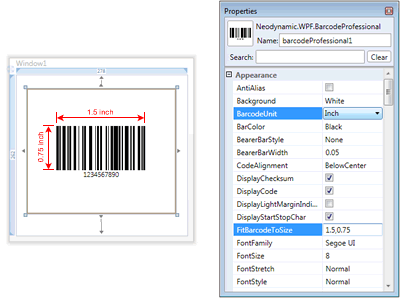
Fitting Barcode to desired size at design time in VS 2008
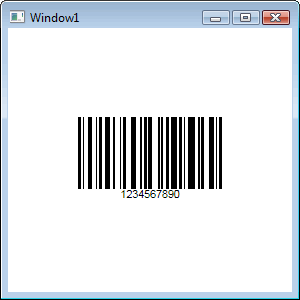
Fitting Barcode to desired size at runtime
Create and save barcode images fitting to a given size by using BarcodeBuilder class
You want to encode the data 1234567890 in Code 128 and the barcode must fit an area of size 1.5 inch x 0.75 inch. The barcode images will be saved as PNG format at 300DPI.
VB
Private Sub SaveBarcode()
    'Create a BarcodeBuilder object
    Dim bc As New Neodynamic.WPF.BarcodeBuilder()
    'Set the barcode symbology to Code 128
    bc.Symbology = Neodynamic.WPF.Symbology.Code128
    'Set the value to encode
    bc.Code = "1234567890"
    'Barcode dimensions settings
    bc.BarcodeUnit = Neodynamic.WPF.BarcodeUnit.Inch
    bc.FitBarcodeToSize = New System.Windows.Size(1.5D, 0.75D)
   'Output image settings
    bc.ImageSettings.Dpi = 300
    bc.ImageSettings.ImageFormat = Neodynamic.WPF.ImageFormat.Png
    'Save the PNG barcode image on disk
    bc.Save("C:\barcode128.png")
End Sub
C#
private void SaveBarcode()
{
    //Create a BarcodeBuilder object
    Neodynamic.WPF.BarcodeBuilder bc = new Neodynamic.WPF.BarcodeBuilder();
    //Set the barcode symbology to Code 128
    bc.Symbology = Neodynamic.WPF.Symbology.Code128;
    //Set the value to encode
    bc.Code = "1234567890";
    //Barcode dimensions settings
    bc.BarcodeUnit = Neodynamic.WPF.BarcodeUnit.Inch;
    bc.FitBarcodeToSize = new System.Windows.Size(1.5d, 0.75d);
    //Output image settings
    bc.ImageSettings.Dpi = 300;
    bc.ImageSettings.ImageFormat = Neodynamic.WPF.ImageFormat.Png;
    //Save the PNG barcode image on disk
    bc.Save(@"C:\barcode128.png");
}