
How to dynamically create ImageDraw controls at runtime in ASP.NET
Product ImageDraw for ASP.NET Published 05/22/2006 Updated 05/22/2006
Requirements
Neodynamic ImageDraw 2.0 for ASP.NET
Microsoft .NET Framework (any version)
Microsoft Visual Studio .NET (any version)
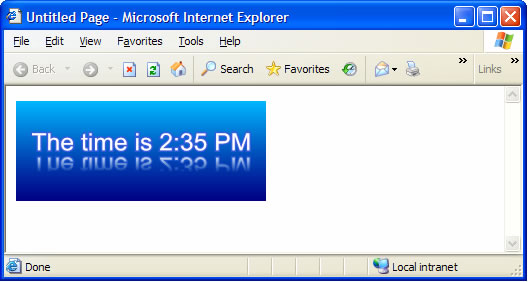
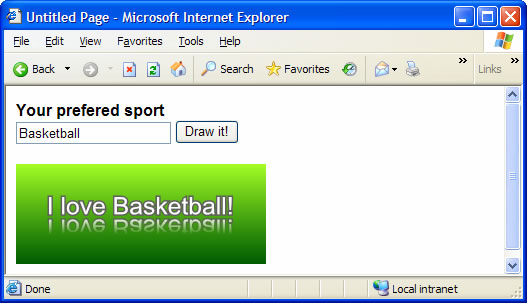
You can create ImageDraw controls at runtime. In the following sample we're going to create a simple ASP.NET WebForm that shows this scenario. In the sample, we'll create an ImageDraw control in the Page's Load event as well as we'll create an ImageDraw control as a response to a click event of a Button in the WebForm.
Follow these steps to create an ImageDraw control in the Page_Load event procedure:
- Open your .NET development tool such as Visual Studio .NET and create a new ASP.NET Web Application.
- Drag and Drop a PlaceHolder control onto it. This control will hold the ImageDraw control we're going to create at runtime.
- Add a reference to Neodynamic.WebControls.ImageDraw.dll assembly.
- In the Page_Load event procedure write the following code:
VB
'Invoke the static method ProcessImageRequest to server any image request

Neodynamic.WebControls.ImageDraw.ImageDraw.ProcessImageRequest()

'Create an instance of ImageDraw
Dim imgDraw As New Neodynamic.WebControls.ImageDraw.ImageDraw()
'Add the ImageDraw object to the PlaceHolder Controls collection
Me.PlaceHolder1.Controls.Add(imgDraw)

'Set the ImageDraw properties and objects now

'Set Canvas properties
imgDraw.Canvas.AutoSize = False '
imgDraw.Canvas.CenterElements = True '
imgDraw.Canvas.Width = 250 '
imgDraw.Canvas.Height = 100 '
imgDraw.Canvas.Fill.Type = Neodynamic.WebControls.ImageDraw.FillType.Gradient
imgDraw.Canvas.Fill.GradientAngle = 90
imgDraw.Canvas.Fill.GradientColor1 = System.Drawing.Color.DeepSkyBlue
imgDraw.Canvas.Fill.GradientColor2 = System.Drawing.Color.DarkBlue

'Create a dynamic text element
Dim txtElem As New Neodynamic.WebControls.ImageDraw.TextElement()
txtElem.Font.Size = 24
txtElem.ForeColor = System.Drawing.Color.White
txtElem.StrokeColor = System.Drawing.Color.RoyalBlue
txtElem.StrokeWidth = 3
txtElem.Text = "The time is " + DateTime.Now.ToShortTimeString()
txtElem.Actions.Add(New Neodynamic.WebControls.ImageDraw.GlassTable())

'Add the TextElement object to the ImageDraw Elements collection
imgDraw.Elements.Add(txtElem)
C#
//Invoke the static method ProcessImageRequest to server any image request Neodynamic.WebControls.ImageDraw.ImageDraw.ProcessImageRequest(); //Create an instance of ImageDraw Neodynamic.WebControls.ImageDraw.ImageDraw imgDraw = new Neodynamic.WebControls.ImageDraw.ImageDraw(); //Add the ImageDraw object to the PlaceHolder Controls collection this.PlaceHolder1.Controls.Add(imgDraw); //Set the ImageDraw properties and objects now //Set Canvas properties imgDraw.Canvas.AutoSize = false; imgDraw.Canvas.CenterElements = true; imgDraw.Canvas.Width = 250; imgDraw.Canvas.Height = 100; imgDraw.Canvas.Fill.Type = Neodynamic.WebControls.ImageDraw.FillType.Gradient; imgDraw.Canvas.Fill.GradientAngle = 90; imgDraw.Canvas.Fill.GradientColor1 = System.Drawing.Color.DeepSkyBlue; imgDraw.Canvas.Fill.GradientColor2 = System.Drawing.Color.DarkBlue; //Create a dynamic text element Neodynamic.WebControls.ImageDraw.TextElement txtElem = new Neodynamic.WebControls.ImageDraw.TextElement(); txtElem.Font.Size = 24; txtElem.ForeColor = System.Drawing.Color.White; txtElem.StrokeColor = System.Drawing.Color.RoyalBlue; txtElem.StrokeWidth = 3; txtElem.Text = "The time is " + DateTime.Now.ToShortTimeString(); txtElem.Actions.Add(new Neodynamic.WebControls.ImageDraw.GlassTable()); //Add the TextElement object to the ImageDraw Elements collection imgDraw.Elements.Add(txtElem); - That's it. Build the ASP.NET Web Application and run it. You'll get the current local time as is shown in the following figure:
Follow these steps to create a barcode control in a Button's Click event:
- Add a new WebForm item to the ASP.NET Web Application project.
- Drag and Drop a TextBox, a Button and a PlaceHolder control onto it.
- In the Page_Load event procedure write the following code:
VB
'Invoke the static method ProcessImageRequest to server any image request
Neodynamic.WebControls.ImageDraw.ImageDraw.ProcessImageRequest()
C#
//Invoke the static method ProcessImageRequest to server any image request Neodynamic.WebControls.ImageDraw.ImageDraw.ProcessImageRequest(); - In the Button1_Click event procedure write the following code (Note that both code versions ARE DIFFERENT!):
VB
Dim imgDraw As Neodynamic.WebControls.ImageDraw.ImageDraw

If (Me.PlaceHolder1.Controls.Count = 0) Then
	'Create an instance of ImageDraw
        imgDraw = New Neodynamic.WebControls.ImageDraw.ImageDraw

	'Add the ImageDraw object to the PlaceHolder Controls collection
        Me.PlaceHolder1.Controls.Add(imgDraw)

	'Set the ImageDraw properties and objects now

	'Set Canvas properties
        imgDraw.Canvas.AutoSize = False
        imgDraw.Canvas.CenterElements = True
        imgDraw.Canvas.Width = 250
        imgDraw.Canvas.Height = 100
        imgDraw.Canvas.Fill.Type = Neodynamic.WebControls.ImageDraw.FillType.Gradient
        imgDraw.Canvas.Fill.GradientAngle = 90
        imgDraw.Canvas.Fill.GradientColor1 = System.Drawing.Color.GreenYellow
        imgDraw.Canvas.Fill.GradientColor2 = System.Drawing.Color.DarkGreen

	'Create a dynamic text element
        Dim txtElem As New Neodynamic.WebControls.ImageDraw.TextElement()
        txtElem.Font.Size = 24
        txtElem.ForeColor = System.Drawing.Color.White
        txtElem.StrokeColor = System.Drawing.Color.DimGray
        txtElem.StrokeWidth = 3
        txtElem.Text = "I love " + Me.TextBox1.Text + "!"
        txtElem.Actions.Add(New Neodynamic.WebControls.ImageDraw.GlassTable())

	'Add the TextElement object to the ImageDraw Elements collection
        imgDraw.Elements.Add(txtElem)
Else
	'Get the ImageDraw object from the PlaceHolder Controls collection
        imgDraw = CType(Me.PlaceHolder1.Controls(0), Neodynamic.WebControls.ImageDraw.ImageDraw)

	'Update TextElement
        Dim txtElem As Neodynamic.WebControls.ImageDraw.TextElement
        txtElem = CType(imgDraw.Elements(0), Neodynamic.WebControls.ImageDraw.TextElement)
        txtElem.Text = "I love " + Me.TextBox1.Text + "!"
End If

'Ensure the new image is unique on the server's memory
imgDraw.OutputImageName = Me.TextBox1.Text
C#
//Create an instance of ImageDraw Neodynamic.WebControls.ImageDraw.ImageDraw imgDraw = new Neodynamic.WebControls.ImageDraw.ImageDraw(); //Add the ImageDraw object to the PlaceHolder Controls collection this.PlaceHolder1.Controls.Add(imgDraw); //Set the ImageDraw properties and objects now //Set Canvas properties imgDraw.Canvas.AutoSize = false; imgDraw.Canvas.CenterElements = true; imgDraw.Canvas.Width = 250; imgDraw.Canvas.Height = 100; imgDraw.Canvas.Fill.Type = Neodynamic.WebControls.ImageDraw.FillType.Gradient; imgDraw.Canvas.Fill.GradientAngle = 90; imgDraw.Canvas.Fill.GradientColor1 = System.Drawing.Color.GreenYellow; imgDraw.Canvas.Fill.GradientColor2 = System.Drawing.Color.DarkGreen; //Create a dynamic text element Neodynamic.WebControls.ImageDraw.TextElement txtElem = new Neodynamic.WebControls.ImageDraw.TextElement(); txtElem.Font.Size = 24; txtElem.ForeColor = System.Drawing.Color.White; txtElem.StrokeColor = System.Drawing.Color.DimGray; txtElem.StrokeWidth = 3; txtElem.Text = "I love " + this.TextBox1.Text + "!"; txtElem.Actions.Add(new Neodynamic.WebControls.ImageDraw.GlassTable()); //Add the TextElement object to the ImageDraw Elements collection imgDraw.Elements.Clear(); imgDraw.Elements.Add(txtElem); //Ensure the new image is unique on the server's memory imgDraw.OutputImageName = this.TextBox1.Text; - That's it. Build the ASP.NET Web Application and run it. Enter some values in the TextBox, click on the Button control and you should get something like it is shown in the following figure:
Remember to download and install ImageDraw in order to reproduce this sample demo.
Need help? Contact Support
We provide best-in-class customer service and support directly from members of our dev team! If we are available when you contact us, you will get a response in few minutes; otherwise the maximum turnaround is 24hs in most cases.