
How to build an advanced ASP.NET AJAX Photo Slideshow featuring imaging effects and watermarks with ImageDraw
Product ImageDraw SDK for .NET Published 11/13/2007 Updated 11/13/2007
Requirements
Neodynamic ImageDraw SDK for .NET
Microsoft .NET Framework (2.0 or later)
Microsoft ASP.NET AJAX Framework (1.0 or later)
Microsoft ASP.NET AJAX Control Toolkit
Microsoft Visual Studio .NET (2005 or later - Visual Web Developer Express Edition)
This ImageDraw demo - which source code files can be found at the end of this page available for downloading - demonstrates how easily you can use ImageDraw object model and ASP.NET AJAX Framework to design an advanced AJAX-based Photo Slideshow. This demo is based on the Slideshow (SlideShowExtender) sample of AJAX Control Toolkit (http://www.asp.net/AJAX/AjaxControlToolkit/Samples/SlideShow/SlideShow.aspx)
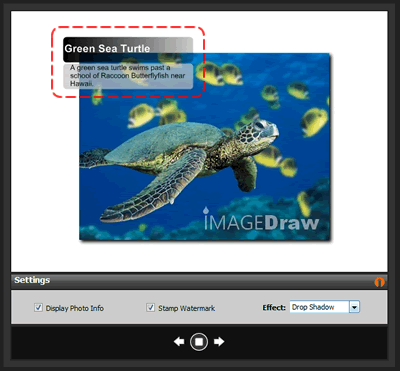
The following figure is a screenshot of the ASP.NET AJAX Photo Slideshow application that leverages ASP.NET AJAX Framework, ASP.NET AJAX Control Toolkit and ImageDraw. Each photo slide is dynamically created by ImageDraw objects adding built-in Rounded Rectangle Shapes for photo metadata; applying the desired imaging effect on the original photo and stamping the ImageDraw logo for watermarking.

AJAX Photo Slideshow featuring image metadata drawn inside ImageDraw rounded rectangle shapes, drop shadow effect and ImageDraw watermark.
This AJAX Photo Slideshow features:
- Photo Metadata spots
The photo info such as image name and description is drawn inside rounded rectangles (autoshapes built-in ImageDraw). The first rounded rectangle for image name features a smooth gradient while the second one for image description features an opacity setting making it semi-transparent.
- Watermark Logo
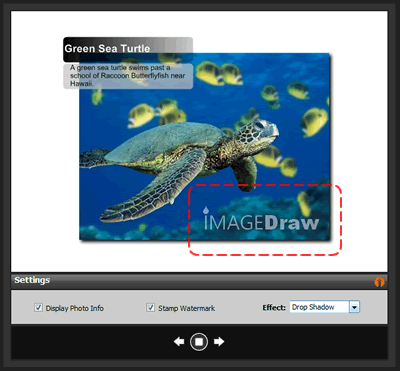
With ImageDraw object model you can easily add watermarks over photos. In this demo, we used an ImageDraw logo image file for watermarking but you can specify any elements on ImageDraw canvas to be used as watermark, for example, you might want a text (not an image file) be used for watermarking.
- Built-in Imaging Effects
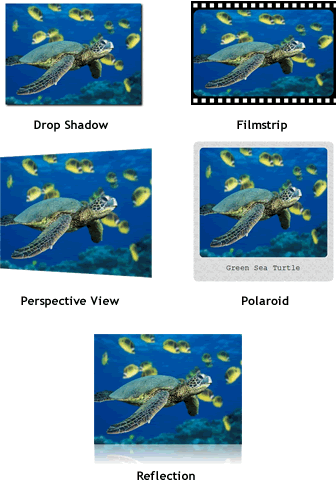
ImageDraw features lots of useful Imaging Effects (a.k.a. Actions) out-of-the-box. In this demo we introduce some of those effects like Drop Shadow, Filmstrip, Perspective View, Polaroid, and Reflection. The following figures shown each of those effects and how each photo looks like after processing.
Sample Files Download
Here are the VB.NET and C# versions of this sample. Please download the zip file and extract it. After that, you'll find all necessary files to reproduce this step by step guide.
- For Visual Basic.NET: ImageDrawAJAXSlideshowVB.zip (1.94 MB)
- For Visual C#.NET: ImageDrawAJAXSlideshowCS.zip (1.94 MB)
Remember to download and install ImageDraw in order to reproduce this sample demo.
Need help? Contact Support
We provide best-in-class customer service and support directly from members of our dev team! If we are available when you contact us, you will get a response in few minutes; otherwise the maximum turnaround is 24hs in most cases.