Repeater Item
The RepeaterItem Class
A RepeaterItem – represented by the Neodynamic.SDK.Printing.RepeaterItem class – repeats every item that lies fully inside its area. It is a layout container: it is never printed itself. Before the label is rendered or converted to printer commands, the SDK removes the RepeaterItem and replaces it with the repeated copies of the items it contained.
A RepeaterItem is created by specifying its X & Y location and its Width & Height size, just like other items. It supports:
- Fixed count repetition: set
Count. - Dynamic (data-bound) repetition: set
DataFieldto an Array/Collection field of your data source. The number of repetitions is taken from the data, row by row. - Rotation, in 90° increments, which changes the direction of the repetition.
Note
The RepeaterItem has no visual output. It does not draw borders or a background. If you need a visible frame, add a separate shape item (it will be repeated only if it fits fully inside the repeater area).
Quick Start
ThermalLabel tLabel = new ThermalLabel(UnitType.Inch, 4, 3);

// Item to repeat
TextItem txt = new TextItem(0.3, 0.3, 2, 0.25, "Hello");

// Repeater area that fully contains the text, repeated 3 times
RepeaterItem rep = new RepeaterItem(0.2, 0.2, 3, 0.45);
rep.Count = 3;

tLabel.Items.Add(txt);
tLabel.Items.Add(rep);
The label will print "Hello" three times, one below the other, 0.45 inches apart.
Main Properties
| Property | Description |
|---|---|
X, Y |
Upper-left corner of the repeater area. |
Width, Height |
Size of the repeater area. Default is 1. Negative values are set to 0. Height is also the distance between consecutive repetitions. |
Count |
Total number of repetitions (original item included) when DataField is not set. Default is 0. |
DataField |
Name of an Array/Collection field. When set, Count is ignored and the number of repetitions comes from the data. |
RotationAngle |
0, 90, 180 or 270. Any other value throws an ArgumentOutOfRangeException. Determines the direction of the repetition. |
For the complete list of members, see the API Reference.
How it works
- Every item whose bounds fall fully inside the repeater area is a child of the repeater. The z-index of the RepeaterItem does not matter.
- Each child is cloned
Count - 1times (or n − 1 times for data binding) and every clone is moved byHeighttimes its repetition index. The original child stays in place as the first repetition. - The RepeaterItem is removed from the label and the clones are inserted in the label at the same z-order position as the item they were cloned from.
Only these item types can be repeated: TextItem, BarcodeItem, ImageItem, shape items (Rectangle, Ellipse, Line) and TableShapeItem. Other items located inside the area, such as a LiteralItem, an RFIDTagItem or another RepeaterItem, are ignored and not repeated.
Direction of the repetition
| RotationAngle | Direction |
|---|---|
0 |
Downwards |
90 |
Leftwards |
180 |
Upwards |
270 |
Rightwards |
For 90 and 270 the area is evaluated rotated: the repeater Height runs along the X axis and its Width along the Y axis, and each child is measured the same way (its Height along X, its Width along Y). Design rotated repeaters with rotated children in mind and verify the result by rendering the label.
Count semantics
Count = 3means three copies in total, the original included.Count = 1prints the children once (the repeater is just removed).Count = 0(the default) with noDataFieldmeans no repetition at all: the RepeaterItem has no effect.- When the label is printed several times (several data rows or
Copies), the repeater is processed again for each label.
Fixed Count Repetition sample
This very simple sample repeats an EllipseShapeItem and a TextItem three times.
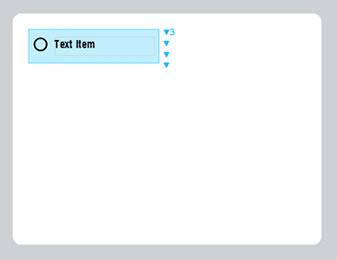
The label at design time in the editor
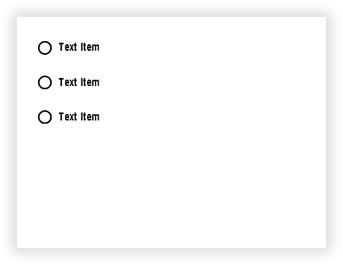
The label at runtime after being processed
Both items fit fully inside the repeater area (0.2, 0.2, 1.7 x 0.45). Since Height is 0.45, the copies are placed at Y = 0.31, 0.76 and 1.21 for the ellipse.
VB.NET
'Define a ThermalLabel object and set unit to inch and label size
Dim tLabel As New ThermalLabel(UnitType.Inch, 4, 3)
tLabel.GapLength = 0.2

'Define an EllipseShapeItem object
Dim ell As New EllipseShapeItem(0.27, 0.31, 0.18, 0.18)
ell.StrokeThickness = 0.02

'Define a TextItem object
Dim txt As New TextItem(0.54, 0.3, 1.3, 0.25, "Text Item")
txt.Font.Name = "ZPL Font 0"
txt.Font.Unit = FontUnit.Point
txt.Font.Size = 10

'Define a RepeaterItem object
Dim rep As New RepeaterItem(0.2, 0.2, 1.7, 0.45)
'Set fixed repetition count
rep.Count = 3

'Add items to ThermalLabel object...
tLabel.Items.Add(ell)
tLabel.Items.Add(txt)
tLabel.Items.Add(rep)

'Create a WindowsPrintJob object
Using pj As New WindowsPrintJob()
    'Create PrinterSettings object
    Dim myPrinter As New PrinterSettings()
    myPrinter.Communication.CommunicationType = CommunicationType.USB
    myPrinter.Dpi = 203
    myPrinter.ProgrammingLanguage = ProgrammingLanguage.ZPL
    myPrinter.PrinterName = "Zebra ZD500R"

    'Set PrinterSettings to WindowsPrintJob
    pj.PrinterSettings = myPrinter
    'Print ThermalLabel object...
    pj.Print(tLabel)
End Using
C#
//Define a ThermalLabel object and set unit to inch and label size
ThermalLabel tLabel = new ThermalLabel(UnitType.Inch, 4, 3);
tLabel.GapLength = 0.2;

//Define an EllipseShapeItem object
EllipseShapeItem ell = new EllipseShapeItem(0.27, 0.31, 0.18, 0.18);
ell.StrokeThickness = 0.02;

//Define a TextItem object
TextItem txt = new TextItem(0.54, 0.3, 1.3, 0.25, "Text Item");
txt.Font.Name = "ZPL Font 0";
txt.Font.Unit = FontUnit.Point;
txt.Font.Size = 10;

//Define a RepeaterItem object
RepeaterItem rep = new RepeaterItem(0.2, 0.2, 1.7, 0.45);
//Set fixed repetition count
rep.Count = 3;

//Add items to ThermalLabel object...
tLabel.Items.Add(ell);
tLabel.Items.Add(txt);
tLabel.Items.Add(rep);

//Create a WindowsPrintJob object
using (WindowsPrintJob pj = new WindowsPrintJob())
{
    //Create PrinterSettings object
    PrinterSettings myPrinter = new PrinterSettings();
    myPrinter.Communication.CommunicationType = CommunicationType.USB;
    myPrinter.Dpi = 203;
    myPrinter.ProgrammingLanguage = ProgrammingLanguage.ZPL;
    myPrinter.PrinterName = "Zebra ZD500R";

    //Set PrinterSettings to WindowsPrintJob
    pj.PrinterSettings = myPrinter;
    //Print ThermalLabel object...
    pj.Print(tLabel);
}
Data Binding Repetition sample
The following sample uses a data source to determine how many times a set of items is repeated and what each copy displays.
For this scenario:
- the RepeaterItem's DataField must be set to a field of type Array/Collection, and
- the DataField of each child item must be set to a field name of the elements of that Array/Collection (not to the collection itself).
Child items without a DataField (a static text, a shape, a ">" bullet, etc.) are still repeated, but all copies show the same content.
The Data Source sample
The data source features a list of food objects. Each food has two Array/Collection fields with a variable number of entries: vitamins and minerals. Both are candidates for the RepeaterItem's DataField.
The Data Source in XML format:
<foods>
    <food>
        <name>Avocado</name>
        <vitamins>
            <vitamin name="B"/>
            <vitamin name="C"/>
            <vitamin name="E"/>
            <vitamin name="K"/>
        </vitamins>
        <minerals>
            <mineral name="Potassium"/>
            <mineral name="Magnesium"/>
        </minerals>
    </food>
    <food>
        <name>Almond</name>
        <vitamins>
            <vitamin name="E"/>
        </vitamins>
        <minerals>
            <mineral name="Calcium"/>
            <mineral name="Phosphorus"/>
            <mineral name="Magnesium"/>
        </minerals>
    </food>
    <food>
        <name>Banana</name>
        <vitamins>
            <vitamin name="B"/>
            <vitamin name="C"/>
        </vitamins>
        <minerals>
            <mineral name="Potassium"/>
            <mineral name="Magnesium"/>
            <mineral name="Manganese"/>
        </minerals>
    </food>
    <food>
        <name>Cheese</name>
        <vitamins>
            <vitamin name="A"/>
            <vitamin name="B"/>
        </vitamins>
        <minerals>
            <mineral name="Calcium"/>
            <mineral name="Phosphorus"/>
        </minerals>
    </food>
    <food>
        <name>Oat</name>
        <vitamins>
            <vitamin name="B"/>
        </vitamins>
        <minerals>
            <mineral name="Zinc"/>
            <mineral name="Phosphorus"/>
            <mineral name="Magnesium"/>
        </minerals>
    </food>
    <food>
        <name>Quinoa</name>
        <vitamins>
            <vitamin name="B"/>
        </vitamins>
        <minerals>
            <mineral name="Phosphorus"/>
            <mineral name="Magnesium"/>
            <mineral name="Manganese"/>
        </minerals>
    </food>
</foods>
The same Data Source in JSON format:
[
  {
    "name": "Avocado",
    "vitamins": [ { "name": "B" }, { "name": "C" }, { "name": "E" }, { "name": "K" } ],
    "minerals": [ { "name": "Potassium" }, { "name": "Magnesium" } ]
  },
  {
    "name": "Almond",
    "vitamins": [ { "name": "E" } ],
    "minerals": [ { "name": "Calcium" }, { "name": "Phosphorus" }, { "name": "Magnesium" } ]
  },
  {
    "name": "Banana",
    "vitamins": [ { "name": "B" }, { "name": "C" } ],
    "minerals": [ { "name": "Potassium" }, { "name": "Magnesium" }, { "name": "Manganese" } ]
  },
  {
    "name": "Cheese",
    "vitamins": [ { "name": "A" }, { "name": "B" } ],
    "minerals": [ { "name": "Calcium" }, { "name": "Phosphorus" } ]
  },
  {
    "name": "Oat",
    "vitamins": [ { "name": "B" } ],
    "minerals": [ { "name": "Zinc" }, { "name": "Phosphorus" }, { "name": "Magnesium" } ]
  },
  {
    "name": "Quinoa",
    "vitamins": [ { "name": "B" } ],
    "minerals": [ { "name": "Phosphorus" }, { "name": "Magnesium" }, { "name": "Manganese" } ]
  }
]
The Label Definition
At design time in the editor the label looks like the following. There are two RepeaterItems, one for vitamins and one for minerals. They sit side by side and do not overlap.
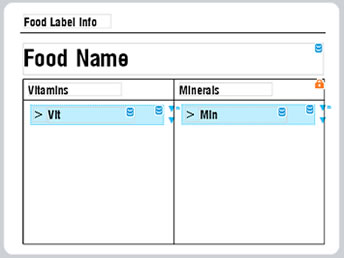
Notice that:
- The
Food Nametext hasDataField="name"but lies outside both repeaters, so it is bound to the food'snameand printed once. - The
VitandMintexts haveDataField="name"and lie inside a repeater, so inside the repeaternamerefers to the vitamin/mineral name. - The
>texts have no DataField; they are simply repeated next to each entry.
The label template in XML format:
<ThermalLabel Version="12.0" Width="4" Height="3" GapLength="0" MarkLength="0" OffsetLength="0" UnitType="Inch" LabelsPerRow="1" LabelsHorizontalGapLength="0" IsContinuous="False" PrintSpeed="" PrintMirror="False" CutAfterPrinting="False" BatchCut="1">
  <Items>
    <RepeaterItem X="2.1182" Y="1.2112" DataField="minerals" Width="1.5946" Height="0.243" />
    <RepeaterItem X="0.3136" Y="1.2153" DataField="vitamins" Width="1.5946" Height="0.243" />
    <TextItem X="0.2294" Y="0.1324" Width="1.0531" Height="0.1748" Text="Food_x0020_Label_x0020_Info" Font="ZPL Font 0,10,Point,,,False,90,,CP850" />
    <LineShapeItem X="0.1853" Y="0.356" Width="3.6576" Height="0.01" />
    <TextItem X="0.2253" Y="0.4773" DataField="name" Width="3.5958" Height="0.3874" Text="Food_x0020_Name" Font="ZPL Font 0,20,Point,,,False,90,,CP850" />
    <TableShapeItem X="0.2214" Y="0.9064" Locked="True" Width="3.6078" Height="1.9756">
      <Columns>
        <Column Width="0" />
        <Column Width="0" />
      </Columns>
      <Rows>
        <Row Height="0.253858269800931" />
        <Row Height="0" />
      </Rows>
    </TableShapeItem>
    <TextItem X="0.2896" Y="0.9505" Width="1.1173" Height="0.1669" Text="Vitamins" Font="ZPL Font 0,10,Point,,,False,90,,CP850" />
    <TextItem X="2.0902" Y="0.9464" Width="1.1173" Height="0.1669" Text="Minerals" Font="ZPL Font 0,10,Point,,,False,90,,CP850" />
    <TextItem X="0.5261" Y="1.2393" DataField="name" Width="1.0371" Height="0.1949" Text="Vit" Font="ZPL Font 0,10,Point,,,False,90,,CP850" />
    <TextItem X="0.3455" Y="1.2352" Width="0.1708" Height="0.1949" Text="_x003E_" Font="ZPL Font 0,10,Point,,,False,90,,CP850" />
    <TextItem X="2.1621" Y="1.2331" Width="0.1708" Height="0.1949" Text="_x003E_" Font="ZPL Font 0,10,Point,,,False,90,,CP850" />
    <TextItem X="2.3427" Y="1.2372" DataField="name" Width="1.0371" Height="0.1949" Text="Min" Font="ZPL Font 0,10,Point,,,False,90,,CP850" />
  </Items>
</ThermalLabel>
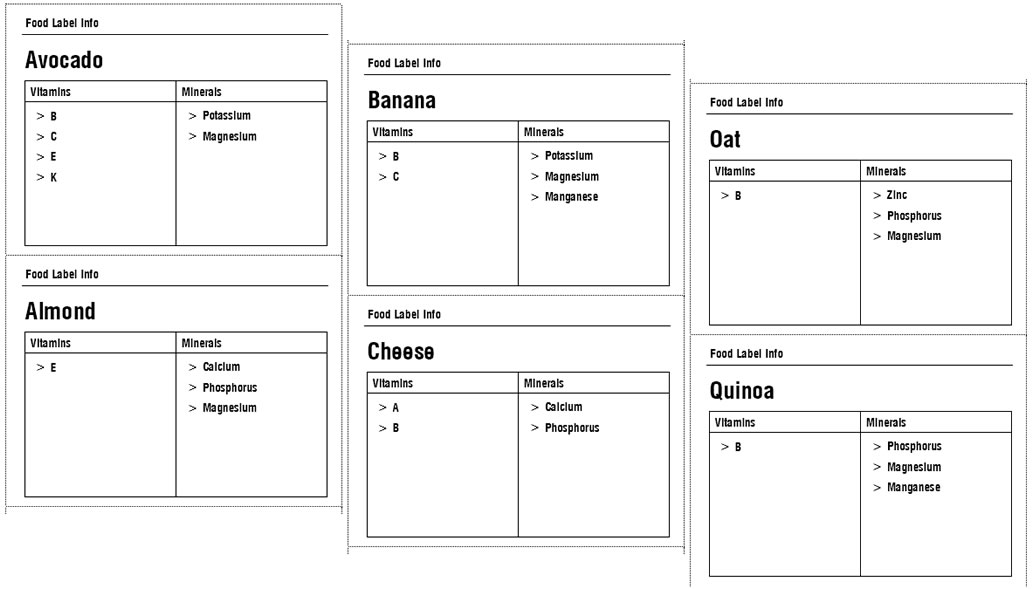
The label at runtime after being processed:
Common mistakes
- A child sticks out of the area. An item is repeated only if it is fully inside the repeater. If a text is slightly wider or taller than the area, it is silently left out of the repetition. Make the repeater area a bit larger than the group of items it holds.
- Overlapping repeaters. Repeaters must not overlap. Items that belong to two areas would be processed twice.
Heighttoo small.Heightis the step between copies. If it is smaller than the children, the copies overlap each other.- Repeater not tall (or wide) enough for the data. The copies are not clipped: if there are more entries than the label can hold, they are placed beyond the label bounds and will not be printed.
- DataField not an Array/Collection. Set
DataFieldonly when the field is a collection; otherwise useCount. - Forgetting that
Countincludes the original.Count = 3gives three items, not four. - Expecting a visible area. The RepeaterItem draws nothing.