Repeater Item
The RepeaterItem Class
A RepeaterItem – represented by Neodynamic.SDK.Printing.RepeaterItem class allows you to repeat any items that are within the given area. RepeaterItem objects are created by specifying some basic properties such as the X & Y location and Width & Height size.
The RepeaterItem supports fixed count repetition or a dynamic number of repetition based on a Data Field. The RepeaterItem also supports rotation!
The z-index value of the RepeaterItem does not matter, as long as an Item is fully within the RepeaterItem boundaries, then that Item will be repeated.
Important
If more than one RepeaterItem is defined in the label, they must not overlap!
Fixed Count Repetition sample
This very simple sample will repeat an EllipseShapeItem and a TextItem three times.
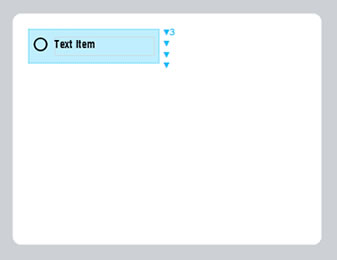
The Label at design time in the editor
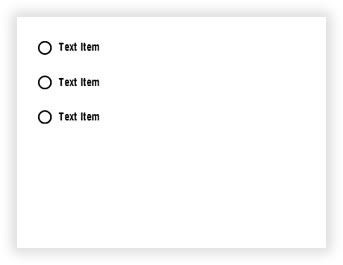
The Label at runtime after being processed
VB
'Define a ThermalLabel object and set unit to inch and label size
Dim tLabel As New ThermalLabel(UnitType.Inch, 4, 3)
tLabel.GapLength = 0.2

'Define an EllipseShapeItem object
Dim ell As New EllipseShapeItem(0.27, 0.31, 0.18, 0.18)
ell.StrokeThickness = 0.02

'Define a TextItem object
Dim txt As New TextItem(0.54, 0.3, 1.3, 0.25, "Text Item")
txt.Font.Name = "ZPL Font 0"
txt.Font.Unit = FontUnit.Point
txt.Font.Size = 10

'Define a RepeaterItem object
Dim rep As New RepeaterItem(0.2, 0.2, 1.7, 0.45)
'Set fixed repetition count
rep.Count = 3

'Add items to ThermalLabel object...
tLabel.Items.Add(ell)
tLabel.Items.Add(txt)
tLabel.Items.Add(rep)

'Create a WindowsPrintJob object
Using pj As New WindowsPrintJob()
    'Create PrinterSettings object
    Dim myPrinter As New PrinterSettings()
    myPrinter.Communication.CommunicationType = CommunicationType.USB
    myPrinter.Dpi = 203
    myPrinter.ProgrammingLanguage = ProgrammingLanguage.ZPL
    myPrinter.PrinterName = "Zebra ZD500R"

    'Set PrinterSettings to WindowsPrintJob
    pj.PrinterSettings = myPrinter
    'Print ThermalLabel object...
    pj.Print(tLabel)
End Using
CS
//Define a ThermalLabel object and set unit to inch and label size
ThermalLabel tLabel = new ThermalLabel(UnitType.Inch, 4, 3);
tLabel.GapLength = 0.2;

//Define an EllipseShapeItem object
EllipseShapeItem ell = new EllipseShapeItem(0.27, 0.31, 0.18, 0.18);
ell.StrokeThickness = 0.02;

//Define a TextItem object
TextItem txt = new TextItem(0.54, 0.3, 1.3, 0.25, "Text Item");
txt.Font.Name = "ZPL Font 0";
txt.Font.Unit = FontUnit.Point;
txt.Font.Size = 10;

//Define a RepeaterItem object
RepeaterItem rep = new RepeaterItem(0.2, 0.2, 1.7, 0.45);
//Set fixed repetition count
rep.Count = 3;

//Add items to ThermalLabel object...
tLabel.Items.Add(ell);
tLabel.Items.Add(txt);
tLabel.Items.Add(rep);

//Create a WindowsPrintJob object
using (WindowsPrintJob pj = new WindowsPrintJob())
{
    //Create PrinterSettings object
    PrinterSettings myPrinter = new PrinterSettings();
    myPrinter.Communication.CommunicationType = CommunicationType.USB;
    myPrinter.Dpi = 203;
    myPrinter.ProgrammingLanguage = ProgrammingLanguage.ZPL;
    myPrinter.PrinterName = "Zebra ZD500R";

    //Set PrinterSettings to WindowsPrintJob
    pj.PrinterSettings = myPrinter;
    //Print ThermalLabel object...
    pj.Print(tLabel);
}
Data Binding Repetition sample
The following sample uses a data source that will determine how many times a set of items will be repeated and their content changed accordly based on the data field.
For this kind of scenarios, the RepeaterItem's DataField property must be set to a field of type Array/Collection while any Items' DataField to be repeated must be set to any field name part of that Array/Collection parent.
The Data Source sample
The following data source sample features a list of food objects. Then each food object features two Array/Collection fields that contain variable number of entries, they are the vitamins and minerals. These two collections are the candidates for RepeaterItem DataField property.
The Data Source in XML format:
<foods>
    <food>
        <name>Avocado</name>
        <vitamins>
            <vitamin name="B"/>
            <vitamin name="C"/>
            <vitamin name="E"/>
            <vitamin name="K"/>
        </vitamins>
        <minerals>
            <mineral name="Potassium"/>
            <mineral name="Magnesium"/>
        </minerals>
    </food>
    <food>
        <name>Almond</name>
        <vitamins>
            <vitamin name="E"/>
        </vitamins>
        <minerals>
            <mineral name="Calcium"/>
            <mineral name="Phosphorus"/>
            <mineral name="Magnesium"/>
        </minerals>
    </food>
    <food>
        <name>Banana</name>
        <vitamins>
            <vitamin name="B"/>
            <vitamin name="C"/>
        </vitamins>
        <minerals>
            <mineral name="Potassium"/>
            <mineral name="Magnesium"/>
            <mineral name="Manganese"/>
        </minerals>
    </food>
    <food>
        <name>Cheese</name>
        <vitamins>
            <vitamin name="A"/>
            <vitamin name="B"/>
        </vitamins>
        <minerals>
            <mineral name="Calcium"/>
            <mineral name="Phosphorus"/>
        </minerals>
    </food>
    <food>
        <name>Oat</name>
        <vitamins>
            <vitamin name="B"/>
        </vitamins>
        <minerals>
            <mineral name="Zinc"/>
            <mineral name="Phosphorus"/>
            <mineral name="Magnesium"/>
        </minerals>
    </food>
    <food>
        <name>Quinoa</name>
        <vitamins>
            <vitamin name="B"/>
        </vitamins>
        <minerals>
            <mineral name="Phosphorus"/>
            <mineral name="Magnesium"/>
            <mineral name="Manganese"/>
        </minerals>
    </food>
</foods>
The same Data Source but in JSON format:
[
  {
    "name": "Avocado",
    "vitamins": [
      {
        "name": "B"
      },
      {
        "name": "C"
      },
      {
        "name": "E"
      },
      {
        "name": "K"
      }
    ],
    "minerals": [
      {
        "name": "Potassium"
      },
      {
        "name": "Magnesium"
      }
    ]
  },
  {
    "name": "Almond",
    "vitamins": [
      {
        "name": "E"
      }
      ],
    "minerals": [
      {
        "name": "Calcium"
      },
      {
        "name": "Phosphorus"
      },
      {
        "name": "Magnesium"
      }
    ]
  },
  {
    "name": "Banana",
    "vitamins": [
      {
        "name": "B"
      },
      {
        "name": "C"
      }
    ],
    "minerals": [
      {
        "name": "Potassium"
      },
      {
        "name": "Magnesium"
      },
      {
        "name": "Manganese"
      }
    ]
  },
  {
    "name": "Cheese",
    "vitamins": [
      {
        "name": "A"
      },
      {
        "name": "B"
      }
    ],
    "minerals": [
      {
        "name": "Calcium"
      },
      {
        "name": "Phosphorus"
      }
    ]
  },
  {
    "name": "Oat",
    "vitamins":
      [
      {
        "name": "B"
      }
      ],
    "minerals": [
      {
        "name": "Zinc"
      },
      {
        "name": "Phosphorus"
      },
      {
        "name": "Magnesium"
      }
    ]
  },
  {
    "name": "Quinoa",
    "vitamins": [
      {
        "name": "B"
      }
      ],
    "minerals": [
      {
        "name": "Phosphorus"
      },
      {
        "name": "Magnesium"
      },
      {
        "name": "Manganese"
      }
    ]
  }
]
The Label Definition
The label at design time in the editor would look like the following. You can see two RepeaterItem, one for the Vitamins and the other one for the Minerals
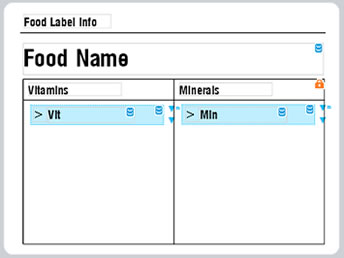
The following is the label template in XML format
<ThermalLabel Version="12.0" Width="4" Height="3" GapLength="0" MarkLength="0" OffsetLength="0" UnitType="Inch" LabelsPerRow="1" LabelsHorizontalGapLength="0" IsContinuous="False" PrintSpeed="" PrintMirror="False" CutAfterPrinting="False" BatchCut="1">
  <Items>
    <RepeaterItem X="2.1182" Y="1.2112" DataField="minerals" Width="1.5946" Height="0.243" />
    <RepeaterItem X="0.3136" Y="1.2153" DataField="vitamins" Width="1.5946" Height="0.243" />
    <TextItem X="0.2294" Y="0.1324" Width="1.0531" Height="0.1748" Text="Food_x0020_Label_x0020_Info" Font="ZPL Font 0,10,Point,,,False,90,,CP850" />
    <LineShapeItem X="0.1853" Y="0.356" Width="3.6576" Height="0.01" />
    <TextItem X="0.2253" Y="0.4773" DataField="name" Width="3.5958" Height="0.3874" Text="Food_x0020_Name" Font="ZPL Font 0,20,Point,,,False,90,,CP850" />
    <TableShapeItem X="0.2214" Y="0.9064" Locked="True" Width="3.6078" Height="1.9756">
      <Columns>
        <Column Width="0" />
        <Column Width="0" />
      </Columns>
      <Rows>
        <Row Height="0.253858269800931" />
        <Row Height="0" />
      </Rows>
    </TableShapeItem>
    <TextItem X="0.2896" Y="0.9505" Width="1.1173" Height="0.1669" Text="Vitamins" Font="ZPL Font 0,10,Point,,,False,90,,CP850" />
    <TextItem X="2.0902" Y="0.9464" Width="1.1173" Height="0.1669" Text="Minerals" Font="ZPL Font 0,10,Point,,,False,90,,CP850" />
    <TextItem X="0.5261" Y="1.2393" DataField="name" Width="1.0371" Height="0.1949" Text="Vit" Font="ZPL Font 0,10,Point,,,False,90,,CP850" />
    <TextItem X="0.3455" Y="1.2352" Width="0.1708" Height="0.1949" Text="_x003E_" Font="ZPL Font 0,10,Point,,,False,90,,CP850" />
    <TextItem X="2.1621" Y="1.2331" Width="0.1708" Height="0.1949" Text="_x003E_" Font="ZPL Font 0,10,Point,,,False,90,,CP850" />
    <TextItem X="2.3427" Y="1.2372" DataField="name" Width="1.0371" Height="0.1949" Text="Min" Font="ZPL Font 0,10,Point,,,False,90,,CP850" />
  </Items>
</ThermalLabel>
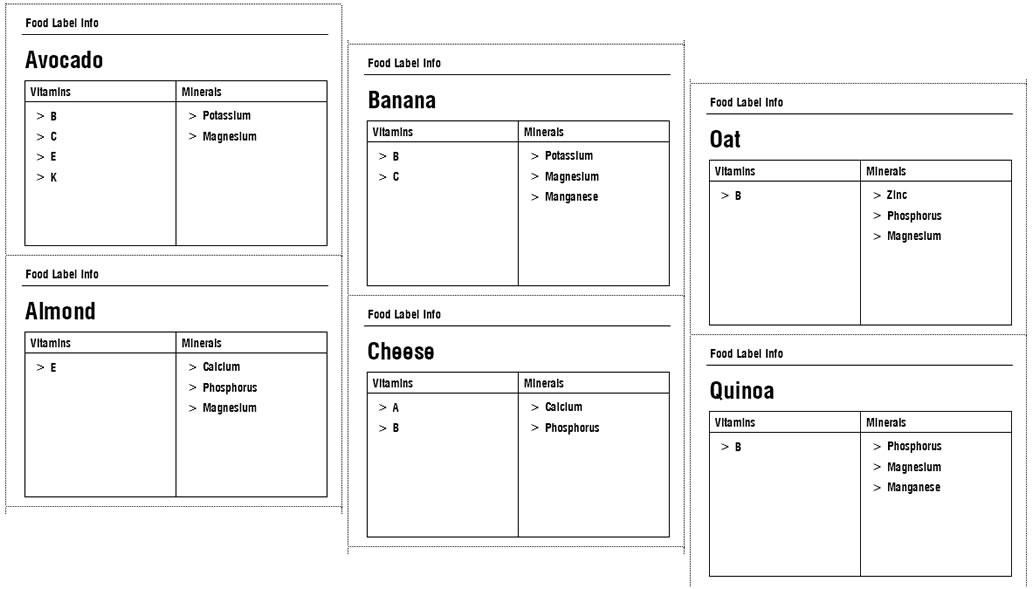
The Label at runtime after being processed: