ThermalLabel XML & JSON Templates
ThermalLabel SDK supports XML & JSON Templates: a ThermalLabel object (its size, settings, items, expressions, pages and embedded fonts) can be exported to a text definition and loaded back later. This is useful to store labels in files or databases, share them between applications (for example, a label designed visually and printed from a service) or send them over the wire.
| Task | XML | JSON |
|---|---|---|
| Export | GetXmlTemplate() |
GetJsonTemplate() |
| Import into an existing label | LoadXmlTemplate(string) |
LoadJsonTemplate(string) |
| Create a new label from a template | ThermalLabel.CreateFromXmlTemplate(string) |
ThermalLabel.CreateFromJsonTemplate(string) |
Both GetXmlTemplate and GetJsonTemplate accept an optional embedFonts argument (default false), see Embedding fonts.
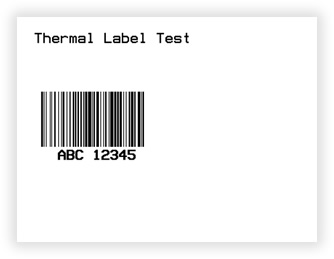
The following label can be saved as an XML or JSON template:
VB
'Define a ThermalLabel object and set unit to inch and label size
Dim tLabel As New ThermalLabel(UnitType.Inch, 4, 3)
tLabel.GapLength = 0.2
'Define a TextItem object
Dim txtItem As New TextItem(0.2, 0.2, 2.5, 0.5, "Thermal Label Test")
'Define a BarcodeItem object
Dim bcItem As New BarcodeItem(0.2, 1, 2, 1, BarcodeSymbology.Code128, "ABC 12345")
'Set bars height to .75inch
bcItem.BarHeight = 0.75
'Set bars width to 0.0104inch
bcItem.BarWidth = 0.0104
'Add items to ThermalLabel object...
tLabel.Items.Add(txtItem)
tLabel.Items.Add(bcItem)
'Save label to XML file
System.IO.File.WriteAllText("C:\temp\myLabel.tl", tLabel.GetXmlTemplate())
'Save label to JSON file
System.IO.File.WriteAllText("C:\temp\myLabel.tlj", tLabel.GetJsonTemplate())
CS
//Define a ThermalLabel object and set unit to inch and label size
ThermalLabel tLabel = new ThermalLabel(UnitType.Inch, 4, 3);
tLabel.GapLength = 0.2;

//Define a TextItem object
TextItem txtItem = new TextItem(0.2, 0.2, 2.5, 0.5, "Thermal Label Test");

//Define a BarcodeItem object
BarcodeItem bcItem = new BarcodeItem(0.2, 1, 2, 1, BarcodeSymbology.Code128, "ABC 12345");
//Set bars height to .75inch
bcItem.BarHeight = 0.75;
//Set bars width to 0.0104inch
bcItem.BarWidth = 0.0104;

//Add items to ThermalLabel object...
tLabel.Items.Add(txtItem);
tLabel.Items.Add(bcItem);

//Save label to XML file
System.IO.File.WriteAllText(@"C:\temp\myLabel.tl", tLabel.GetXmlTemplate());
//Save label to JSON file
System.IO.File.WriteAllText(@"C:\temp\myLabel.tlj", tLabel.GetJsonTemplate());
The extensions
.tl(XML) and.tlj(JSON) are just a convention used in these samples; the SDK does not care about file names or extensions.
The XML Template
The XML file contains a description like the following (shortened; the exact attributes depend on the SDK version):
<?xml version="1.0" encoding="utf-8"?>
<ThermalLabel Version="16.0" Width="4" Height="3" GapLength="0.2" MarkLength="0" OffsetLength="0" UnitType="Inch" LabelsPerRow="1" LabelsHorizontalGapLength="0" IsContinuous="False" PrintSpeed="" PrintMirror="False" CutAfterPrinting="False" ...>
  <Items>
    <TextItem X="0.2" Y="0.2" Width="2.5" Text="Thermal_x0020_Label_x0020_Test" Font="NativePrinterFontA,10,Point,,,False,90,,CP850" />
    <BarcodeItem X="0.2" Y="1" Width="2" Height="1" Symbology="Code128" Code="ABC_x0020_12345" BarHeight="0.75" ... />
  </Items>
</ThermalLabel>
Things worth knowing:
Versionis the SDK's major version constant (ThermalLabel.Version, currently"16.0"), not a template-format version you control.- Always written on the
ThermalLabelelement:Version,Width,Height,GapLength,MarkLength,OffsetLength,UnitType,LabelsPerRow,LabelsHorizontalGapLength,IsContinuous,PrintSpeed,PrintMirror,CutAfterPrinting,BatchCut,DataFieldReplicates. - Written only when different from the default:
Darkness,SheetLabelsWidth/Height/Count/Margin,DesignBackgroundImage,Margin,UseDefaultMediaType,IsDuplexDesign,Tag,Shape. The same rule applies to item attributes (Name,DataField,Expression,Width,Height, colors, etc.): if a property has its default value, it is omitted. That is whyTextItemabove has noHeight(0.5 is the default). - Child elements:
<Items>,<Expressions>(<Expr Code="..."/>),<Pages>(<Page X Y Width Height/>) and<Fonts>(embedded fonts). - Culture: numbers are always written and parsed with the invariant culture (
0.2, never0,2), regardless of the machine's regional settings. - Fonts are written as
Name,Size,Unit,...,CodePagestrings (for exampleNativePrinterFontA,10,Point,,,False,90,,CP850). - Images are embedded in the template:
ImageItemwritesSource="Base64"+SourceData(the content) whenSourceBase64orSourceBinaryare set, orSource="File"+SourceData(just the path) whenSourceFileis used. WithFile, the path must be reachable wherever the template is loaded. - The returned string is produced from UTF-8 bytes and may start with a BOM character. If you load it back with
LoadXmlTemplatethere is no problem; if you write it to disk withFile.WriteAllTextit is saved as plain UTF-8.
The JSON Template
The JSON file contains the same label definition. Property names are in camelCase and every item includes a typeName (the class name, such as TextItem or BarcodeItem).
{
  "width": 4,
  "height": 3,
  "gapLength": 0.2,
  "items": [
    { "typeName": "TextItem", "x": 0.2, "y": 0.2, "width": 2.5, "text": "Thermal Label Test", "font": { ... } },
    { "typeName": "BarcodeItem", "x": 0.2, "y": 1, "width": 2, "height": 1, "symbology": "Code128", "code": "ABC 12345", "barHeight": 0.75, "barWidth": 0.0104 }
  ],
  "expressions": []
}
The sample above is illustrative: it shows the shape of the document, not the exact output byte by byte. Generate a template from your own label with
GetJsonTemplate()to see the exact content for your SDK version.
Things worth knowing:
- Default values are omitted. Each property is compared against a freshly created default instance and skipped if equal, so the JSON is compact.
- The root always includes
width,height,itemsandexpressions. - Not exported (runtime-only):
DataSource,DataMemberandDataSourceCultureInfoof the label, and the computedIsSheetOfLabels/IsDataBound. Items'UnitTypeandDpiare also left out (they come from the label). typeNamemust be the name of an item class in theNeodynamic.SDK.Printingnamespace (TextItem,BarcodeItem,ImageItem,ShapeItem,RepeaterItem,RFIDTagItem, ...).- Legacy format: JSON documents that start with
{"ThermalLabel"(the old PascalCase format used by previous SDK versions) are detected byLoadJsonTemplateand converted internally, so templates saved long ago can still be loaded. New templates are always written in the current camelCase format.
Loading a ThermalLabel XML Template
VB
'Create a ThermalLabel from the XML template
Dim tLabel As New ThermalLabel()
tLabel.LoadXmlTemplate(System.IO.File.ReadAllText("C:\temp\myLabel.tl"))

'...or in one line
Dim tLabel2 As ThermalLabel = ThermalLabel.CreateFromXmlTemplate(System.IO.File.ReadAllText("C:\temp\myLabel.tl"))
CS
//Create a ThermalLabel from the XML template
ThermalLabel tLabel = new ThermalLabel();
tLabel.LoadXmlTemplate(System.IO.File.ReadAllText(@"C:\temp\myLabel.tl"));

//...or in one line
ThermalLabel tLabel2 = ThermalLabel.CreateFromXmlTemplate(System.IO.File.ReadAllText(@"C:\temp\myLabel.tl"));
Loading a ThermalLabel JSON Template
VB
Dim tLabel As New ThermalLabel()
tLabel.LoadJsonTemplate(System.IO.File.ReadAllText("C:\temp\myLabel.tlj"))

Dim tLabel2 As ThermalLabel = ThermalLabel.CreateFromJsonTemplate(System.IO.File.ReadAllText("C:\temp\myLabel.tlj"))
CS
ThermalLabel tLabel = new ThermalLabel();
tLabel.LoadJsonTemplate(System.IO.File.ReadAllText(@"C:\temp\myLabel.tlj"));

ThermalLabel tLabel2 = ThermalLabel.CreateFromJsonTemplate(System.IO.File.ReadAllText(@"C:\temp\myLabel.tlj"));
Loading rules (XML and JSON)
- Loading replaces the label's content:
Items,Expressions,PagesandFontsare cleared first, then filled from the template. Label settings that the template does not mention keep the value the object already had, so preferCreateFromXmlTemplate/CreateFromJsonTemplate(a fresh label) when you want exactly what the template says. - An XML without a
ThermalLabelroot throws an exception: "The specified content is not a valid ThermalLabel XML template." In XML, unknown item elements are silently ignored. LoadJsonTemplateignoresnull, empty or whitespace-only strings (the label is left untouched).- Data binding is not part of the template: set
DataSource/DataMemberafter loading (see Data Binding).DataField,DataFieldFormatStringandExpressionof the items are saved. Label-level Expressions are saved in theExpressionscollection.
Embedding fonts
Custom (non-printer) fonts are referenced by name, so the machine that loads the template needs them. To make a template self-contained, pass embedFonts: true:
string xml  = tLabel.GetXmlTemplate(true);
string json = tLabel.GetJsonTemplate(true);
The fonts used by TextItem and BarcodeItem (Font and TextFont) are converted and stored in the Fonts section of the template; they are registered again automatically when the template is loaded. Printer-native fonts and the reserved names (NativePrinterFontA/B/S, ZPL Font 0, Swis721 BT) are never embedded. See Using Fonts.
Side effect:
embedFonts: truemodifies the label itself, not only the output: for each embedded font the item'sCustomFontFileis cleared and the font name is replaced with the embedded font name. If you keep using the label afterwards, work with the loaded copy or re-create the label.