
How to serialize a Barcode Professional object
Product Barcode Professional for Windows Forms Published 02/24/2006 Updated 02/24/2006
Requirements
Neodynamic Barcode Professional 2.0 for Windows Forms (WinControl)
Microsoft .NET Framework (any version)
Microsoft Visual Studio .NET (any version)
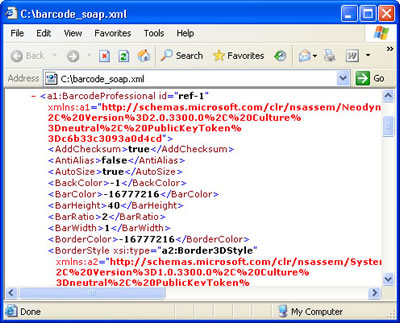
Barcode Professional now supports three types of serialization - Binary, SOAP, and XML.
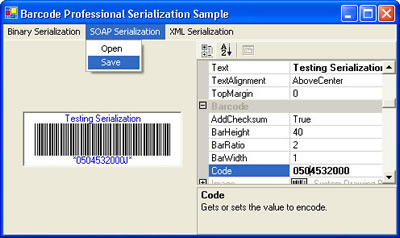
In the following sample we're going to create a simple Windows Forms application that shows how to serialize a barcode control with each serialization type.
Follow these steps:
- Open your .NET development tool - such as Visual Studio .NET - and create a new Windows Application.
- Drag and Drop onto a Windows Form the following controls:
- a MainMenu control. Add to it three menus (Binary Serialization, SOAP Serialization, XML Serialization) and under each of them add two menu options (Open and Save)
- a Panel control and under it a Barcode Professional control,
- and a PropertyGrid control

- Add to the project a reference to the System.Runtime.Serialization.Formatters.Soap.dll assembly and in the code-behind file of the Form add the following namespaces references:
VB
Imports System.Runtime.Serialization
Imports System.Runtime.Serialization.Formatters.Binary
Imports System.Runtime.Serialization.Formatters.Soap
Imports System.IO
Imports System.Xml
Imports System.Xml.Serialization
Imports Neodynamic.WinControls.BarcodeProfessional
C#
using System.Runtime.Serialization; using System.Runtime.Serialization.Formatters.Binary; using System.Runtime.Serialization.Formatters.Soap; using System.IO; using System.Xml; using System.Xml.Serialization; using Neodynamic.WinControls.BarcodeProfessional; - Double-click on the Form and write the following code in the Form1_Load event procedure:
VB
propertyGrid1.SelectedObject = barcodeProfessional1C#
propertyGrid1.SelectedObject = barcodeProfessional1; - Now, we're going to write the Save menu option of each serialization type. Write the following code for the appropriate serialization type:
VB
'Binary Serialization - Save Menu Option
Dim fs As FileStream = New FileStream("C:\barcode.dat", FileMode.Create)
Dim b As BinaryFormatter = New BinaryFormatter
b.Serialize(fs, barcodeProfessional1)
fs.Close()
MessageBox.Show("Barcode Saved!")
'SOAP Serialization - Save Menu Option
Dim fs As FileStream = New FileStream("C:\barcode_soap.xml", FileMode.Create)
Dim soap As SoapFormatter = New SoapFormatter
soap.Serialize(fs, barcodeProfessional1)
fs.Close()
MessageBox.Show("Barcode Saved!")
'XML Serialization - Save Menu Option
Dim xmls As XmlSerializer = New XmlSerializer(barcodeProfessional1.GetType())
Dim wr As XmlTextWriter = New XmlTextWriter("C:\barcode.xml", System.Text.Encoding.ASCII)
xmls.Serialize(wr, barcodeProfessional1)
wr.Close()
MessageBox.Show("Barcode Saved!")
C#
//Binary Serialization - Save Menu Option FileStream fs = new FileStream("C:\\barcode.dat",FileMode.Create); BinaryFormatter b = new BinaryFormatter(); b.Serialize(fs, barcodeProfessional1); fs.Close(); MessageBox.Show("Barcode Saved!"); //SOAP Serialization - Save Menu Option FileStream fs = new FileStream("C:\\barcode_soap.xml",FileMode.Create); SoapFormatter soap = new SoapFormatter(); soap.Serialize(fs, barcodeProfessional1); fs.Close(); MessageBox.Show("Barcode Saved!"); //XML Serialization - Save Menu Option XmlSerializer xmls = new XmlSerializer(barcodeProfessional1.GetType()); XmlTextWriter wr = new XmlTextWriter("C:\\barcode.xml", System.Text.Encoding.ASCII); xmls.Serialize(wr, barcodeProfessional1); wr.Close(); MessageBox.Show("Barcode Saved!"); - For the Open menu option of each serialization type, write the following code:
VB
'Binary Serialization - Open Menu Option
Dim fs As FileStream = New FileStream("C:\barcode.dat", FileMode.Open)
Dim b As BinaryFormatter = New BinaryFormatter
barcodeProfessional1 = CType(b.Deserialize(fs), BarcodeProfessional)
fs.Close()
RefreshRestoredObject()
'SOAP Serialization - Open Menu Option
Dim fs As FileStream = New FileStream("C:\barcode_soap.xml", FileMode.Open)
Dim soap As SoapFormatter = New SoapFormatter
barcodeProfessional1 = CType(soap.Deserialize(fs), BarcodeProfessional)
fs.Close()
RefreshRestoredObject()
'XML Serialization - Open Menu Option
Dim fs As FileStream = New FileStream("C:\barcode.xml", FileMode.Open)
Dim xmls As XmlSerializer = New XmlSerializer(barcodeProfessional1.GetType())
barcodeProfessional1 = CType(xmls.Deserialize(fs), BarcodeProfessional)
fs.Close()
RefreshRestoredObject()
C#
//Binary Serialization - Open Menu Option FileStream fs = new FileStream("C:\\barcode.dat",FileMode.Open); BinaryFormatter b=new BinaryFormatter(); barcodeProfessional1 = (BarcodeProfessional)b.Deserialize(fs); fs.Close(); RefreshRestoredObject(); //SOAP Serialization - Open Menu Option FileStream fs = new FileStream("C:\\barcode_soap.xml",FileMode.Open); SoapFormatter soap = new SoapFormatter(); barcodeProfessional1 = (BarcodeProfessional)soap.Deserialize(fs); fs.Close(); RefreshRestoredObject(); //XML Serialization - Open Menu Option FileStream fs = new FileStream("C:\\barcode.xml",FileMode.Open); XmlSerializer xmls = new XmlSerializer(barcodeProfessional1.GetType()); barcodeProfessional1 = (BarcodeProfessional)xmls.Deserialize(fs); fs.Close(); RefreshRestoredObject(); - RefreshRestoredObject is a private method we've defined to do common tasks for all Open options. Write it in the Form class:
VB
Private Sub RefreshRestoredObject()
propertyGrid1.SelectedObject = barcodeProfessional1
panel1.Controls.Clear()
panel1.Controls.Add(barcodeProfessional1)
MessageBox.Show("Barcode Restored!")
End Sub
C#
private void RefreshRestoredObject()
{
propertyGrid1.SelectedObject = barcodeProfessional1;
panel1.Controls.Clear();
panel1.Controls.Add(barcodeProfessional1);
MessageBox.Show("Barcode Restored!");
}
That's it. Build the Windows Application. Run it and play with it.
Need help? Contact Support
We provide best-in-class customer service and support directly from members of our dev team! If we are available when you contact us, you will get a response in few minutes; otherwise the maximum turnaround is 24hs in most cases.