
Barcode Professional for WPF
Key Features
For .NET Framework 3.5+, .NET Core 3.1 & .NET 5+
Visual Studio Support
XPS, Crystal Reports .NET & ReportViewer (RDLC)
True Vector-based Barcode Symbols
Barcode 2D Generator for WPF Apps
Barcode Professional for WPF is a lightweight .NET barcode encoder that generates and prints vector barcode symbols in WPF Apps targeting .NET Framework 3.5+, .NET Core 3.1 or .NET 5+. Creates WPF high-quality Linear (1D), Postal, Component Composite, MICR & 2D Barcodes including Code 39, Code 128, GS1-128, GS1 DataBar (RSS-14), ISBN, EAN 13 & UPC, Postal (USPS, British Royal Mail & Mailmark, Australia Post, DHL, FedEx, Japan, Korea), Data Matrix, QR Code, rMQR, PDF 417, Aztec Code, UPS MaxiCode, Chinese Han Xin Code, IFA PPN, MICR E-13-B Characters, all EAN/UPC Composite Barcodes (CC-A, CC-B & CC-C), 2D DotCode, Swiss-QRCode, JAB-Code Multicolored, 2D-Pharmacode and many more barcode standards
Download fully-functional eval version... [ What's New in v11.0? ]
Articles & Tutorials
NiceLabel
"The quality of the Barcode Pro library is great, support even better: response is super fast and fix available in a day or two."
Andrej Zrimšek
R&D Director
NiceLabel / Euro Plus d.o.o.
from Slovenia
Install from NuGet
Barcode Professional for WPF ships in two NuGet packages, one per .NET runtime:
| Your project targets | NuGet package | Install |
|---|---|---|
| .NET Core 3.1 and .NET 5+ (including .NET 8, 9 & 10) | Neodynamic.WPF.NetCore.BarcodeProfessional | dotnet add package Neodynamic.WPF.NetCore.BarcodeProfessional |
| .NET Framework 3.5+ | Neodynamic.WPF.Barcode | Install-Package Neodynamic.WPF.Barcode |

This edition supports .NET Framework 3.5+, .NET Core 3.1 and .NET 5+ (including .NET 8, 9 & 10) WPF apps, with one NuGet package for each runtime. Need barcodes in ASP.NET Core, Linux, macOS or Xamarin? Then try our Barcode Professional for .NET Standard edition!
Native WPF Printing & Reporting Tools Integration
WPF Printing
Easily create & print Avery Barcode Address Labels in WPF by using FixedDocument class and barcode visual objects. Perform barcode printing on high-demand scenarios from WPF Console or Windows Services projects.XML Paper Spec
XPS is an open document format, a spool file format and a page description language. You can use Barcode Professional for WPF classes for XPS barcode integration to generate vector-based barcodes producing high quality outputs in the XPS documents and reports.VS ReportViewer & Crystal Reports
Barcode Professional for WPF also generates raster barcode images which can be easily inserted into Local Reports RDLC or RPT Crystal Reports. Preview barcode reports through ReportViewer or Crystal Reports Viewer and export them to PDF or Excel file formats and get the barcodes embedded without any issues.Full Imaging Support
Barcode Professional for WPF is a vector-based engine but can also generate barcodes in raster image formats like GIF, BMP, PNG, JPEG/JPG & TIFF. Monochrome (Black and White 1 bit per pixel) barcode image generation is also supported. All barcode can be rotated at 90, 180 & 270 degrees. Take a look at this article about how to create barcode TIFF images in WPFTrue WPF Vector Barcode Engine
WPF DrawingContext
Render true vector barcodes on DrawingContext objects. Get crisp high quality barcodes even if they are applied with any WPF transforms like scale or rotation.Not a Barcode Fontware
Barcode Professional for WPF is a vector-based engine which renders high-quality & high-precision barcodes by using WPF Drawing API classes. There are many reasons why you should not use a barcode fontware in your WPF projectsCreate Artistic Barcodes
Create customized barcodes by stamping logos or pictures on symbols as well as specifying an image for filling the bars or dots!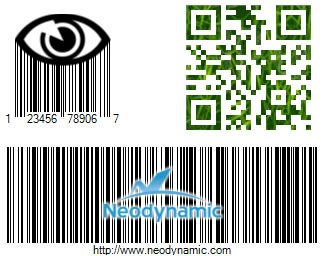
Create Artistic QR Codes with Custom Shape Patterns!
In addition to stamp images on barcode symbols, theArtModuleShape and ArtFinderShape properties allow you to customize the QR Code modules and finders!
ArtFinderShape Patterns


ArtModuleShape Patterns


QR Code Samples by combining the patterns...




Windows App Certification Ready

XAML Data Binding
WPF Data Binding provides a simple and consistent way for applications to present and interact with data. Barcode Professional supports XAML data-binding scenarios and can be bound to data from a variety of data sources in the form of common language runtime (CLR) objects, XML, ADO.NET, SQL Server Databases, etc.Best Barcode Solution for WPF Apps
Used by Well-known Brands
WaspLabeler +2D
The Barcode Labeling Software WaspLabeler +2D v7.0 from Wasp Barcode Technologies was developed using .NET WPF platform and Neodynamic's Barcode Professional for WPF
GS1-AIM-ISO/IEC Compliance
Our barcode algorithms were written by following the official specifications of each barcode symbology. Our barcode engine provides you with exclusive features like auto-checksum, data validation, Bar Width Adjustment (BWA) for linear & 2D symbols, auto-encoding methods for shortest barcode symbol generation.Easy to Dev & Deploy
Easy as 1, 2, 3! (1) Just add the NuGet package (or a reference to the Barcode Professional for WPF DLL), (2) instantiate it in XAML, VB.NET or C#, (3) set up barcode properties and that's it! XCOPY deploy the barcode dll bundled with your exe app or dll project.
GS1 Compliance for 2D barcodes at Point of Sale (POS)
Our barcode algorithms are fully 2D capable to meet the GS1's Ambition 2027 requirements. For your reference, the Neodynamic's products are officially listed by GS1 website under Barcode Creation section.Use in ASP.NET Web Projects
Barcode Professional for WPF can be used in ASP.NET projects like Websites (aspx, ashx) or Web Services (asmx). Easy to use and deploy as with desktop projects.Best-in-class Support
Trust in Real Barcode Experts! Don't be cheated by fake "companies" who just copy/paste open-source code and use similar names to ours. We are experts in the barcode field and we'll be here to help you on any matter related to WPF and barcode standards.Which Barcode Edition Do I Need?
The same GS1, ISO/IEC & AIM compliant barcode engine is available in these editions:
| Edition | Best for | NuGet package / delivery | Platforms |
|---|---|---|---|
| Barcode Professional for .NET Standard | Cross-platform .NET: ASP.NET Core, APIs, console, services, Xamarin | Neodynamic.SDK.BarcodeCore | Windows, Linux, macOS (.NET Standard 2.0) |
| Barcode Professional for Blazor | Blazor Server & WebAssembly apps | Neodynamic.Blazor.Barcode | Any Blazor host |
| Barcode Professional for Windows Forms | WinForms desktop apps, printing & reports | Neodynamic.WinControls.NetCore.BarcodeProfessional (.NET Core 3.1 & .NET 5+)Neodynamic.WinControls.BarcodeProfessional (.NET Framework) | Windows |
| Barcode Professional for WPF | WPF apps, XPS & vector printing | Neodynamic.WPF.NetCore.BarcodeProfessional (.NET Core 3.1 & .NET 5+)Neodynamic.WPF.Barcode (.NET Framework) | Windows |
| BarcodePro Web API for Docker | Any language, servers and cloud | Docker image neodynamic/barcodeprowebapi | Linux container (amd64 & arm64) |
| Barcode Professional for SSRS & PBIRS | SQL Server Reporting Services & Power BI Report Server | Installer: Custom Report Item (CRI) and DLL | SSRS 2005–2022, PBIRS |
| Barcode Professional for ASP.NET Legacy | Existing ASP.NET WebForms & MVC apps | Neodynamic.WebControls.BarcodeProfessional | Windows (.NET Framework 2.0–4.x) |
| Barcode Professional SDK for .NET Windows Legacy | Existing .NET Framework apps | Neodynamic.SDK.Barcode | Windows (.NET Framework 2.0–4.x) |
New web or cross-platform project? Use Barcode Professional for .NET Standard. See also the full feature comparison.
Barcode Professional for WPF FAQ
- Does it support .NET Core and modern .NET?
- Yes. Use the Neodynamic.WPF.NetCore.BarcodeProfessional NuGet package for WPF apps targeting .NET Core 3.1 and .NET 5 or later, including .NET 8, 9 and 10, and Neodynamic.WPF.Barcode for .NET Framework 3.5 or later.
- Are the barcodes vector-based?
- Yes. Barcodes are rendered with the WPF Drawing API as true vector graphics, so they stay crisp at any scale or rotation, on screen, in XPS documents and when printed.
- How do I print barcodes from WPF?
- Use the barcode visual objects in a FixedDocument to print labels such as Avery address labels, print from WPF console apps or Windows Services, or generate XPS documents with vector barcodes.
- Can I bind barcodes to data in XAML?
- Yes. It supports XAML data binding to CLR objects, XML, ADO.NET and SQL Server data sources.
- Can it also create barcode images?
- Yes. Besides vector output it creates GIF, BMP, PNG, JPEG and TIFF images, including monochrome 1-bpp, for RDLC ReportViewer and Crystal Reports.
- Which barcode types are supported?
- Linear (1D), postal, composite, MICR and 2D barcodes, including Code 39, Code 128, GS1-128, GS1 DataBar, EAN-13, UPC-A, ITF-14, Data Matrix, GS1 DataMatrix, QR Code, rMQR, PDF417, Aztec, MaxiCode, Han Xin Code, DotCode, Swiss QR Code, JAB-Code, USPS Intelligent Mail, Royal Mail Mailmark and Australia Post, plus 2D-Pharmacode and MICR E-13B characters.
- Does it run on Linux or macOS?
- No, WPF is Windows only. For cross-platform .NET apps use Barcode Professional for .NET Standard.