
Barcode Professional for Reporting Services / PBIRS
Key Features
PBIRS 2025 & SSRS 2022, 2019, 2017, 2016, 2014, 2012, 2008/R2, 2005
Server Reports (RDL) & Local Reports (RDLC) Support
Visual Studio, SQL Data Tools & BIDS
Get barcodes in PDF, Excel, Word, TIFF & MHT
Barcode Generator for Reporting Services (SSRS) & Power BI Report Server (PBIRS)
Barcode Professional for Reporting Services (SSRS) & Power BI Report Server (PBIRS) is the most advanced Barcode
CRI that allows you to create high-quality & high-precision GS1-AIM-ISO-Compliance barcodes for your
RDL
reports within Visual Studio, SQL Server Data Tools or
BIDS.
Easily Embed & Print Linear (1D), Postal, Component Composite, MICR & 2D Barcodes including Code 39, Code 128, GS1-128, GS1 DataBar (RSS-14), EAN 13 & UPC, Postal (USPS, British Royal Mail, Mailmark, Australia Post, DHL, FedEx, Japan, Korea), Data Matrix, QR Code, rMQR, PDF 417, Aztec Code, UPS MaxiCode, Chinese Han Xin Code, 2D DotCode, IFA PPN, Swiss-QRCode, JAB-Code Multicolored 2D Matrix, 2D-Pharmacode, MICR E-13-B Characters, all EAN/UPC Composite Barcodes (CC-A, CC-B & CC-C) and many more barcode standards
Download fully-functional eval version... [ What's New in v15.0? ]
Articles & Tutorials
VPAT
Rehrig Pacific Company (USA)
"Was in need of putting BarCodes in SSRS, NeoDynamic's Barcode Professional works perfect, extremely easy to setup and use. Couldn't be happier with choosing this product."
Chad Holewinski
Technology Services Manager
Development
Rehrig Pacific Company
from USA
How to Add Barcodes to SSRS & PBIRS Reports
- Install Barcode Professional for SSRS. A wizard registers it in Visual Studio / SSDT / BIDS and on the report server.
- Drag the Barcode CRI from the toolbox onto your RDL report, bind its value to a dataset field (e.g.
=Fields!ProductCode.Value) and pick the symbology (QR Code, GS1-128, Data Matrix...) with the Barcode Builder. On Express, Web or Workgroup editions, use the Barcode DLL from the report Code section instead. - Deploy the report and the barcode assembly (XCOPY) to SSRS or Power BI Report Server. Barcodes render as images, so they are kept when exporting to PDF, Excel, Word, TIFF and MHT.
Seamless Integration
VS, BIDS & SQL Data Tools
Embed a visual barcode CRI directly from VS, BIDS & SQL Server Data Tools toolbox if you have SQL Server Standard, Enterprise, Business or Datacenter editions. Easily customize the barcode using the built-in "Barcode Builder" feature. Preview, print and test barcodes right from your dev box. Current supported tools:Full SSRS Editions Support
Some SSRS Editions like Express, Workgroup & Web lack of support for third-party visual CRI components. Our product addresses this limitation by providing out-of-the-box a Barcode DLL which works with all editions of Reporting Services!Easy to Dev & Deploy
For development, a wizard-style assistant guides you with the correct installation process. For deployment, a simple XCOPY approach is sufficient to get it up and running.Getting Barcodes Right
GS1-AIM-ISO/IEC Compliance
Our barcode algorithms were written by following the official specifications - published by GS1, ISO/IEC & AIM - of each barcode symbology. This ensures you that the generated barcodes will pass the verification process required by many companies like those in the postal, health, food and many other sectors.Accurate & Advanced
Our barcode engine provides you with an exclusive set of features like auto-checksum, data validation, Bar Width Adjustment (BWA) for linear & 2D symbols, auto-encoding methods for shortest barcode symbol generation and more; that only a Barcode Expert company can offer.Avoid Barcode Font Headaches
Barcode Professional for SSRS is a graphic-based engine that renders high-quality & high-precision barcodes in PNG, JPEG, BMP & GIF formats.
Generally speaking, there are many reasons why you should not use a barcode fontware in your projects. To those reasons, we can add these others when using a barcode font with Reporting Services:
Complex Deployment. You need to be sure that each client machine viewing the report will have the barcode font installed!
Barcode is missing when exporting your reports to PDF, Word or Excel. The barcode will not be displayed if the client machine does not have the barcode font installed.

GS1 Compliance for 2D barcodes at Point of Sale (POS)
Our barcode algorithms are fully 2D capable to meet the GS1's Ambition 2027 requirements. For your reference, the Neodynamic's products are officially listed by GS1 website under Barcode Creation section.Create Artistic Barcodes
Create customized barcodes by stamping logos or pictures on symbols as well as specifying an image for filling the bars or dots!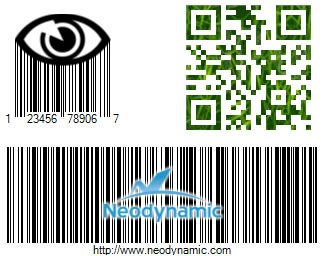
Create Artistic QR Codes with Custom Shape Patterns!
In addition to stamp images on barcode symbols, theArtModuleShape and ArtFinderShape properties allow you to customize the QR Code modules and finders!
ArtFinderShape Patterns


ArtModuleShape Patterns


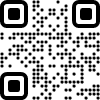
QR Code Samples by combining the patterns...




Barcode Pioneer in SSRS platform. Our Trajectory & Know-How
Neodynamic Barcode Professional for SSRS was the first barcode graphic-based component targeting the first release of RS i.e. SSRS 2000. In 2005 our product was included in the MS official Component Partners for Reporting Services. A few months later, MS released SSRS 2005 and our product was again the first barcode visual CRI that was mentioned by Brian Welcker (former SSRS Group Program Manager). Since then; we have been improving our product by adding support to more barcode symbologies as well as newer version of Reporting Services.
Why to choose us?
By choosing our product you get an accurate barcode solution as well as best-in-class support from a barcode expert company with strong know-how on RS platform.
Hunter Douglas (Poland)
"We are using Neodynamic Barcode Professional for SSRS on daily basis for almost a year now. It is a very good tool which makes our work easier every day. Other companies from our group also started to use it. Before choosing this solution we have tested some other products and surely Neodynamic is the best!"
Patryk Szudrowicz
IT Administrator
Hunter Douglas Fabrication Sp. z o.o.
from Poland
Getting Started
Tutorials on Barcode in Reporting Services
Which Barcode Edition Do I Need?
The same GS1, ISO/IEC & AIM compliant barcode engine is available in these editions:
| Edition | Best for | NuGet package / delivery | Platforms |
|---|---|---|---|
| Barcode Professional for .NET Standard | Cross-platform .NET: ASP.NET Core, APIs, console, services, Xamarin | Neodynamic.SDK.BarcodeCore | Windows, Linux, macOS (.NET Standard 2.0) |
| Barcode Professional for Blazor | Blazor Server & WebAssembly apps | Neodynamic.Blazor.Barcode | Any Blazor host |
| Barcode Professional for Windows Forms | WinForms desktop apps, printing & reports | Neodynamic.WinControls.NetCore.BarcodeProfessional (.NET Core 3.1 & .NET 5+)Neodynamic.WinControls.BarcodeProfessional (.NET Framework) | Windows |
| Barcode Professional for WPF | WPF apps, XPS & vector printing | Neodynamic.WPF.NetCore.BarcodeProfessional (.NET Core 3.1 & .NET 5+)Neodynamic.WPF.Barcode (.NET Framework) | Windows |
| BarcodePro Web API for Docker | Any language, servers and cloud | Docker image neodynamic/barcodeprowebapi | Linux container (amd64 & arm64) |
| Barcode Professional for SSRS & PBIRS | SQL Server Reporting Services & Power BI Report Server | Installer: Custom Report Item (CRI) and DLL | SSRS 2005–2022, PBIRS |
| Barcode Professional for ASP.NET Legacy | Existing ASP.NET WebForms & MVC apps | Neodynamic.WebControls.BarcodeProfessional | Windows (.NET Framework 2.0–4.x) |
| Barcode Professional SDK for .NET Windows Legacy | Existing .NET Framework apps | Neodynamic.SDK.Barcode | Windows (.NET Framework 2.0–4.x) |
New web or cross-platform project? Use Barcode Professional for .NET Standard. See also the full feature comparison.
Barcode Professional for SSRS & PBIRS FAQ
- How do I add a barcode to an SSRS report?
- Install Barcode Professional for SSRS, then drag the Barcode Custom Report Item (CRI) from the Visual Studio, SQL Server Data Tools or BIDS toolbox onto the RDL report, bind its value to a dataset field and choose the symbology. On SSRS editions that do not support custom report items, use the included Barcode DLL from the report Code section instead.
- Does it work with Power BI Report Server?
- Yes. It supports Power BI Report Server (PBIRS) 2025 as well as SQL Server Reporting Services 2022, 2019, 2017, 2016, 2014, 2012, 2008 R2 and 2005.
- Does it work with SSRS Express, Web or Workgroup editions?
- Yes. Those editions do not support third-party custom report items, so the product includes a Barcode DLL that works with all editions of Reporting Services.
- Do I need to install barcode fonts?
- No. Barcodes are rendered as images, so there are no fonts to install on the report server or client machines, and barcodes are not lost when exporting to PDF, Word or Excel.
- Are barcodes kept when exporting reports?
- Yes. Barcodes are included when the report is exported to PDF, Excel, Word, TIFF and MHT.
- Does it support local reports (RDLC)?
- Yes. It supports server reports (RDL) and local reports (RDLC).
- Which barcode types are supported?
- Linear (1D), postal, composite, MICR and 2D barcodes, including Code 39, Code 128, GS1-128, GS1 DataBar, EAN-13, UPC, Data Matrix, QR Code, rMQR, PDF417, Aztec, MaxiCode, Han Xin Code, DotCode, Swiss QR Code, JAB-Code, USPS, Royal Mail Mailmark, Australia Post and MICR E-13B characters. See the full list of barcode symbologies.
- Which Visual Studio versions are supported?
- Visual Studio 2026, 2022, 2019, 2017, 2015, 2013, 2012, 2008 and 2005, SQL Server Data Tools (SSDT) and BIDS.
- How is it deployed to the report server?
- A wizard guides the development setup, and deployment to the report server is a simple XCOPY of the barcode assembly.