
How to dynamically resize images by using ASP.NET FileUpload and ImageDraw
Product ImageDraw for ASP.NET Published 09/26/2007 Updated 09/26/2007
Requirements
Neodynamic ImageDraw 2.0 (or greater) for ASP.NET (WebControl)
Microsoft .NET Framework 2.0 (or greater)
Microsoft Visual Studio 2005 or Visual Web Developer 2005 Express Edition
In the following Step-By-Step Guide we're going to create a simple ASP.NET WebForm that lets users to upload image files which will be resized on-the-fly by Neodynamic ImageDraw component.
Follow these steps:
- Open Visual Studio and create a new ASP.NET Website
- From the Solution Explorer, please add a reference to Neodynamic ImageDraw for ASP.NET assembly which file name is Neodynamic.WebControls.ImageDraw.dll
- Create/Open an ASP.NET WebForm ASPX and write the following content inside the Form tag:
<h1>
    Image Upload
</h1>
<p>
    <asp:FileUpload ID="FileUpload1" runat="server" Width="338px" />
    <asp:RequiredFieldValidator ID="RequiredFieldValidator1" runat="server" ControlToValidate="FileUpload1"
        Display="Dynamic" ErrorMessage="Please specify an image file." SetFocusOnError="True"
        ValidationGroup="Group1"></asp:RequiredFieldValidator>
    <asp:RegularExpressionValidator ID="RegularExpressionValidator1" runat="server" ControlToValidate="FileUpload1"
        ErrorMessage="Please specify an image file." SetFocusOnError="True" ValidationExpression="^.+\.((jpg)|(gif)|(jpeg)|(png)|(bmp))$"
        Display="Dynamic" ValidationGroup="Group1"></asp:RegularExpressionValidator>
</p>
<p>
    <asp:Button ID="Button1" runat="server" OnClick="Button1_Click" Text="Upload, Resize and Save"
        ValidationGroup="Group1" />
</p>
At design-time, the WebForm should look like the following figure:
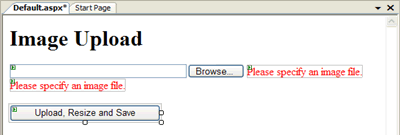
A simple WebForm featuring an ASP.NET FileUpload control
- After that, write the following code to handle the "Upload, Resize and Save" button's click event.
VB
Protected Sub Button1_Click(ByVal sender As Object, ByVal e As System.EventArgs) Handles Button1.Click

    If Me.IsValid AndAlso Me.FileUpload1.HasFile Then
        'Create an ImageElement to wrap up the uploaded image
        Dim uploadedImage As Neodynamic.WebControls.ImageDraw.ImageElement
        uploadedImage = Neodynamic.WebControls.ImageDraw.ImageElement.FromBinary(Me.FileUpload1.FileBytes)

        'Create Resize imaging action to apply on the uploaded image
        'NOTE: You may apply any of the ImageDraw built-in imaging actions
        Dim actResize As New Neodynamic.WebControls.ImageDraw.Resize()
        actResize.Width = 150
        actResize.LockAspectRatio = Neodynamic.WebControls.ImageDraw.LockAspectRatio.WidthBased

        uploadedImage.Actions.Add(actResize)

        'Composite the output image by using ImageDraw class
        Dim imgDraw As New Neodynamic.WebControls.ImageDraw.ImageDraw()

        'Add uploaded image
        imgDraw.Elements.Add(uploadedImage)

        'Output image settings...
        'For example: save the image in JPEG format always
        imgDraw.ImageFormat = Neodynamic.WebControls.ImageDraw.ImageDrawFormat.Jpeg
        imgDraw.JpegCompressionLevel = 90

        'Now, save the output image on disk
        Dim fileName As String = "C:\Temp\" + System.IO.Path.GetFileNameWithoutExtension(Me.FileUpload1.FileName) + ".jpg"
        imgDraw.Save(fileName)

    End If

End Sub
C#
protected void Button1_Click(object sender, EventArgs e) { if (this.IsValid && this.FileUpload1.HasFile) { //Create an ImageElement to wrap up the uploaded image Neodynamic.WebControls.ImageDraw.ImageElement uploadedImage; uploadedImage = Neodynamic.WebControls.ImageDraw.ImageElement.FromBinary(this.FileUpload1.FileBytes); //Create Resize imaging action to apply on the uploaded image //NOTE: You may apply any of the ImageDraw built-in imaging actions Neodynamic.WebControls.ImageDraw.Resize actResize = new Neodynamic.WebControls.ImageDraw.Resize(); actResize.Width = 150; actResize.LockAspectRatio = Neodynamic.WebControls.ImageDraw.LockAspectRatio.WidthBased; uploadedImage.Actions.Add(actResize); //Composite the output image by using ImageDraw class Neodynamic.WebControls.ImageDraw.ImageDraw imgDraw = new Neodynamic.WebControls.ImageDraw.ImageDraw(); //Add uploaded image imgDraw.Elements.Add(uploadedImage); //Output image settings... //For example: save the image in JPEG format always imgDraw.ImageFormat = Neodynamic.WebControls.ImageDraw.ImageDrawFormat.Jpeg; imgDraw.JpegCompressionLevel = 90; //Now, save the output image on disk string fileName = @"C:\Temp\" + System.IO.Path.GetFileNameWithoutExtension(this.FileUpload1.FileName) + ".jpg"; imgDraw.Save(fileName); } } - That's it. Run your application. Specify an image file and click on "Upload, Resize and Save" button.
The uploaded image is resized on-the-fly by ImageDraw classes and the output image is saved on disk.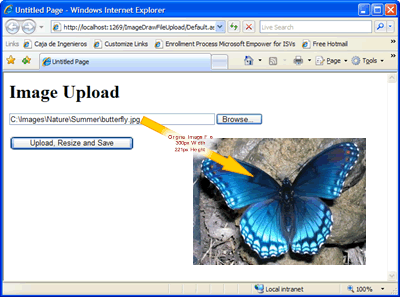
The original uploaded image

The uploaded image dynamically resized on-the-fly by ImageDraw
Need help? Contact Support
We provide best-in-class customer service and support directly from members of our dev team! If we are available when you contact us, you will get a response in few minutes; otherwise the maximum turnaround is 24hs in most cases.