Dynamic Composite Image using ASP.NET GridView Data Binding
Product ImageDraw for ASP.NET Published 09/25/2007 Updated 09/25/2007
Requirements
Neodynamic ImageDraw (2.0 or later) for ASP.NET
Microsoft .NET Framework (2.0 or later)
Microsoft Visual Studio .NET (2005 or later - Visual Web Developer Express Edition)
In the following guide you'll learn about Data Binding with ImageDraw and GridView control.
The idea behind this guide is to create a list of Music Albums using a GridView and ImageDraw controls. ImageDraw will be used to dynamically compose the Album's Cover merging it with the MSN Butterfly logo and applying some built-in ImageDraw effects onto them. The Albums information is stored into an XML file which is available for downloading at the end of this guide. The following image tries to provide a preview of what we want to accomplish with this demo.

The original album's covers and MSN Butterfly image are merged to create the output composite image.
In this guide we'll use a GridView control which is only available for ASP.NET 2.0 or later and Visual Studio 2005. Visual Web Developer Express Edition can be use as well.
Follow these steps
- Open VS 2005 and create a new Website.
- Create a new folder and name it "images". This folder will hold the MSN Butterfly logo (msnbutterfly.png). Note: This image is provided for downloading at the end of this guide.
- Add the XML file (albums.xml) containing the Albums information - included the CD Cover in Base64 string format. Note: This XML file is provided for downloading at the end of this guide.
- With the Default.aspx webform opened at design-time, drag and drop a GridView control onto it.
- Set the Classic auto format for it.
- Set AllowPaging property to True
- Set PageSize property to 3
Edit its columns as follows:- Uncheck Auto-generate fields
- Add a TempleateField
- Set the HeaderText property to Cover
- Add a BoundField
- Set the HeaderText property to Album Title
- Set the DataField property to Name
- Add a BoundField
- Set the HeaderText property to Distributed By
- Set the DataField property to Company
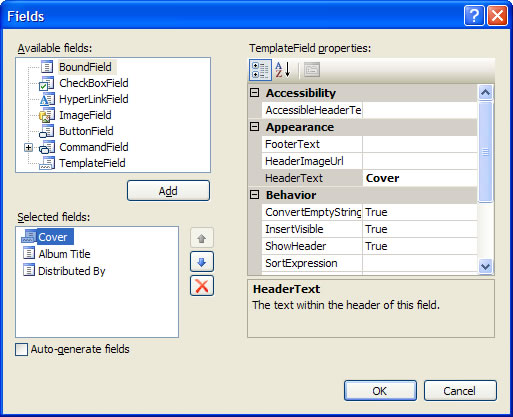
- Edit the GridView's ItemTemplate and drag and drop an ImageDraw control inside it.
- Now it's time to design the Album Composite Image using ImageDraw control. Each output Album Composite Image to generate will look like the following:
There are two ways to compose the image using ImageDraw:
- Write ASP.NET HTML code
- Use the built-in ImageDraw Visual Editor
Using ImageDraw Visual Editor to compose the output image
- With the ImageDraw control in Design View, launch ImageDraw Visual Editor right-clicking on ImageDraw control and selecting ImageDraw Visual Editor... To learn more about ImageDraw Visual Editor please read it in the product help documentation or clicking on Help button on the Visual Editor form.
- ImageDraw controls are based on a Canvas and one or more Elements -ImageElement and TextElement. Follow these steps to get the Album Composite Image:
- In this sample we're going to use PNG output image format with transparency. In order to get a transparent background we need to setting up the Canvas' fill. To do that, click on Fill button. The Fill editor dialog will appear (To learn more about Fill Editor please read it in the product help documentation or clicking on Help button on that form). In it, set the Transparency value to 0 (ZERO) as is shown in the following figure.
It's well known that Microsoft Internet Explorer 5.5 or 6.x - for Windows platform - cannot display PNG files with transparent backgrounds properly. ImageDraw controls solve this issue by implementing a well known PNG Hacking method based on the Internet Explorer AlphaImageLoader filter. For further details, please refer to the product help documentation.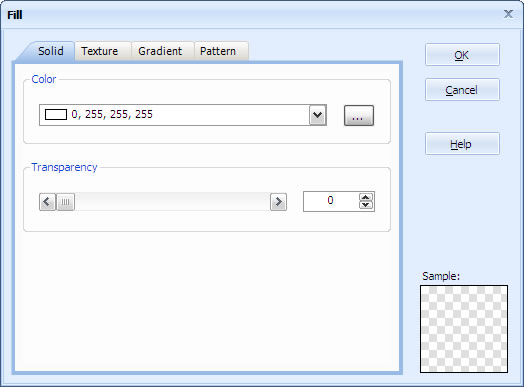
Click on OK button to close the Fill Editor dialog box. - Now, add an ImageElement - clicking on Image button on the elements toolbar - that will represent the Album Cover. This ImageElement will be data-bound with Base64 string stored in the XML file.
Data Binding Setting on the ImageElement object: Select the ImageElement and in the Properties pane, set the DataImageBase64Field property to CdCoverBase64 (the field name of the data source containing the base64 string representation of the image source).
Applying imaging effects on the ImageElement: We will apply 4 (four) imaging actions on this element. Right-clicking on the ImageElement and select Actions > Scale on the context menu. After that, select the Scale action on the left pane and set the following properties:- HeightPercentage: 40
- WidthPercentage: 40
Then, add another action selecting DecorativeBorder and set the following properties for it:- Fill-BackgroundColor: LimeGreen
- Width: 3
Add another action selecting Rotate and set the following properties for it:- Angle: 25
Finally, add another action selecting DropShadow and set the following properties for it:- Fill-BackgroundColor: LimeGreen
- Width: 3
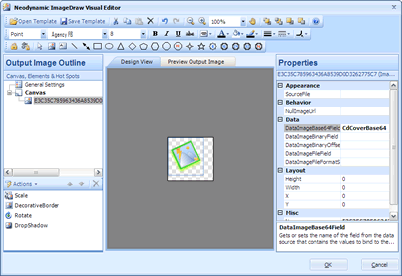
- Add another ImageElement which will wrap the MSN Butterfly logo located in the images local folder.
Select the ImageElement and set these properties:- SourceFile: ~/images/msnbutterfly.png
- X: 60
- Y: 60
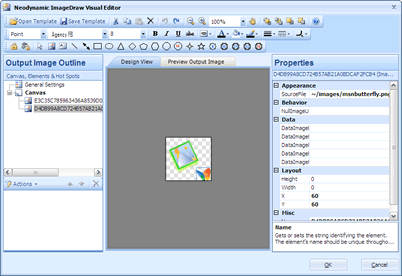
- That's it. Click on OK button. End editing ItemTemplate. You should get something like the following at design time.
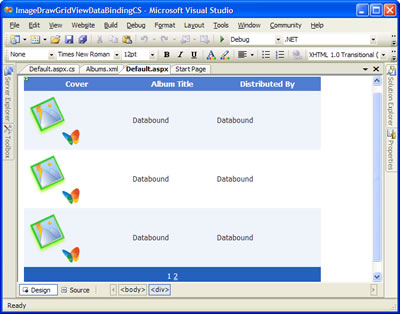
- In order each output composite Album image is unique in the server's memory we must set the OutputImageName property of ImageDraw to a unique value. To accomplish this just set the following Data Binding expression to that property:
Disable ViewState on the ImageDraw control by setting the EnableViewState property to False.OutputImageName='<%# Eval("Id") %>'
IMPORTANT: Learn more about ImageDraw Data Binding reading the product help documentation.If you change to Source View you'll find the following ASP.NET HTML code for the album composite image created by ImageDraw designer. You should find the generated HTML code fairly self-explanatory.
<neoimg:ImageDraw ID="ImageDraw1" runat="server" CacheExpiresAtDateTime="" EnableViewState="False" OutputImageName='' >
    <Elements>
        <neoimg:ImageElement DataImageBase64Field="CdCoverBase64" Name="E3C35C785963436A8539D0D3262775C7"
            Source="File">
            <Actions>
                <neoimg:Scale HeightPercentage="40" WidthPercentage="40" />
                <neoimg:DecorativeBorder Fill-BackgroundColor="LimeGreen" Width="3" />
                <neoimg:Rotate Angle="25" />
                <neoimg:DropShadow Angle="270" Color="GreenYellow" />
            </Actions>
        </neoimg:ImageElement>
        <neoimg:ImageElement Name="D4DB99A8CD724B57AB21A0BDCAF2FCB4" Source="File" SourceFile="~/images/msnbutterfly.png"
            X="60" Y="60">
        </neoimg:ImageElement>
    </Elements>
    <Canvas Fill-BackgroundColor="0, 255, 255, 255" Height="88" Width="92" Fill-ForegroundColor="0, 0, 0" Fill-GradientColor1="255, 255, 255" Fill-GradientColor2="0, 0, 0" />
</neoimg:ImageDraw>
- In this sample we're going to use PNG output image format with transparency. In order to get a transparent background we need to setting up the Canvas' fill. To do that, click on Fill button. The Fill editor dialog will appear (To learn more about Fill Editor please read it in the product help documentation or clicking on Help button on that form). In it, set the Transparency value to 0 (ZERO) as is shown in the following figure.
- The last step is to code the Data Binding stuff at code-behind. Copy and paste the following code for Page_Load and GridView1_PageIndexChanging event procedures.
VB
Protected Sub Page_Load(ByVal sender As Object, ByVal e As System.EventArgs) Handles Me.Load
    If Not Me.IsPostBack Then
        DoBinding()
    End If
End Sub

Protected Sub DoBinding()
    Dim ds As DataSet = New DataSet
    ds.ReadXml(Server.MapPath("albums.xml"))

    Me.GridView1.DataSource = ds
    Me.GridView1.DataBind()
End Sub

Protected Sub GridView1_PageIndexChanging(ByVal sender As Object, ByVal e As System.Web.UI.WebControls.GridViewPageEventArgs) Handles GridView1.PageIndexChanging
    Me.GridView1.PageIndex = e.NewPageIndex
    Me.DoBinding()
End Sub
C#
protected void Page_Load(object sender, EventArgs e) { if (!IsPostBack) { DoBinding(); } } private void DoBinding() { DataSet ds = new DataSet(); ds.ReadXml(Server.MapPath("albums.xml")); this.GridView1.DataSource = ds; this.GridView1.DataBind(); } protected void GridView1_PageIndexChanging(object sender, GridViewPageEventArgs e) { this.GridView1.PageIndex = e.NewPageIndex; DoBinding(); } - That's it. Run your application. You should get something like this.
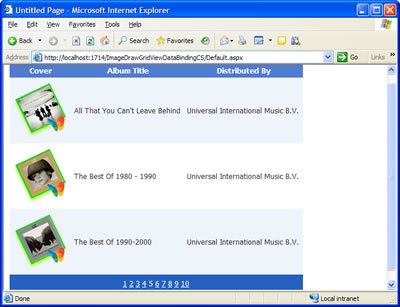
Dynamic Albums Composite Image with ImageDraw and GridView controls
Sample Files Download
Here are the VB.NET and C# versions of this sample. Please, download the zip file you want to. After extract it you'll find all necessary files to reproduce this step by step guide.
For ImageDraw 3.0
- For Visual Basic.NET: ImageDraw30GridViewDataBindingVB.zip (585 KB)
- For Visual C#.NET: ImageDraw30GridViewDataBindingCS.zip (585 KB)
For ImageDraw 2.0
- For Visual Basic.NET: ImageDrawGridViewDataBindingVB.zip (355 KB)
- For Visual C#.NET: ImageDrawGridViewDataBindingCS.zip (355 KB)
Remember to download and install ImageDraw in order to reproduce this sample demo.