Download JSPrintManager Client App for Free
JSPrintManager (JSPM) App is the client-side part of JSPrintManager Solution. It can be installed on any number of client machines without paying any fees. Download JSPM and read System Requirements for each available platform:
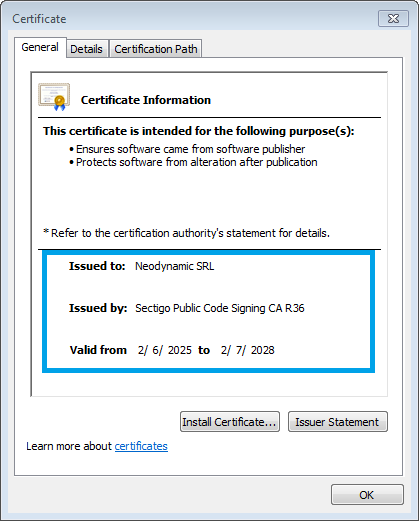
The installer package is digitally-signed with a Windows Authenticode Certificate issued by Sectigo Limited. Install the package only if the Publisher is Neodynamic; otherwise contact us.
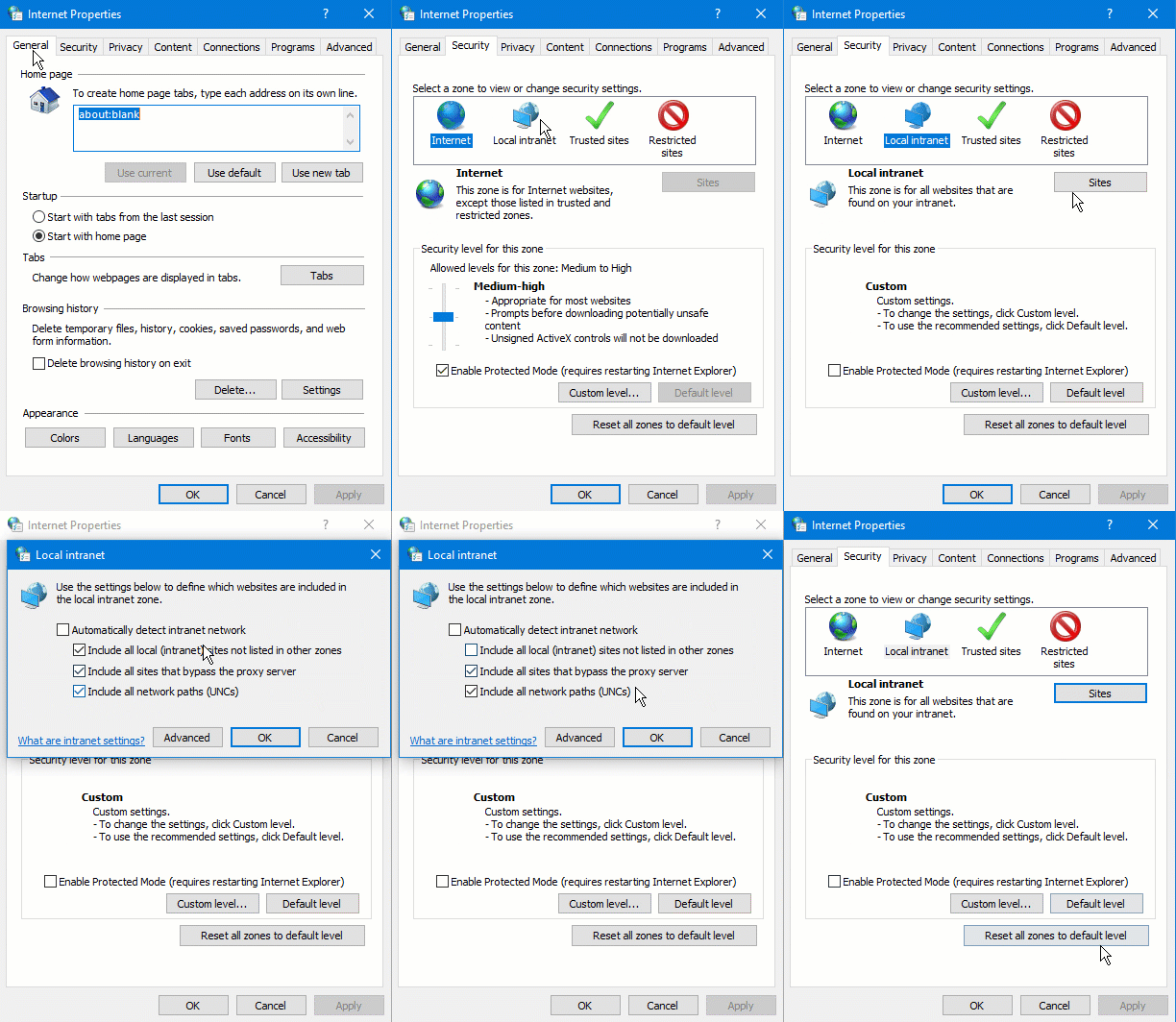
Internet Explorer (IE) users must allow websocket connection to localhost! Open Internet Explorer, then click ⚙ (Gear Icon) ⇨ Internet Options ⇨ Security ⇨ Local Intranet ⇨ Sites ⇨ Uncheck the first checkbox as shown below:
|
OS Windows XP Windows Vista Windows 7 Windows 8.x Windows 10 Windows 11 |
BROWSER Internet Explorer 10+ Microsoft Edge Mozilla Firefox 31+ Google Chrome 31+ Safari 6.0.3+ |
sheetNames and sheetIndexes array props to PrintFileXLS class.JSPM.JSPrintManager.getUsbDevices() func to return the list of USB devices available in the client system.JSPM.USBComm class.JSPM.JSPrintManager.getHidDevices() func to return the list of HID devices available in the client system.JSPM.HIDComm class.enableDecodeBarcode prop to ClientScanJob class.trayIndex and paperIndex props to the InstalledPrinter class to set the tray and paper by their indexes.pageTrays prop to the InstalledPrinter class to set the relationship between document pages and trays (Available only for PDF files).autoTrayByPageSize prop to the InstalledPrinter class to automatically select the printer tray based on the document page size (Available only for PDF files). It mimics the Acrobat's feature called "Choose paper source by PDF page size".The installer package is digitally-signed & notarized by Apple, Inc. Install the package only if the Publisher/Developer ID is Neodynamic S.R.L. (557X362695); otherwise contact us.
|
OS macOS/OSX 10.7+ / Intel or Apple Silicon ARM |
BROWSER Safari shipped with the OS or latest version Mozilla Firefox latest version Google Chrome latest version |
JSPM.JSPrintManager.getScannersInfo() function.
# Step 1 - Install prerequisites
sudo apt install libgtk2.0-0 libfreeimage3

# If any package is not found, please add Ubuntu 22.04 (Jammy) repository to get legacy packages
echo "deb http://ubuntu.com jammy-security main universe" | sudo tee /etc/apt/sources.list.d/jammy-legacy.list
sudo apt update
sudo apt install libgtk2.0-0 libfreeimage3

# Step 2 - Install JSPrintManager
sudo apt install ./jspm9-9.0.0.0-amd64.deb
# Step 1 - Install prerequisites
# For CentOS 7 / RHEL 7 please use yum instead of dnf
sudo dnf install gtk2 libfreeimage

# Step 2 - Install JSPrintManager
sudo dnf install ./jspm9-9.0.0.0-1.x86_64.rpm
chrome://certificate-manager/localcerts/usercerts
~/.neodynamic/jspm/ca/jspm_ca.cer
The installer package is digitally-signed with GPG. Verify our packages by installing Public Neodynamic GPG KEY available at http://www.neodynamic.com/pub/NEODYNAMIC-JSPM-GPG-KEY.txt
|
OS Debian 8+ Ubuntu 14.04+ Linux Mint 17+ Fedora 21+ CentOS 7+ |
BROWSER Mozilla Firefox shipped with the OS or latest version Google Chrome latest version |
JSPM.JSPrintManager.getScannersInfo() function.
• The device must allow installing "unknown apps" i.e. APK files that are not available in the Play Store
• Read the user configuration manual
The apk package is digitally-signed. Certificate signature:
SHA-256 digest: 48d1d30c0248f5f475cd133b0c6f5edfd4da99e0bd33a4d5561ee229c0f2cf12
SHA-1 digest: 113fb5060dad15559000e86b9e07e3d75003e5f5
MD5 digest: 1ca33958ee8c695fa7622a1ad2a601bd
|
OS Android 8+ |
BROWSER Chrome |
# Step 1 - Install prerequisites
sudo apt install libgtk2.0-0 libfreeimage3

# Step 2 - Install JSPrintManager
sudo apt install ./jspm9-9.0.0.0-armhf.debchrome://certificate-manager/localcerts/usercerts
~/.neodynamic/jspm/ca/jspm_ca.cer
The installer package is digitally-signed with GPG. Verify our packages by installing Public Neodynamic GPG KEY available at http://www.neodynamic.com/pub/NEODYNAMIC-JSPM-GPG-KEY.txt
|
OS Raspbian Jessie or greater |
BROWSER Iceweasel / Mozilla Firefox, Chromium latest version |
JSPM.JSPrintManager.getScannersInfo() function.