How to create Avery Address Labels in WPF with C# or VB.NET featuring USPS Postnet Barcodes
Product Barcode Professional for WPF Published 12/26/2007 Updated 12/26/2007
Requirements
Neodynamic Barcode Professional for WPF (any version)
Microsoft .NET Framework 3.0 or greater
Microsoft Visual Studio 2008
Microsoft Visual Basic 2008 Express Edition
Microsoft Visual C# 2008 Express Edition
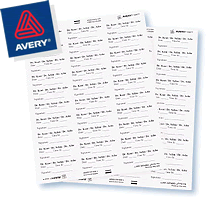 This demo - which source code files can be found at the end of this page available for downloading - demonstrates how you can easily create Avery Address Labels featuring USPS Postnet barcode in WPF Applications. Barcode Professional for WPF provides vector-based barcode generation producing high quality barcodes.
This step-by-step guide illustrates how you can create Avery Address Labels featuring Postnet barcodes by leveraging WPF Document and Printing capabilities together Barcode Professional for WPF.
The following figure is a screenshot of the demo application will be creating.
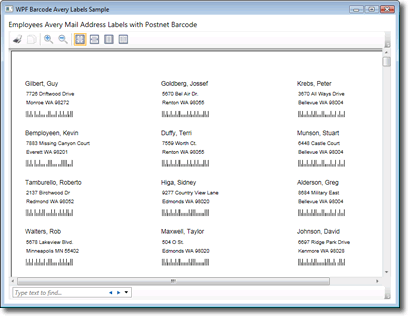
WPF Avery Address Labels featuring USPS Postnet Barcode
During the course of this walkthrough, you will accomplish the following activities:
- Create a WPF Application using Visual Studio 2008 or Express Editions.
- Create a WPF User Control which will represent an individual label featuring USPS Postnet barcode by leveraging Barcode Professional for WPF
- Create a .NET Class wrapping an Avery Address Label layout (In this case will be creating an "Ambassador Address Label - Avery 5160" and responsible of generating a FixedDocument object based on XML data source.
- Create a simple WPF Window which will display the Avery Address Label through out a WPF DocumentViewer control.
Please follow these steps:
- Ensure you have installed Barcode Professional for WPF
- Launch Visual Studio and create a new WPF Application
- Create a new folder in your project and name it "data" (without quotes)
- Add the AdventureWorksEmployees.xml file inside Data folder. That XML file contains info about AdventureWorks employees including Name, Address, City, State and Postal Code
- In this sample will be creating an "Ambassador Address Label - Avery 5160". This particular Avery Product features individual labels which size is 2.625 inch x 1 inch. We'll create a WPF User Control which will represent each individual label and will hold a BarcodeProfessional WPF Control for encoding/generating USPS Postnet barcodes.
- Add a new WPF User Control to the project and name it AveryBarcodeLabel
- Resize the User Control to Width = 252 and Height = 96. The size value is calculated by translating the label size to WPF Device Independent Unit (DIU = 1/96th inch per unit). Based on our sample:
Width = 2.625 * 96 = 252
Height = 1 * 96 = 96
- After that, drag & drop from VS Toolbox to the User Control:
- 3 TextBlock
- 1 BarcodeProfessional
- The User Control elements layout should look like follows (bellow to the figure is the XAML code for reference)
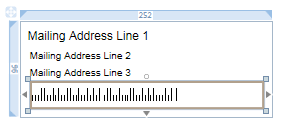
<Grid> <TextBlock Height="21" Margin="8,8,8,0" Name="txtLine1" VerticalAlignment="Top" Text="Mailing Address Line 1" TextTrimming="CharacterEllipsis" FontFamily="Arial" FontSize="12" /> <TextBlock FontFamily="Arial" FontSize="10" Margin="10,29,6,0" Name="txtLine2" Text="Mailing Address Line 2" TextTrimming="CharacterEllipsis" Height="17" VerticalAlignment="Top" /> <TextBlock FontFamily="Arial" FontSize="10" Margin="10,46,6,33" Name="txtLine3" Text="Mailing Address Line 3" TextTrimming="CharacterEllipsis" /> <my:BarcodeProfessional Margin="10,0,8,8" Name="bcPostnet" xmlns:my="clr-namespace:Neodynamic.WPF;assembly=Neodynamic.WPF.Barcode" DisplayCode="False" Symbology="Postnet" QuietZone="0" Height="28" VerticalAlignment="Bottom" AntiAlias="False" BarcodeAlignment="Left" /> </Grid> - Now in the User Control code-behind class, change it so it looks like follows:
VB
Partial Public Class AveryBarcodeLabel

    Public Sub New(ByVal line1 As String, ByVal line2 As String, ByVal line3 As String, ByVal zipCode As String)

        InitializeComponent()

        'set visual elements
        Me.txtLine1.Text = line1
        Me.txtLine2.Text = line2
        Me.txtLine3.Text = line3
        Me.bcPostnet.Code = zipCode

    End Sub

End Class
C#
public partial class AveryBarcodeLabel : UserControl
{
    public AveryBarcodeLabel() : this("Line1","Line2","Line3","12345")
    {
    }

    public AveryBarcodeLabel(string line1, string line2, string line3, string zipCode)
    {
        InitializeComponent();

        //set visual elements
        this.txtLine1.Text = line1;
        this.txtLine2.Text = line2;
        this.txtLine3.Text = line3;
        this.bcPostnet.Code = zipCode;
    }
}
- The "Ambassador Address Label - Avery 5160" features 30 labels per sheet and the sheet size as well as labels layout is the following:
We'll create a class for wrapping this info and the same will be the responsible of generating a FixedDocument object displaying all labels from data source.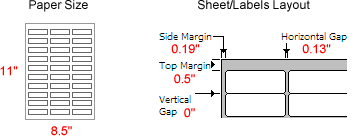
- Add a new Class item and name it Avery5160
- After that, paste the following code for Avery5160 class:
VB
Imports System.Data Imports System.Windows.Markup '''''' Ambassador Address Label - Avery 5160 ''' '''Public Class Avery5160 'Constants for Avery Address Label 5160 Const PAPER_SIZE_WIDTH As Double = 816 '8.5" x 96 Const PAPER_SIZE_HEIGHT As Double = 1056 '11" x 96 Const LABEL_WIDTH As Double = 252 '2.625" x 96 Const LABEL_HEIGHT As Double = 96 '1" x 96 Const SIDE_MARGIN As Double = 18.24 '0.19" x 96 Const TOP_MARGIN As Double = 48 '0.5" x 96 Const HORIZONTAL_GAP As Double = 12.48 '0.13" x 96 Const LABELS_PER_SHEET As Double = 30 '3 columns of 10 labels Private Function CreatePage() As FixedPage 'Create new page Dim page = New FixedPage() 'Set background page.Background = Brushes.White 'Set page size (Letter size) page.Width = PAPER_SIZE_WIDTH page.Height = PAPER_SIZE_HEIGHT Return page End Function Public Function CreateDocument(ByVal data As DataTable) As FixedDocument 'Create new document Dim doc As New FixedDocument() 'Set page size doc.DocumentPaginator.PageSize = New Size(PAPER_SIZE_WIDTH, PAPER_SIZE_HEIGHT) 'Number of records Dim count As Double = CDbl(data.Rows.Count) If count > 0 Then Dim line1 As String = "" Dim line2 As String = "" Dim line3 As String = "" Dim postalCode As String = "" Dim label As AveryBarcodeLabel 'Determine number of pages to generate Dim pageCount As Double = Math.Ceiling(count / LABELS_PER_SHEET) Dim dataIndex As Integer = 0 Dim currentColumn As Integer = 0 Dim currentRow As Integer = 0 Dim i As Integer For i = 0 To pageCount - 1 'Create page Dim page As New PageContent() Dim fixedPage As FixedPage = Me.CreatePage() 'Create labels Dim j As Integer For j = 0 To 29 If (j Mod 10 = 0) Then currentRow = 0 Else currentRow += 1 End If If (j < 10) Then currentColumn = 0 ElseIf (j > 19) Then currentColumn = 2 Else currentColumn = 1 End If If (dataIndex < count) Then 'Get data from DataTable line1 = CStr(data.Rows(dataIndex)("Name")) line2 = CStr(data.Rows(dataIndex)("Address")) postalCode = CStr(data.Rows(dataIndex)("PostalCode")) line3 = CStr(data.Rows(dataIndex)("City")) + " " + CStr(data.Rows(dataIndex)("State")) + " " + postalCode 'Create individual label label = New AveryBarcodeLabel(line1, line2, line3, postalCode) 'Set label location If (currentColumn = 0) Then System.Windows.Documents.FixedPage.SetLeft(label, SIDE_MARGIN) ElseIf (currentColumn = 1) Then System.Windows.Documents.FixedPage.SetLeft(label, SIDE_MARGIN + LABEL_WIDTH + HORIZONTAL_GAP) Else System.Windows.Documents.FixedPage.SetLeft(label, SIDE_MARGIN + LABEL_WIDTH * 2 + HORIZONTAL_GAP * 2) End If System.Windows.Documents.FixedPage.SetTop(label, TOP_MARGIN + currentRow * LABEL_HEIGHT) 'Add label object to page fixedPage.Children.Add(label) dataIndex += 1 End If Next 'Invoke Measure(), Arrange() and UpdateLayout() for drawing fixedPage.Measure(New Size(PAPER_SIZE_WIDTH, PAPER_SIZE_HEIGHT)) fixedPage.Arrange(New Rect(New Point(), New Size(PAPER_SIZE_WIDTH, PAPER_SIZE_HEIGHT))) fixedPage.UpdateLayout() CType(page, IAddChild).AddChild(fixedPage) doc.Pages.Add(page) Next End If Return doc End Function End Class C#
////// Ambassador Address Label - Avery 5160 /// public class Avery5160 { //Constants for Avery Address Label 5160 private const double PAPER_SIZE_WIDTH = 816; //8.5" x 96 private const double PAPER_SIZE_HEIGHT = 1056; //11" x 96 private const double LABEL_WIDTH = 252; //2.625" x 96 private const double LABEL_HEIGHT = 96; //1" x 96 private const double SIDE_MARGIN = 18.24; //0.19" x 96 private const double TOP_MARGIN = 48; //0.5" x 96 private const double HORIZONTAL_GAP = 12.48; //0.13" x 96 private const double LABELS_PER_SHEET = 30; //3 columns of 10 labels private FixedPage CreatePage() { //Create new page FixedPage page = new FixedPage(); //Set background page.Background = Brushes.White; //Set page size (Letter size) page.Width = PAPER_SIZE_WIDTH; page.Height = PAPER_SIZE_HEIGHT; return page; } public FixedDocument CreateDocument(DataTable data) { //Create new document FixedDocument doc = new FixedDocument(); //Set page size doc.DocumentPaginator.PageSize = new Size(PAPER_SIZE_WIDTH, PAPER_SIZE_HEIGHT); //Number of records double count = (double)data.Rows.Count; if(count > 0) { string line1 = ""; string line2 = ""; string line3 = ""; string postalCode = ""; AveryBarcodeLabel label; //Determine number of pages to generate double pageCount = Math.Ceiling(count / LABELS_PER_SHEET); int dataIndex = 0; int currentColumn = 0; int currentRow = 0; for (int i = 0; i < pageCount; i++) { //Create page PageContent page = new PageContent(); FixedPage fixedPage = this.CreatePage(); //Create labels for (int j = 0; j < 30; j++) { if (j % 10 == 0) { currentRow = 0; } else { currentRow++; } if (j < 10) { currentColumn = 0; } else if (j > 19) { currentColumn = 2; } else { currentColumn = 1; } if (dataIndex < count) { //Get data from DataTable line1 = (string)data.Rows[dataIndex]["Name"]; line2 = (string)data.Rows[dataIndex]["Address"]; postalCode = (string)data.Rows[dataIndex]["PostalCode"]; line3 = (string)data.Rows[dataIndex]["City"] + " " + (string)data.Rows[dataIndex]["State"] + " " + postalCode; //Create individual label label = new AveryBarcodeLabel(line1, line2, line3, postalCode); //Set label location if (currentColumn == 0) { FixedPage.SetLeft(label, SIDE_MARGIN); } else if (currentColumn == 1) { FixedPage.SetLeft(label, SIDE_MARGIN + LABEL_WIDTH + HORIZONTAL_GAP); } else { FixedPage.SetLeft(label, SIDE_MARGIN + LABEL_WIDTH * 2 + HORIZONTAL_GAP * 2); } FixedPage.SetTop(label, TOP_MARGIN + currentRow * LABEL_HEIGHT); //Add label object to page fixedPage.Children.Add(label); dataIndex++; } } //Invoke Measure(), Arrange() and UpdateLayout() for drawing fixedPage.Measure(new Size(PAPER_SIZE_WIDTH, PAPER_SIZE_HEIGHT)); fixedPage.Arrange(new Rect(new Point(), new Size(PAPER_SIZE_WIDTH, PAPER_SIZE_HEIGHT))); fixedPage.UpdateLayout(); ((IAddChild)page).AddChild(fixedPage); doc.Pages.Add(page); } } return doc; } }
- The last step is for designing the Window element for displaying the Avery Labels in a DocumentViewer control. Open default Window1 file at design time and drag & drop a TextBlock and a DocumentViewer control. The Window elements layout should look like follows (bellow to the figure is the XAML code for reference)
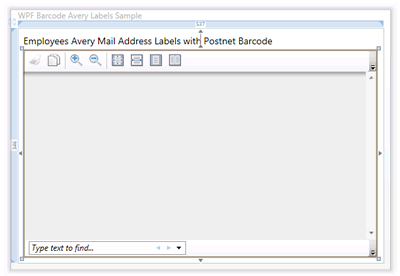
Employees Avery Mail Address Labels With Postnet Barcode
Finally, in the Window code-behind class:<Grid> <DocumentViewer Margin="8,32,9,8" Name="documentViewer1" /> <TextBlock Height="21" Margin="8,9,149,0" Name="textBlock1" VerticalAlignment="Top" Text="Employees Avery Mail Address Labels with Postnet Barcode" FontSize="14" /> </Grid>- Add the following methods:
VB
Private Function GetRootFolder() As String
	'Get root folder
        Dim contentDir As String = Directory.GetCurrentDirectory()
        Dim dirLength As Integer = contentDir.Length

        If (contentDir.ToLower().EndsWith("\bin\debug")) Then
            contentDir = contentDir.Remove(dirLength - 10, 10)
        ElseIf (contentDir.ToLower().EndsWith("\bin\release")) Then
            contentDir = contentDir.Remove(dirLength - 12, 12)
        End If

        Return contentDir
End Function

Private Function GetEmployees() As DataTable
        Dim ds As New DataSet()
        ds.ReadXml(Me.GetRootFolder() + "\data\AdventureWorksEmployees.xml")
        Return ds.Tables(0)
End Function
C#
private string GetRootFolder() { //Get root folder string contentDir = Directory.GetCurrentDirectory(); int dirLength = contentDir.Length; if (contentDir.ToLower().EndsWith(@"\bin\debug")) contentDir = contentDir.Remove(dirLength - 10, 10); else if (contentDir.ToLower().EndsWith(@"\bin\release")) contentDir = contentDir.Remove(dirLength - 12, 12); return contentDir; } private DataTable GetEmployees() { DataSet ds = new DataSet(); ds.ReadXml(this.GetRootFolder() + @"\data\AdventureWorksEmployees.xml"); return ds.Tables[0]; } - Add the following code in the Window_Loaded event procedure:
VB
Dim avery As New Avery5160()
Me.documentViewer1.Document = avery.CreateDocument(Me.GetEmployees())
C#
Avery5160 avery = new Avery5160();
this.documentViewer1.Document = avery.CreateDocument(this.GetEmployees());
- Add the following methods:
- That's it. Run your project. You should get something like the following:
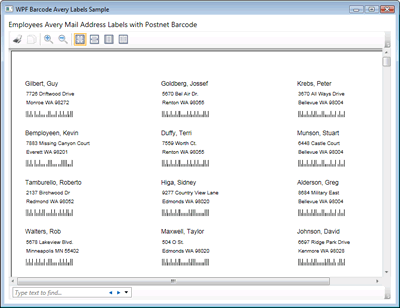
WPF Avery Address Labels featuring USPS Postnet Barcode
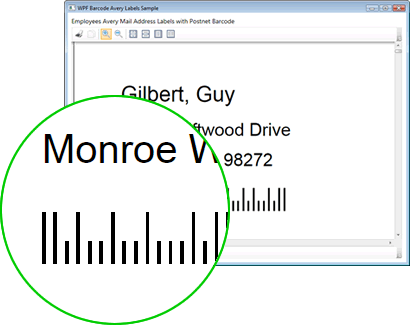
Barcode Professional for WPF generates high quality vector-based barcodes
Sample Files Download
Here are the VB.NET and C# versions of this sample. Please download the zip file and extract it.
- For Visual Basic.NET: BarcodeWPFAveryPostnetVB.zip (20 KB)
- For Visual C#.NET: BarcodeWPFAveryPostnetCS.zip (18 KB)
Remember to download and install Barcode Professional for WPF in order to reproduce this sample demo.