How to use Barcode Professional in Visual Studio Local Report (RDLC) - ASP.NET Product List Sample with PDF & Excel support
Product Barcode Professional for Reporting Services Published 04/27/2007 Updated 04/27/2007
Overview
In the following sample we'll create a RDLC report which displays barcode images into it by using Barcode Professional and Visual Studio 2005 ReportViewer controls in an ASP.NET Web Application
Requirements
Neodynamic Barcode Professional 2.0 for Reporting Services or greater
Microsoft .NET Framework 2.0 or greater
Microsoft Visual Studio 2005 or greater
Microsoft Visual Studio 2005 ReportViewer control
Microsoft Visual Web Developer Express Edition with ReportViewer add-in installed
ASP.NET 2.0
Due to its flexible design, Barcode Professional allows you to easily add barcode images in RDLC (Report Definition Language Client-side processing) reports. You can use all Barcode Symbologies - Linear & 2D - built-in Barcode Professional.
In this sample we'll create a Product List RDLC report using Microsoft's AdventureWorks database sample.
Follow up these steps
- Open Visual Studio 2005 and create a new ASP.NET Web Application.
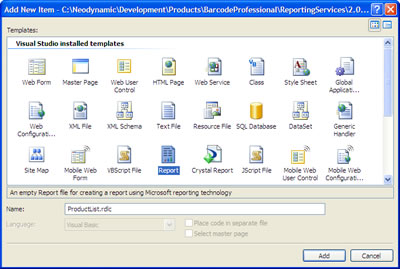
- Add a new Report (RDLC) item and name it ProductList.rdlc
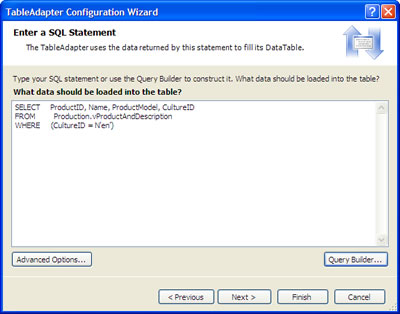
- Add a new Data Source for the report. If you have the AventureWorks Database installed in a SQL Server 2005 select it and enter the following SQL Statement:
SELECT ProductID, Name, ProductModel, CultureID FROM Production.vProductAndDescription WHERE (CultureID = N'en')
as is shown in the below figure.
- In this sample we'll use the Industrial 2 of 5 Barcode Symbology, but remember that you can use ANY Barcode Symbology built-in Barcode Professional. IMPORTANT: Industrial 2 of 5 is a barcode symbology which encodes numeric values ONLY. So if you need to encode alphanumeric values, please choose another symbology such as Code 128 or the one which is required for your project.
Follow these steps:- Ensure to install Barcode Professional for Reporting Services.
IMPORTANT: After installing Barcode Professional for Reporting Services you must register it into the Global Assembly Cache (GAC). The assembly to register is located in [BarcodeInstallDir]\bin\For SSRS 2005\Neodynamic.ReportingServices.Barcode.dll - In Visual Studio 2005 and with the report opened at design-time, add a reference to the Barcode Professional assembly (Neodynamic.ReportingServices.Barcode.dll) going to Report > Report properties… Add the reference as is shown in the following figure:
We'll need to create an instance of Barcode Professional to use it then in a custom function. To do this, add a new entry in the Classes grid as is shown in the following figure. Notice that the instance will be named objBarcode and that the full reference to the class is Neodynamic.ReportingServices.Barcode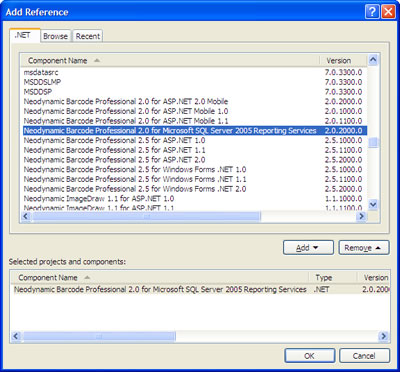

- We need to create a VB.NET function which will be invoked to get the appropriate Industrial 2 of 5 barcode image by using the Barcode Professional instance created in the previous step. In the Code tab write the following code:
IMPORTANT: If you are using Barcode Professional 3.0 or greater, then modify the line objBarcode.BarHeight = 20 in the function below to objBarcode.BarHeight = 0.2 because in those new versions all barcode-related dimensions are measured in inches instead of pixel!Public Function GetBarcode(ByVal code As String) As Byte() 'Set the value to encode objBarcode.Code = code 'Set the Industrial 2 of 5 Barcode Symbology objBarcode.Symbology = Neodynamic.ReportingServices.Symbology.Industrial2of5 'Set the Bar's height to 20 px objBarcode.BarHeight = 20 'Hide the value to encode in the barcode image objBarcode.DisplayCode = False 'Generate the barcode image Return objBarcode.GetBarcodeImagePng() End Function
NOTE: In the previous function we're returning a barcode image in PNG format (objBarcode.GetBarcodeImagePng). You can return other image format of the generated barcode by using the other GetBarcodeImageXYZ() methods available. (For further info, please refer to Class Reference in the product help)This VB.NET function called GetBarcode requires a code parameter. This value will be specified with some fields of the report’s Data Source. And as you can see in this function you can set any property of Barcode Professional.
Click OK to close the dialog box.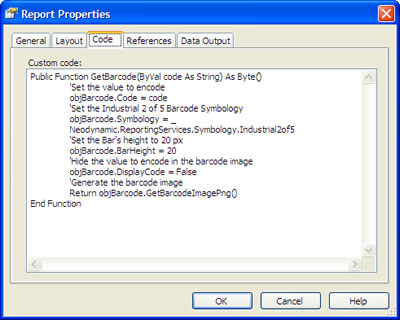
- Ensure to install Barcode Professional for Reporting Services.
- Now we'll design the Product List layout. Open the report at design time and drag & drop the following controls and fields as is shown in the following figure (The control below Product Barcode header is an Image control):
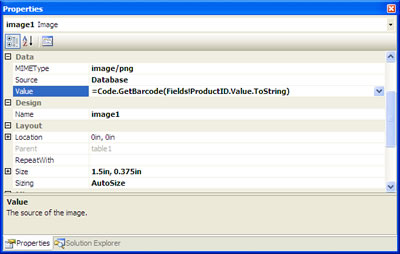
The Image control that will hold the barcode image has to have its Source property set to Database, the Sizing property to AutoSize, the MIMEType property to a image/[format] that matches with the GetBarcodeImage[format] method used in the custom function, and the Value property to an expression such as the following: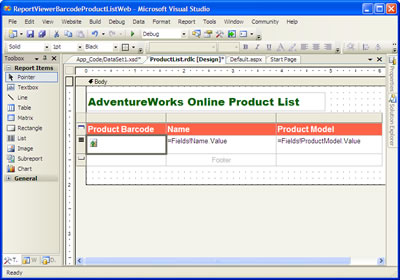
=Code.GetBarcode(Fields!ProductID.Value.ToString)
- Now, it's time to display the report onto a WebForm by using a ReportViewer control. So, open your WebForm at design time and drag & drop a ReportViewer control onto it and specify the ProductList.rdlc report.
The last thing to do is to add a line of code in the Page_Load event procedure. So, go to it and add the following line:
• For Barcode Professional 2.0:VB
Me.ReportViewer1.LocalReport.AddTrustedCodeModuleInCurrentAppDomain("Neodynamic.ReportingServices.Barcode, Version=2.0.2000.0, Culture=neutral, PublicKeyToken=c6b33c3093a0d4cd")C#
• For Barcode Professional 3.0:this.reportViewer1.LocalReport.AddTrustedCodeModuleInCurrentAppDomain("Neodynamic.ReportingServices.Barcode, Version=2.0.2000.0, Culture=neutral, PublicKeyToken=c6b33c3093a0d4cd");VB
Me.ReportViewer1.LocalReport.AddTrustedCodeModuleInCurrentAppDomain("Neodynamic.ReportingServices.Barcode, Version=3.0.2000.0, Culture=neutral, PublicKeyToken=c6b33c3093a0d4cd")C#
• For Barcode Professional 4.0:this.reportViewer1.LocalReport.AddTrustedCodeModuleInCurrentAppDomain("Neodynamic.ReportingServices.Barcode, Version=3.0.2000.0, Culture=neutral, PublicKeyToken=c6b33c3093a0d4cd");VB
Me.ReportViewer1.LocalReport.AddTrustedCodeModuleInCurrentAppDomain("Neodynamic.ReportingServices.Barcode, Version=4.0.2000.0, Culture=neutral, PublicKeyToken=c6b33c3093a0d4cd")C#
this.reportViewer1.LocalReport.AddTrustedCodeModuleInCurrentAppDomain("Neodynamic.ReportingServices.Barcode, Version=4.0.2000.0, Culture=neutral, PublicKeyToken=c6b33c3093a0d4cd");Ensure that you've registered or installed the Barcode Professional for SSRS 2005 assembly into the Global Assembly Cache (GAC) - That's it. Run your app. You'll get something like the following:
Barcode Professional supports PDF & Excel exportation. So, if you do that onto the previous form you’ll get your report with barcode images in PDF and Excel formats.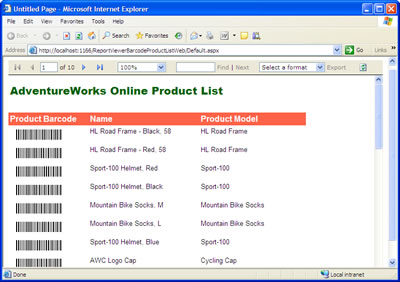
![Adobe Reader - [ProductList.pdf]](https://www.neodynamic.com/Support/FAQs/30/pdfSmall.jpg)
PDF Support
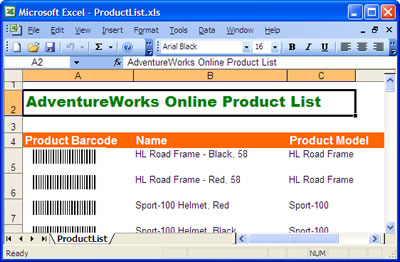
Excel Support
- Deployment
To deploy your project on a ASP.NET server, just ensure that the Barcode Professional for Reporting Services is installed or registered in the server's Global Assembly Cache (GAC). For further details, please refer to Deployment topic in the product help.