
This walkthrough illustrates how easily you can use Barcode Professional SDK for .NET in ASP.NET Web Applications. During the course of this walkthrough, you will accomplish the following activities:
Neodynamic Barcode Professional SDK for .NET
Microsoft .NET Framework 3.5 (ASP.NET 3.5) or greater
Microsoft Visual Studio 2008
Microsoft Visual Web Developer 2008 Express Edition (VWD)
<html xmlns="http://www.w3.org/1999/xhtml">
<head id="Head1" runat="server">
    <title>Barcode Professional SDK in ASP.NET</title>
    <style type="text/css">
        .newStyle1 {
            font-family: arial, Helvetica, sans-serif;
        }
    </style>
</head>
<body>
    <form id="form1" runat="server">
        <div class="newStyle1">
            <h3>Barcode Professional SDK in ASP.NET</h3>
            <br />
            Enter Value to Encode:
            <br />
            <asp:TextBox ID="TextBox1" runat="server" Width="264px">
            </asp:TextBox><asp:Button ID="Button1" runat="server" Text="Barcode Now!"
                onclick="Button1_Click" />
            <br />
            <br />
            <asp:Image ID="Image1" runat="server" Visible="false" />
        </div>
    </form>
</body>
</html>
If (Me.TextBox1.Text.Length > 0) Then
    Me.Image1.ImageUrl = "~/BarcodeGen.ashx?code=" + Me.TextBox1.Text
    Me.Image1.Visible = True
End If
if (this.TextBox1.Text.Length >  0)
{
    this.Image1.ImageUrl = "~/BarcodeGen.ashx?code=" + this.TextBox1.Text;
    this.Image1.Visible = true;
}
<%@ WebHandler Language="VB" Class="BarcodeGen" %>

Imports System
Imports System.Web

Imports Neodynamic.SDK

Public Class BarcodeGen : Implements IHttpHandler

    Public Sub ProcessRequest(ByVal context As HttpContext) Implements IHttpHandler.ProcessRequest

        'Get value to encode from querystring
        Dim valueToEncode As String = context.Request("code")

        'Create BarcodeProfessional object
        Dim bc As New BarcodeProfessional()
        'Set barcode standard
        bc.Symbology = Symbology.Code128
        'Set value to encode
        bc.Code = valueToEncode

        'Generate barcode
        context.Response.ContentType = "image/gif"
        context.Response.BinaryWrite(bc.GetBarcodeImage(System.Drawing.Imaging.ImageFormat.Gif))
    End Sub

    Public ReadOnly Property IsReusable() As Boolean Implements IHttpHandler.IsReusable
        Get
            Return False
        End Get
    End Property

End Class
<%@ WebHandler Language="C#" Class="BarcodeGen" %>

using System;
using System.Web;

using Neodynamic.SDK;

public class BarcodeGen : IHttpHandler {

    public void ProcessRequest (HttpContext context) {

        //Get value to encode from querystring
        string valueToEncode = context.Request["code"];

        //Create BarcodeProfessional object
        BarcodeProfessional bc = new BarcodeProfessional();
        //Set barcode standard
        bc.Symbology = Symbology.Code128;
        //Set value to encode
        bc.Code = valueToEncode;

        //Generate barcode
        context.Response.ContentType = "image/gif";
        context.Response.BinaryWrite(bc.GetBarcodeImage(System.Drawing.Imaging.ImageFormat.Gif));
    }

    public bool IsReusable {
        get {
            return false;
        }
    }
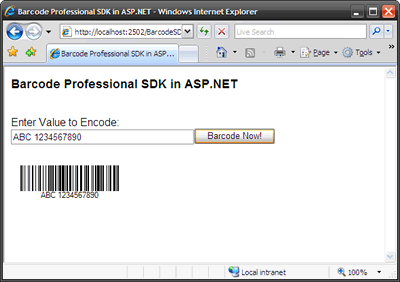
} 

| Tweet |
|
We provide best-in-class customer service and support directly from members of our dev team! If we are available when you contact us, you will get a response in few minutes; otherwise the maximum turnaround is 24hs in most cases.