
Neodynamic Barcode Professional 4.0 for WPF (or greater)
Microsoft .NET Framework 3.5 (or greater)
Microsoft Visual Studio 2010 or Visual Basic 2010 Express or Visual C# 2010 Express
In this guide you will learn how to print vector-based barcodes inside a Console App or Windows Service by using Neodynamic Barcode Professional for WPF.
Taking advantage on the printing features of WPF which is very powerful and easy to use, you can print barcode documents or labels in scenarios where the classic GDI+ (System.Drawing.Printing.PrintDocument class) is not supported like Windows Services. Although the source code in this guide is for Console Apps, you can easily port it to a Windows Service project.
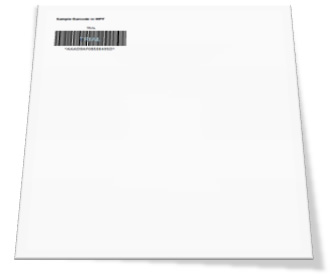
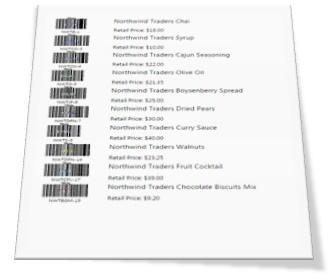
This guide provides two printing scenarios. The first one is for printing a single page document featuring a Code 39 barcode while the second one is for printing a multipage document with a list of products. The products are in a XML file including id, name and price and a Code 128 barcode is generated for each product ID. Please note that although we have used simple linear barcodes Code 39 and Code 128 in this guide, you could use any of the barcode standards included in Barcode Professional for WPF like EAN-13, UPC-A, GS1-128, USPS Intelligent Mail Barcode as well as 2D symbologies like Data Matrix, QR Code, Aztec Code, PDF 417, etc. (More info about all supported barcode symbologies in Barcode Professional for WPF)
Please follow up these steps:
Imports System.Printing
Imports System.Windows.Xps
Imports System.Windows.Media
Imports System.Globalization
Imports System.Windows

Public Class SinglePageDocBarcode

    Public Shared Sub Print()
        Dim server As New LocalPrintServer()
        Dim queue As PrintQueue = server.DefaultPrintQueue
        Dim ticket As PrintTicket = queue.DefaultPrintTicket
        Dim writer As XpsDocumentWriter = PrintQueue.CreateXpsDocumentWriter(queue)
        writer.Write(CreateVisual(ticket), ticket)
    End Sub

    Private Shared Function CreateVisual(ByVal ticket As PrintTicket) As Visual
        Dim width As Double = ticket.PageMediaSize.Width.Value
        Dim height As Double = ticket.PageMediaSize.Height.Value
        Const inch As Double = 96

        Dim visual As New DrawingVisual()
        Using dc As DrawingContext = visual.RenderOpen()
            'Draw a sample text
            dc.DrawText(New FormattedText("Sample Barcode in WPF", CultureInfo.InvariantCulture, FlowDirection.LeftToRight, New Typeface(New FontFamily("Arial"), FontStyles.Normal, FontWeights.Bold, FontStretches.Normal), 14, Brushes.Black), New Point(0.5 * inch, 0.5 * inch))

            'Draw a barcode
            Dim bc As New Neodynamic.WPF.BarcodeBuilder()
            bc.BarcodeUnit = Neodynamic.WPF.BarcodeUnit.Inch
            bc.Symbology = Neodynamic.WPF.Symbology.Code39
            bc.Extended = True
            bc.AddChecksum = False
            bc.Code = Guid.NewGuid().ToString().ToUpper().Replace("-", "").Substring(0, 16)
            bc.BarWidth = 1 / inch
            bc.BarHeight = 0.75
            bc.QuietZone = New Thickness(0, 0.1, 0, 0.1)
            bc.FontSize = 12
            'locate the barcode drawing by using TranslateTransform
            dc.PushTransform(New TranslateTransform(0.5 * inch, inch))

            dc.DrawDrawing(bc.GetBarcodeDrawing())

        End Using


        Return visual
    End Function

End Class
using System;
using System.Windows.Media;
using System.Printing;
using System.Windows;
using System.Windows.Xps;
using System.Globalization;

namespace WPFBarcodePrintConsoleCS
{
    class SinglePageDocBarcode
    {

        public static void Print()
        {
            LocalPrintServer server = new LocalPrintServer();
            PrintQueue queue = server.DefaultPrintQueue;
            PrintTicket ticket = queue.DefaultPrintTicket;
            XpsDocumentWriter writer = PrintQueue.CreateXpsDocumentWriter(queue);
            writer.Write(CreateVisual(ticket), ticket);
        }

        private static Visual CreateVisual(PrintTicket ticket)
        {
            double width = ticket.PageMediaSize.Width.Value;
            double height = ticket.PageMediaSize.Height.Value;
            const double inch = 96;

            DrawingVisual visual = new DrawingVisual();
            using (DrawingContext dc = visual.RenderOpen())
            {
                //Draw a sample text
                dc.DrawText(new FormattedText("Sample Barcode in WPF",
                    CultureInfo.InvariantCulture,
                     FlowDirection.LeftToRight,
                     new Typeface(new FontFamily("Arial"), FontStyles.Normal, FontWeights.Bold, FontStretches.Normal),
                     14,
                     Brushes.Black), new Point(0.5 * inch, 0.5 * inch));

                //Draw a barcode
                Neodynamic.WPF.BarcodeBuilder bc = new Neodynamic.WPF.BarcodeBuilder();
                bc.BarcodeUnit = Neodynamic.WPF.BarcodeUnit.Inch;
                bc.Symbology = Neodynamic.WPF.Symbology.Code39;
                bc.Extended = true;
                bc.AddChecksum = false;
                bc.Code = Guid.NewGuid().ToString().ToUpper().Replace("-", "").Substring(0, 16);
                bc.BarWidth = 1 / inch;
                bc.BarHeight = 0.75;
                bc.QuietZone = new Thickness(0, 0.1, 0, 0.1);
                bc.FontSize = 12;
                //locate the barcode drawing by using TranslateTransform
                dc.PushTransform(new TranslateTransform(0.5 * inch, inch));

                dc.DrawDrawing(bc.GetBarcodeDrawing());

            }

            return visual;
        }

    }
} 
Imports System.Printing
Imports System.Windows.Xps
Imports System.Windows.Media
Imports System.Globalization
Imports System.Windows
Imports System.Windows.Controls
Imports System.Windows.Documents
Imports System.Windows.Markup

Public Class MultiPageDocBarcode

    Const INCH As Double = 96

    'US letter size in INCH
    Const PAPER_WIDTH As Double = 11
    Const PAPER_HEIGHT As Double = 8.5
    Const PAPER_MARGIN As Double = 0.5

    Const NUM_OF_PROD_PER_SHEET As Double = 10


    Private Shared Function CreateProductItem(ByVal id As String, ByVal name As String, ByVal price As String) As Canvas
        'Create a product canvas for placing text and barcode of the product
        Dim c As New Canvas()
        c.Width = (PAPER_WIDTH - 2 * PAPER_MARGIN) * INCH
        c.Height = (PAPER_HEIGHT / NUM_OF_PROD_PER_SHEET) * INCH

        'create barcode for product id
        Dim bc As New Neodynamic.WPF.BarcodeProfessional()
        bc.BarcodeUnit = Neodynamic.WPF.BarcodeUnit.Inch
        bc.Symbology = Neodynamic.WPF.Symbology.Code128
        bc.Code = id
        bc.BarWidth = 1 / INCH
        bc.BarHeight = 0.5
        bc.QuietZone = New Thickness(0, 0, 0, 0.1)
        bc.FontSize = 12

        'create textblocks for product info
        Dim txtProdName As New TextBlock()
        txtProdName.Text = name
        txtProdName.FontSize = 24
        txtProdName.SetValue(Canvas.LeftProperty, 2 * INCH)

        Dim txtProdPrice As New TextBlock()
        txtProdPrice.Text = "Retail Price: " + price
        txtProdPrice.FontSize = 20
        txtProdPrice.SetValue(Canvas.LeftProperty, 2 * INCH)
        txtProdPrice.SetValue(Canvas.TopProperty, 0.5 * INCH)

        'add elements to the canvas
        c.Children.Add(bc)
        c.Children.Add(txtProdName)
        c.Children.Add(txtProdPrice)

        Return c
    End Function


    Private Shared Function CreatePage() As FixedPage
        'Create new page
        Dim page As New FixedPage()
        'Set background
        page.Background = Brushes.White
        'Set page size (Letter size)
        page.Width = PAPER_WIDTH * INCH
        page.Height = PAPER_HEIGHT * INCH
        Return page
    End Function


    Private Shared Function CreateDocument(ByVal data As DataTable) As FixedDocument

        'Create new document
        Dim doc As New FixedDocument()
        'Set page size
        doc.DocumentPaginator.PageSize = New Size(PAPER_WIDTH * INCH, PAPER_HEIGHT * INCH)

        'Number of records
        Dim count As Double = data.Rows.Count

        If (count > 0) Then

            'Determine number of pages to generate
            Dim pageCount As Double = Math.Ceiling(count / NUM_OF_PROD_PER_SHEET)

            Dim dataIndex As Integer = 0
            Dim currentRow As Integer = 0

            Dim prodId As String
            Dim prodName As String
            Dim prodPrice As String
            Dim prodCanvas As Canvas

            Dim i As Integer = 0
            Dim j As Integer = 0

            For i = 0 To i < pageCount

                'Create page
                Dim page As New PageContent()
                Dim fixedPage As FixedPage = CreatePage()
                'Create labels
                For j = 0 To j < NUM_OF_PROD_PER_SHEET

                    If (j Mod NUM_OF_PROD_PER_SHEET = 0) Then
                        currentRow = 0
                    Else
                        currentRow += 1
                    End If

                    If (dataIndex < count) Then
                        'Get data from DataTable
                        prodId = data.Rows(dataIndex)("ProdId").ToString
                        prodName = data.Rows(dataIndex)("ProdName").ToString
                        prodPrice = data.Rows(dataIndex)("ProdPrice").ToString
                        'Create individual product 'label'
                        prodCanvas = CreateProductItem(prodId, prodName, prodPrice)

                        'Set product label location
                        fixedPage.SetLeft(prodCanvas, PAPER_MARGIN * INCH)
                        fixedPage.SetTop(prodCanvas, PAPER_MARGIN * INCH + currentRow * prodCanvas.Height)

                        'Add label object to page
                        fixedPage.Children.Add(prodCanvas)

                        dataIndex += 1
                    End If
                Next

                'Invoke Measure(), Arrange() and UpdateLayout() for drawing
                fixedPage.Measure(New Size(PAPER_WIDTH * 96, PAPER_HEIGHT * 96))
                fixedPage.Arrange(New Rect(New Point(), New Size(PAPER_WIDTH * 96, PAPER_HEIGHT * 96)))
                fixedPage.UpdateLayout()

                DirectCast(page, IAddChild).AddChild(fixedPage)

                doc.Pages.Add(page)
            Next

        End If

        Return doc

    End Function


    Public Shared Sub Print()

        'get data from xml file
        Dim xmlFile As String = "c:\temp\NorthwindProducts.xml"
        Dim ds As New DataSet()
        ds.ReadXml(xmlFile)

        'print
        Dim server As New LocalPrintServer()
        Dim queue As PrintQueue = server.DefaultPrintQueue
        Dim ticket As PrintTicket = queue.DefaultPrintTicket
        Dim writer As XpsDocumentWriter = PrintQueue.CreateXpsDocumentWriter(queue)
        writer.Write(CreateDocument(ds.Tables(0)), ticket)

    End Sub

End Class
using System;
using System.Windows.Media;
using System.Printing;
using System.Windows;
using System.Windows.Xps;
using System.Globalization;
using System.Windows.Controls;
using System.Windows.Documents;
using System.Data;
using System.Windows.Markup;
using System.IO;
using System.Reflection;

namespace WPFBarcodePrintConsoleCS
{
    class MultiPageDocBarcode
    {

        const double INCH = 96;

        //US letter size in INCH
        const double PAPER_WIDTH = 11;
        const double PAPER_HEIGHT = 8.5;
        const double PAPER_MARGIN = 0.5;

        const double NUM_OF_PROD_PER_SHEET = 10;

        private static Canvas CreateProductItem(string id, string name, string price)
        {
            //Create a product canvas for placing text and barcode of the product
            Canvas c = new Canvas();
            c.Width = (PAPER_WIDTH - 2 * PAPER_MARGIN) * INCH;
            c.Height = (PAPER_HEIGHT / NUM_OF_PROD_PER_SHEET) * INCH;

            //create barcode for product id
            Neodynamic.WPF.BarcodeProfessional bc = new Neodynamic.WPF.BarcodeProfessional();
            bc.BarcodeUnit = Neodynamic.WPF.BarcodeUnit.Inch;
            bc.Symbology = Neodynamic.WPF.Symbology.Code128;
            bc.Code = id;
            bc.BarWidth = 1 / INCH;
            bc.BarHeight = 0.5;
            bc.QuietZone = new Thickness(0, 0, 0, 0.1);
            bc.FontSize = 12;

            //create textblocks for product info
            TextBlock txtProdName = new TextBlock();
            txtProdName.Text = name;
            txtProdName.FontSize = 24;
            txtProdName.SetValue(Canvas.LeftProperty, 2 * INCH);

            TextBlock txtProdPrice = new TextBlock();
            txtProdPrice.Text = "Retail Price: " + price;
            txtProdPrice.FontSize = 20;
            txtProdPrice.SetValue(Canvas.LeftProperty, 2 * INCH);
            txtProdPrice.SetValue(Canvas.TopProperty, 0.5 * INCH);

            //add elements to the canvas
            c.Children.Add(bc);
            c.Children.Add(txtProdName);
            c.Children.Add(txtProdPrice);

            return c;
        }


        private static FixedPage CreatePage()
        {
            //Create new page
            FixedPage page = new FixedPage();
            //Set background
            page.Background = Brushes.White;
            //Set page size (Letter size)
            page.Width = PAPER_WIDTH * INCH;
            page.Height = PAPER_HEIGHT * INCH;
            return page;
        }


        private static FixedDocument CreateDocument(DataTable data)
        {
            //Create new document
            FixedDocument doc = new FixedDocument();
            //Set page size
            doc.DocumentPaginator.PageSize = new Size(PAPER_WIDTH * INCH, PAPER_HEIGHT * INCH);

            //Number of records
            double count = (double)data.Rows.Count;

            if (count > 0)
            {
                //Determine number of pages to generate
                double pageCount = Math.Ceiling(count / NUM_OF_PROD_PER_SHEET);

                int dataIndex = 0;
                int currentRow = 0;

                string prodId;
                string prodName;
                string prodPrice;
                Canvas prodCanvas;

                for (int i = 0; i < pageCount; i++)
                {
                    //Create page
                    PageContent page = new PageContent();
                    FixedPage fixedPage = CreatePage();
                    //Create labels
                    for (int j = 0; j < NUM_OF_PROD_PER_SHEET; j++)
                    {
                        if (j % NUM_OF_PROD_PER_SHEET == 0)
                        {
                            currentRow = 0;
                        }
                        else
                        {
                            currentRow++;
                        }


                        if (dataIndex < count)
                        {
                            //Get data from DataTable
                            prodId = (string)data.Rows[dataIndex]["ProdId"];
                            prodName = (string)data.Rows[dataIndex]["ProdName"];
                            prodPrice = (string)data.Rows[dataIndex]["ProdPrice"];
                            //Create individual product 'label'
                            prodCanvas = CreateProductItem(prodId, prodName, prodPrice);

                            //Set product label location
                            FixedPage.SetLeft(prodCanvas, PAPER_MARGIN * INCH);
                            FixedPage.SetTop(prodCanvas, PAPER_MARGIN * INCH + currentRow * prodCanvas.Height);

                            //Add label object to page
                            fixedPage.Children.Add(prodCanvas);

                            dataIndex++;
                        }
                    }

                    //Invoke Measure(), Arrange() and UpdateLayout() for drawing
                    fixedPage.Measure(new Size(PAPER_WIDTH * 96, PAPER_HEIGHT * 96));
                    fixedPage.Arrange(new Rect(new Point(), new Size(PAPER_WIDTH * 96, PAPER_HEIGHT * 96)));
                    fixedPage.UpdateLayout();

                    ((IAddChild)page).AddChild(fixedPage);

                    doc.Pages.Add(page);
                }
            }

            return doc;
        }


        public static void Print()
        {
            //get data from xml file
            string xmlFile = @"c:\temp\NorthwindProducts.xml";
            DataSet ds = new DataSet();
            ds.ReadXml(xmlFile);

            //print
            LocalPrintServer server = new LocalPrintServer();
            PrintQueue queue = server.DefaultPrintQueue;
            PrintTicket ticket = queue.DefaultPrintTicket;
            XpsDocumentWriter writer = PrintQueue.CreateXpsDocumentWriter(queue);
            writer.Write(CreateDocument(ds.Tables[0]), ticket);
        }

    }

}
Module Module1

    Sub Main()

        Dim done As Boolean = False

        Do
            Console.WriteLine("Neodynamic Barcode Pro for WPF")
            Console.WriteLine("WPF Barcode Printing in Console or Windows Services")
            Console.WriteLine("===================================================\n\n")
            Console.WriteLine("Select one of the following:\n")
            Console.WriteLine("1 -> For printing a single page with a barcode")
            Console.WriteLine("2 -> For printing a multipage doc with barcodes\n")
            Console.Write("Enter Your selection (0 to exit): ")
            Dim userSelect As String = Console.ReadLine()
            Dim iSel As Integer

            Try
                iSel = Integer.Parse(userSelect)
            Catch
                Console.Clear()
                Continue Do
            End Try

            If iSel = 0 Then
                done = True
            ElseIf iSel = 1 Then
                Console.WriteLine("Printing a single page with a barcode...")
                SinglePageDocBarcode.Print()
            ElseIf iSel = 2 Then
                Console.WriteLine("Printing a multipage doc with barcodes...")
                MultiPageDocBarcode.Print()
            Else
                Console.Clear()
                Continue Do
            End If

            Console.WriteLine()
        Loop While Not (done)

    End Sub

End Module
using System;

namespace WPFBarcodePrintConsoleCS
{
    class Program
    {
        [STAThread]
        static void Main(string[] args)
        {

            bool done = false;

            do
            {
                Console.WriteLine("Neodynamic Barcode Pro for WPF");
                Console.WriteLine("WPF Barcode Printing in Console or Windows Services");
                Console.WriteLine("===================================================\n\n");
                Console.WriteLine("Select one of the following:\n");
                Console.WriteLine("1 -> For printing a single page with a barcode");
                Console.WriteLine("2 -> For printing a multipage doc with barcodes\n");
                Console.Write("Enter Your selection (0 to exit): ");
                string userSelect = Console.ReadLine();
                int iSel;
                try
                {
                    iSel = int.Parse(userSelect);
                }
                catch
                {
                    Console.Clear();
                    continue;
                }
                switch (iSel)
                {
                    case 0:
                        done = true;
                        break;
                    case 1:
                        Console.WriteLine("Printing a single page with a barcode...");
                        SinglePageDocBarcode.Print();
                        break;
                    case 2:
                        Console.WriteLine("Printing a multipage doc with barcodes...");
                        MultiPageDocBarcode.Print();
                        break;
                    default:
                        Console.Clear();
                        continue;
                }
                Console.WriteLine();
            } while (!done);

        }

    }
} Sample Files Download
Here are the VB.NET and C# versions of this sample. Please download the zip file and extract it.
Remember to download and install Barcode Professional for WPF in order to reproduce this sample demo.
We provide best-in-class customer service and support directly from members of our dev team! If we are available when you contact us, you will get a response in few minutes; otherwise the maximum turnaround is 24hs in most cases.