
Neodynamic ThermalLabel SDK 8.0+
Microsoft .NET Framework 4.6.1+
Microsoft Visual Studio 2017+
Any Zebra Thermal Printer supporting ZPL (Zebra Programming Language) or EPL (Eltron Programming Language)
ThermalLabel SDK supports .NET Data Binding scenarios allowing you to print thermal labels bound to a data source such as custom .NET objects, XML files, Databases, ADO.NET, etc.
In this guide you will learn how to perform data binding with XML files to print barcode labels with Zebra ZPL printers by using ThermalLabel SDK for .NET
The following sample features a XML file containing books info. An ADO.NET DataSet object wrapping the books info from the XML source and a ThermalLabel objects will be used to perform data binding scenario printing a set of thermal labels for each book as shown in the following figure.
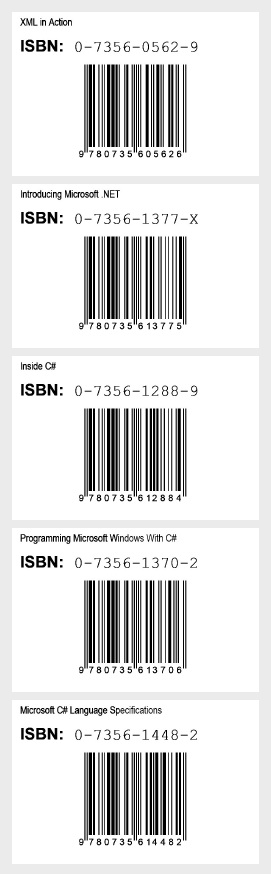
IMPORTANT: To test the sample code you must have installed a Zebra ZPL-based or EPL-based thermal printer.
<Books xmlns="">
  <Book ISBN="0-7356-0562-9" Title="XML in Action" />
  <Book ISBN="0-7356-1377-X" Title="Introducing Microsoft .NET" />
  <Book ISBN="0-7356-1288-9" Title="Inside C#" />
  <Book ISBN="0-7356-1370-2" Title="Programming Microsoft Windows With C#" />
  <Book ISBN="0-7356-1448-2" Title="Microsoft C# Language Specifications" />
</Books>
'Define a ThermalLabel object and set unit to inch and label size
Dim tLabel As New ThermalLabel(UnitType.Inch, 3, 2)
tLabel.GapLength = 0.2

'Define a TextItem object for binding to book's title
Dim txt1 As New TextItem(0.1, 0.05, 2.8, 0.3, "")
'set data field
txt1.DataField = "Title"
'set font
txt1.Font.Name = "Arial Narrow"
txt1.Font.Unit = FontUnit.Point
txt1.Font.Size = 9
'set alignment
txt1.TextAlignment = TextAlignment.Left

'Define a TextItem object for ISBN word
Dim txt2 As New TextItem(0.1, 0.3, 0.75, 0.5, "ISBN:")
'set font
txt2.Font.Name = "Arial"
txt2.Font.Unit = FontUnit.Point
txt2.Font.Size = 14
txt2.Font.Bold = True
'set alignment
txt2.TextAlignment = TextAlignment.Left

'Define a TextItem object for binding to ISBN code
Dim txt3 As New TextItem(0.75, 0.32, 2, 0.5, "")
'set data field
txt3.DataField = "ISBN"
'set font
txt3.Font.Name = "Courier New"
txt3.Font.Unit = FontUnit.Point
txt3.Font.Size = 14
'set alignment
txt3.TextAlignment = TextAlignment.Left

'Define a BarcodeItem object for encoding ISBN barcode
Dim bc As New BarcodeItem(0.1, 0.57, 2.8, 1.3, BarcodeSymbology.Isbn, "")
'set data field
bc.DataField = "ISBN"
'set barcode size
bc.BarWidth = 0.013
bc.BarHeight = 1
bc.EanUpcGuardBar = True
bc.EanUpcGuardBarHeight = bc.BarHeight + 5 * bc.BarWidth
'set barcode alignment
bc.BarcodeAlignment = BarcodeAlignment.MiddleCenter

'Add items to ThermalLabel object...
tLabel.Items.Add(txt1)
tLabel.Items.Add(txt2)
tLabel.Items.Add(txt3)
tLabel.Items.Add(bc)

'Create data source...
Dim books As New DataSet()
books.ReadXml("c:\temp\books.xml")

'set data source...
tLabel.DataSource = books

'Create a WindowsPrintJob object
Using pj As New WindowsPrintJob()
	'Create PrinterSettings object
	Dim myPrinter As New PrinterSettings()
	myPrinter.Communication.CommunicationType = CommunicationType.USB
	myPrinter.Dpi = 203
	myPrinter.ProgrammingLanguage = ProgrammingLanguage.ZPL
	myPrinter.PrinterName = "Zebra  TLP2844-Z"

	'Set PrinterSettings to PrintJob
	pj.PrinterSettings = myPrinter
	'Print ThermalLabel object...
	pj.Print(tLabel)
End Using
//Define a ThermalLabel object and set unit to inch and label size
ThermalLabel tLabel = new ThermalLabel(UnitType.Inch, 3, 2);
tLabel.GapLength = 0.2;

//Define a TextItem object for binding to book's title
TextItem txt1 = new TextItem(0.1, 0.05, 2.8, 0.3, "");
//set data field
txt1.DataField = "Title";
//set font
txt1.Font.Name = "Arial Narrow";
txt1.Font.Unit = FontUnit.Point;
txt1.Font.Size = 9;
//set alignment
txt1.TextAlignment = TextAlignment.Left;

//Define a TextItem object for ISBN word
TextItem txt2 = new TextItem(0.1, 0.3, 0.75, 0.5, "ISBN:");
//set font
txt2.Font.Name = "Arial";
txt2.Font.Unit = FontUnit.Point;
txt2.Font.Size = 14;
txt2.Font.Bold = true;
//set alignment
txt2.TextAlignment = TextAlignment.Left;

//Define a TextItem object for binding to ISBN code
TextItem txt3 = new TextItem(0.75, 0.32, 2, 0.5, "");
//set data field
txt3.DataField = "ISBN";
//set font
txt3.Font.Name = "Courier New";
txt3.Font.Unit = FontUnit.Point;
txt3.Font.Size = 14;
//set alignment
txt3.TextAlignment = TextAlignment.Left;


//Define a BarcodeItem object for encoding ISBN barcode
BarcodeItem bc = new BarcodeItem(0.1, 0.57, 2.8, 1.3, BarcodeSymbology.Isbn, "");
//set data field
bc.DataField = "ISBN";
//set barcode size
bc.BarWidth = 0.013;
bc.BarHeight = 1;
bc.EanUpcGuardBar = true;
bc.EanUpcGuardBarHeight = bc.BarHeight + 5 * bc.BarWidth;
//set barcode alignment
bc.BarcodeAlignment = BarcodeAlignment.MiddleCenter;

//Add items to ThermalLabel object...
tLabel.Items.Add(txt1);
tLabel.Items.Add(txt2);
tLabel.Items.Add(txt3);
tLabel.Items.Add(bc);

//Create data source...
DataSet books = new DataSet();
books.ReadXml(@"c:\temp\books.xml");

//set data source...
tLabel.DataSource = books;

//Create a WindowsPrintJob object
using (WindowsPrintJob pj = new WindowsPrintJob())
{
	//Create PrinterSettings object
	PrinterSettings myPrinter = new PrinterSettings();
	myPrinter.Communication.CommunicationType = CommunicationType.USB;
	myPrinter.Dpi = 203;
	myPrinter.ProgrammingLanguage = ProgrammingLanguage.ZPL;
	myPrinter.PrinterName = "Zebra  TLP2844-Z";

	//Set PrinterSettings to PrintJob
	pj.PrinterSettings = myPrinter;
	//Print ThermalLabel object...
	pj.Print(tLabel);
}
We provide best-in-class customer service and support directly from members of our dev team! If we are available when you contact us, you will get a response in few minutes; otherwise the maximum turnaround is 24hs in most cases.