
Neodynamic ThermalLabel SDK 8.0+
Microsoft .NET Framework 4.6.1+
Microsoft Visual Studio 2017+
Any Zebra Thermal Printer supporting ZPL (Zebra Programming Language) or EPL (Eltron Programming Language)
Data Masking allows you to serialize data items by specifying a Mask string as well as an increment string. Data Masking can be used with TextItem as well as BarcodeItem
Data Masking consists of the following concepts:
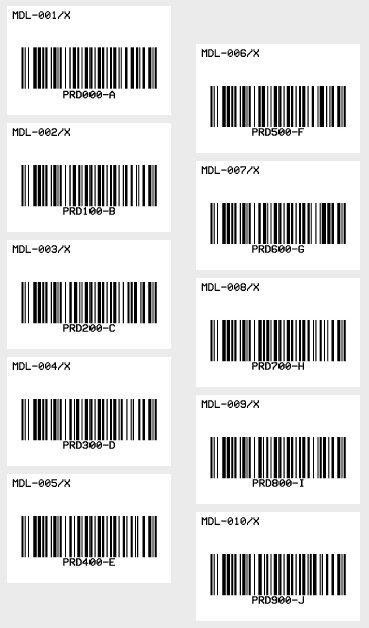
'Define a ThermalLabel object and set unit to inch and label size
Dim tLabel As New ThermalLabel(UnitType.Inch, 3, 2)
tLabel.GapLength = 0.2

'Define a TextItem object
Dim txt As New TextItem(0.1, 0.1, 2.8, 0.5, "MDL-001/X")
'set Mask info...
txt.Mask = "%%%%ddd%%"
txt.MaskIncrement = "1%%"
'set font
txt.Font.Name = Neodynamic.SDK.Printing.Font.NativePrinterFontA
txt.Font.Unit = FontUnit.Point
txt.Font.Size = 10

'Define a BarcodeItem object
Dim bc As New BarcodeItem(0.1, 0.57, 2.8, 1.3, BarcodeSymbology.Code128, "PRD000-A")
'set Mask info...
bc.Mask = "%%%d%%%A"
bc.MaskIncrement = "1%%%B"
'set barcode size
bc.BarWidth = 0.02
bc.BarHeight = 0.75
'set barcode alignment
bc.BarcodeAlignment = BarcodeAlignment.MiddleCenter
'set font
bc.Font.Name = Neodynamic.SDK.Printing.Font.NativePrinterFontA
bc.Font.Unit = FontUnit.Point
bc.Font.Size = 10

'Add items to ThermalLabel object...
tLabel.Items.Add(txt)
tLabel.Items.Add(bc)

'Create a WindowsPrintJob object
Using pj As New WindowsPrintJob()
	'Create PrinterSettings object
	Dim myPrinter As New PrinterSettings()
	myPrinter.Communication.CommunicationType = CommunicationType.USB
	myPrinter.Dpi = 203
	myPrinter.ProgrammingLanguage = ProgrammingLanguage.ZPL
	myPrinter.PrinterName = "Zebra  TLP2844-Z"

	'Set PrinterSettings to PrintJob
	pj.PrinterSettings = myPrinter
	'Set num of labels to generate
	pj.Copies = 10
	'Print ThermalLabel object...
	pj.Print(tLabel)
End Using
//Define a ThermalLabel object and set unit to inch and label size
ThermalLabel tLabel = new ThermalLabel(UnitType.Inch, 3, 2);
tLabel.GapLength = 0.2;

//Define a TextItem object
TextItem txt = new TextItem(0.1, 0.1, 2.8, 0.5, "MDL-001/X");
//set Mask info...
txt.Mask = "%%%%ddd%%";
txt.MaskIncrement = "1%%";
//set font
txt.Font.Name = Neodynamic.SDK.Printing.Font.NativePrinterFontA;
txt.Font.Unit = FontUnit.Point;
txt.Font.Size = 10;

//Define a BarcodeItem object
BarcodeItem bc = new BarcodeItem(0.1, 0.57, 2.8, 1.3, BarcodeSymbology.Code128, "PRD000-A");
//set Mask info...
bc.Mask = "%%%d%%%A";
bc.MaskIncrement = "1%%%B";
//set barcode size
bc.BarWidth = 0.02;
bc.BarHeight = 0.75;
//set barcode alignment
bc.BarcodeAlignment = BarcodeAlignment.MiddleCenter;
//set font
bc.Font.Name = Neodynamic.SDK.Printing.Font.NativePrinterFontA;
bc.Font.Unit = FontUnit.Point;
bc.Font.Size = 10;

//Add items to ThermalLabel object...
tLabel.Items.Add(txt);
tLabel.Items.Add(bc);

//Create a WindowsPrintJob object
using (WindowsPrintJob pj = new WindowsPrintJob())
{
	//Create PrinterSettings object
	PrinterSettings myPrinter = new PrinterSettings();
	myPrinter.Communication.CommunicationType = CommunicationType.USB;
	myPrinter.Dpi = 203;
	myPrinter.ProgrammingLanguage = ProgrammingLanguage.ZPL;
	myPrinter.PrinterName = "Zebra  TLP2844-Z";

	//Set PrinterSettings to PrintJob
	pj.PrinterSettings = myPrinter;
	//Set num of labels to generate
	pj.Copies = 10;
	//Print ThermalLabel object...
	pj.Print(tLabel);
}
We provide best-in-class customer service and support directly from members of our dev team! If we are available when you contact us, you will get a response in few minutes; otherwise the maximum turnaround is 24hs in most cases.