
How to get the barcode image in order to save it in a Database table or into an XML file
Product Barcode Professional for ASP.NET Published 02/24/2006 Updated 02/24/2006
Requirements
Neodynamic Barcode Professional 2.0 for ASP.NET (WebControl)
Microsoft .NET Framework (any version)
Microsoft Visual Studio .NET (any version)
Barcode Professional includes the GetBarcodeImage() method that allows you to get an array byte representation of the barcode image to generate.
So, if you want to save the barcode image into a Database or XML file you should call the mentioned method.
In the following sample we're going to create an ASP.NET Web Application that allows us to save barcode images into an XML file through a DataSet object.
Follow up these steps
- Open your .NET development tool such as Visual Studio .NET and create a new ASP.NET Web Application.
- Drag and Drop the following controls onto the WebForm design surface:
- a Barcode Professional control
- a TextBox control
- a Button control
- a Panel control and into it a Literal control
- Set the Barcode Professional's Symbology property to Code128
- Set the Panel's Visible property to False
- Double-click on the Button control and write the following code in the Button1_Click event procedure:
VB
'Set the value to encode
BarcodeProfessional1.Code = TextBox1.Text
'Create a DataSet and save the barcode image
Dim ds As DataSet = New DataSet("MyDataSet")
Dim dt As DataTable = New DataTable("MyTable")
ds.Tables.Add(dt)
'Create a column to hold the barcode image
Dim dc As DataColumn = New DataColumn("BarcodeImage", GetType(Byte()))
dt.Columns.Add(dc)
'Create a new row
Dim dr As DataRow = dt.NewRow()
'Save the barcode image
dr("BarcodeImage") = BarcodeProfessional1.GetBarcodeImage(System.Drawing.Imaging.ImageFormat.Gif)
dt.Rows.Add(dr)
'Show the DataSet content
Literal1.Text = Server.HtmlEncode(ds.GetXml())
Panel1.Visible = True
C#
//Set the value to encode
BarcodeProfessional1.Code = TextBox1.Text;
//Create a DataSet and save the barcode image
DataSet ds = new DataSet("MyDataSet");
DataTable dt = new DataTable("MyTable");
ds.Tables.Add(dt);
//Create a column to hold the barcode image
DataColumn dc = new DataColumn("BarcodeImage", typeof(byte[]));
dt.Columns.Add(dc);
//Create a new row
DataRow dr = dt.NewRow();
//Save the barcode image
dr["BarcodeImage"] = BarcodeProfessional1.GetBarcodeImage(System.Drawing.Imaging.ImageFormat.Gif);
dt.Rows.Add(dr);
//Show the DataSet content
Literal1.Text = Server.HtmlEncode(ds.GetXml());
Panel1.Visible = true;
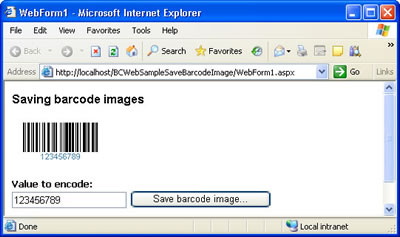
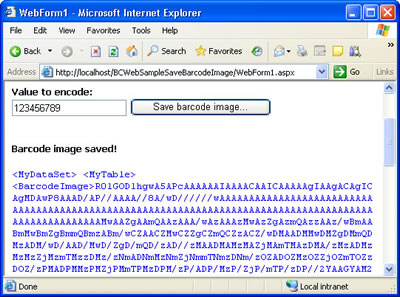
That's it. Build the ASP.NET Web Application. Run it and play with it. You'll see the following output.
Need help? Contact Support
We provide best-in-class customer service and support directly from members of our dev team! If we are available when you contact us, you will get a response in few minutes; otherwise the maximum turnaround is 24hs in most cases.