Counters
Counters let you index data items by a selected increment or decrement value, so the item increases or decreases by that value on every printed label (serial numbers, lot numbers, countdowns, etc.). Counters work with TextItem and BarcodeItem objects.
How it works
A counter is set up on a TextItem or BarcodeItem with the CounterStep property:
| Property | Type | Default | Description |
|---|---|---|---|
CounterStep |
Integer |
0 |
Increment (positive) or decrement (negative) applied on every printed label. 0 means no counter. |
CounterUseLeadingZeros |
Boolean |
False |
True keeps the width of the original number padded with zeros; False suppresses leading zeros. |
The SDK looks for the number to index in the Text property (TextItem) or the Code property (BarcodeItem):
- It scans the content from right to left and takes the right-most contiguous run of digits (0-9). That run is the indexing portion; the rest of the content is left untouched.
- The content may end with letters or symbols: the scan skips them until it finds a digit.
- Only one run is indexed. In
"A12-B34"the counter is34;"12"is never modified. - If the content has no digits, the counter has nothing to index and the original content is printed unchanged on every label.
| Content | CounterStep |
CounterUseLeadingZeros |
Labels 1, 2, 3... |
|---|---|---|---|
ABC01 |
1 |
False |
ABC1, ABC2, ABC3 |
ABC01 |
1 |
True |
ABC01, ABC02, ABC03 |
Decreasing 50 |
-1 |
False |
Decreasing 50, Decreasing 49, Decreasing 48 |
LOT-100-X |
5 |
False |
LOT-100-X, LOT-105-X, LOT-110-X |
Item |
1 |
any | Item, Item, Item (no digits) |
The first label always shows the original value; the counter starts to move from the second label.
How many labels are generated?
- Without a DataSource: one label per
PrintJob.Copies(default1, minimum1). WithCopies = 10you get 10 labels with 10 different values. - With a DataSource: one label per data row (see Data Binding).
Copiesis not used to create the rows.
Note: with counters,
Copiesdoes not mean "the printer repeats the same label": the SDK generates a different label for each copy. Labels with no counter, mask or data source are sent once and repeated by the printer (^PQin ZPL).
Wrap-around and limits
- Decrementing below zero wraps around using the width of the original number: with two digits and a step of
-1,01is followed by00(or0without leading zeros) and then by99. - Incrementing has no upper wrap-around:
99followed by+1prints100. The number simply gets longer. WithCounterUseLeadingZeros = Truethe padding never truncates. - The indexing portion is parsed as a 64-bit integer, so it can't have more than about 18 digits. Use shorter numbers, or split long codes into a fixed prefix and a numeric tail.
- If the step is large enough to go below zero by more than one full cycle (for example
5with step-1over 20 labels), the value is not wrapped enough times and a negative number may be printed. Keep|CounterStep| * (labels - 1)within the capacity of the original number.
Combining counters
- Counters + DataSource. If a counter item also has a
DataField, the value of the first record is used as the starting value, formatted withDataFieldFormatString; the following labels are computed from it by the counter (they are not re-read from the data source). Items without a counter are bound normally. - Counters + Mask. A label can contain counter items and mask items together (see Mask in Text Item). Each item follows its own rule.
- Repeaters. Items inside a data-bound Repeater are not affected by counters.
- Several counters. Every
TextItem/BarcodeItemwithCounterStep <> 0is indexed independently, so one label can have an increasing barcode and a decreasing text as in the sample below.
Printing, exporting and progress
Counters work the same way for native printer commands (ZPL, EPL, Fingerprint/Direct Protocol) and for the image-based languages (ESC/POS, PCL) and exports (image, PDF), because they all go through the same data-binding pipeline. The LabelProgress event of the print job reports each generated label (see Data Binding).
Sample
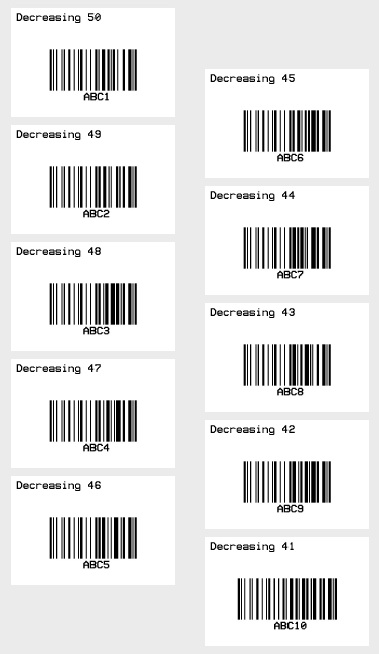
The following sample prints 10 labels with a Code-128 barcode whose value goes from ABC01 to ABC10 and a text that decreases from Decreasing 50 to Decreasing 41.
VB
'Define a ThermalLabel object and set unit to inch and label size
Dim tLabel As New ThermalLabel(UnitType.Inch, 3, 2)
tLabel.GapLength = 0.2

'Define a TextItem object
Dim txt As New TextItem(0.1, 0.1, 2.8, 0.5, "Decreasing 50")
'set counter step for decreasing by 1
txt.CounterStep = -1
'set font
txt.Font.Name = Neodynamic.SDK.Printing.Font.NativePrinterFontA
txt.Font.Unit = FontUnit.Point
txt.Font.Size = 10

'Define a BarcodeItem object
Dim bc As New BarcodeItem(0.1, 0.57, 2.8, 1.3, BarcodeSymbology.Code128, "ABC01")
'set counter step for increasing by 1
bc.CounterStep = 1
'keep the leading zero: ABC01, ABC02 ... ABC10
bc.CounterUseLeadingZeros = True
'set barcode size
bc.BarWidth = 0.02
bc.BarHeight = 0.75
'set barcode alignment
bc.BarcodeAlignment = BarcodeAlignment.MiddleCenter
'set font
bc.Font.Name = Neodynamic.SDK.Printing.Font.NativePrinterFontA
bc.Font.Unit = FontUnit.Point
bc.Font.Size = 10

'Add items to ThermalLabel object...
tLabel.Items.Add(txt)
tLabel.Items.Add(bc)

'Create a WindowsPrintJob object
Using pj As New WindowsPrintJob()
    'Create PrinterSettings object
    Dim myPrinter As New PrinterSettings()
    myPrinter.Communication.CommunicationType = CommunicationType.USB
    myPrinter.Dpi = 203
    myPrinter.ProgrammingLanguage = ProgrammingLanguage.ZPL
    myPrinter.PrinterName = "Zebra  TLP2844-Z"

    'Set PrinterSettings to WindowsPrintJob
    pj.PrinterSettings = myPrinter
    'Set num of labels to generate
    pj.Copies = 10
    'Print ThermalLabel object...
    pj.Print(tLabel)
End Using
C#
// Define a ThermalLabel object and set unit to inch and label size
ThermalLabel tLabel = new ThermalLabel(UnitType.Inch, 3, 2);
tLabel.GapLength = 0.2;

// Define a TextItem object
TextItem txt = new TextItem(0.1, 0.1, 2.8, 0.5, "Decreasing 50");
// set counter step for decreasing by 1
txt.CounterStep = -1;
// set font
txt.Font.Name = Neodynamic.SDK.Printing.Font.NativePrinterFontA;
txt.Font.Unit = FontUnit.Point;
txt.Font.Size = 10;

// Define a BarcodeItem object
BarcodeItem bc = new BarcodeItem(0.1, 0.57, 2.8, 1.3, BarcodeSymbology.Code128, "ABC01");
// set counter step for increasing by 1
bc.CounterStep = 1;
// keep the leading zero: ABC01, ABC02 ... ABC10
bc.CounterUseLeadingZeros = true;
// set barcode size
bc.BarWidth = 0.02;
bc.BarHeight = 0.75;
// set barcode alignment
bc.BarcodeAlignment = BarcodeAlignment.MiddleCenter;
// set font
bc.Font.Name = Neodynamic.SDK.Printing.Font.NativePrinterFontA;
bc.Font.Unit = FontUnit.Point;
bc.Font.Size = 10;

// Add items to ThermalLabel object...
tLabel.Items.Add(txt);
tLabel.Items.Add(bc);

// Create a WindowsPrintJob object
using (WindowsPrintJob pj = new WindowsPrintJob())
{
    // Create PrinterSettings object
    PrinterSettings myPrinter = new PrinterSettings();
    myPrinter.Communication.CommunicationType = CommunicationType.USB;
    myPrinter.Dpi = 203;
    myPrinter.ProgrammingLanguage = ProgrammingLanguage.ZPL;
    myPrinter.PrinterName = "Zebra  TLP2844-Z";

    // Set PrinterSettings to WindowsPrintJob
    pj.PrinterSettings = myPrinter;
    // Set num of labels to generate
    pj.Copies = 10;
    // Print ThermalLabel object...
    pj.Print(tLabel);
}
WindowsPrintJobis available on Windows only. On other platforms usePrintJoband send the commands fromGetNativePrinterCommands()yourself.
Common mistakes
- Expecting
Copiesto repeat the same label. With counters each copy is a different label. SetCopiesto the total number of labels you need. - Forgetting
CounterUseLeadingZeros.ABC01withCounterStep = 1printsABC1,ABC2... unless the property isTrue. - Counter without digits. If the content has no digit, nothing changes. Add a number such as
"LOT0". - More than one number in the content. Only the right-most run is indexed (
"2024-0001"indexes0001). - Too many digits. Runs longer than about 18 digits can't be parsed.
- Barcode symbologies that restrict the data. The incremented value must stay valid for the symbology (for example, numeric-only or fixed-length symbologies, check digits). Prefer a symbology that accepts the full content.
Masks or Counters?
| Counters | Data Masking | |
|---|---|---|
| Alphabet | decimal digits | decimal, hex, octal, alphabetic, alphanumeric |
| Which characters change | the right-most run of digits | the positions marked in the mask |
| Step | integer (positive or negative) | one increment character per position (no decrement) |
| Leading zeros | CounterUseLeadingZeros |
always kept (fixed width) |
| Wrap-around | the number just grows (99 → 100) |
wraps inside the mask (99 → 00) |