Data Masking
Data Masking lets you serialize data items (serial numbers, product IDs, hexadecimal codes, alphabetic sequences...) by specifying a Mask string and an Increment string. It works with TextItem and BarcodeItem objects.
Use it instead of Counters when the value is not a plain decimal number: when each position has its own alphabet (digits, hex, octal, letters), when you need to increment only some characters of the value, or when the step differs per position.
Properties
| Property | Type | Default | Description |
|---|---|---|---|
Mask |
String |
"" |
Defines which characters of the value are serialized and with which alphabet. |
MaskIncrement |
String |
"" |
The value added to the data on every label, written with the same alphabet as the mask. |
Important: masking is active only when both
MaskandMaskIncrementare set (non-empty). Setting onlyMaskdoes nothing. Although the increment is conceptually "1 by default", the property default is an empty string, so you must always set it explicitly (for example"1").
Both properties accept only letters, digits and %. Any other character (-, /, spaces...) throws an ArgumentException when you set the property.
The input Mask
The mask is aligned to the characters of the target string (the Text property of a TextItem, the Code property of a BarcodeItem) starting at the right-most position. Each mask character is a placeholder that says what kind of character is in that position:
| Placeholder | Alphabet | Notes |
|---|---|---|
D or d |
Decimal digits 0-9 |
|
H |
Hexadecimal 0-9, A-F |
Uppercase output |
h |
Hexadecimal 0-9, a-f |
Lowercase output |
O or o |
Octal 0-7 |
|
A |
Alphabetic A-Z |
Uppercase |
a |
Alphabetic a-z |
Lowercase |
N |
Alphanumeric 0-9, A-Z |
Uppercase |
n |
Alphanumeric 0-9, a-z |
Lowercase |
% |
(skip) | The character is left untouched |
- The case of the placeholder matters for
H/h,A/aandN/n: it selects the alphabet, so the character currently in the data must belong to that alphabet. With maskHHH,0FEserializes correctly, but in0fethe lowercase letters are not part of the uppercase alphabet and are left unchanged. Usehhhfor lowercase data. - Any other letter or digit that is not a placeholder (for example
X,Z,0) is treated like%: the character is skipped. - Characters you want to keep fixed (a prefix such as
MDL-, a separator such as/) are marked with%(or any non-placeholder character).
The Mask Increment
The increment is the value added to the data on every label. It is written with the same placeholders' alphabets, one character per position, right-aligned like the mask (a shorter increment is padded on the left with 0):
"1"adds 1 to the right-most character;"01"is equivalent.- In alphabetic positions the "zero" is
A(ora). To add one you writeB; to add two,C. - Use
%in the increment for positions that must not change. - A character in the increment that doesn't belong to the alphabet of its position is taken as
0. - Increments can be larger than one: increment
"2"over007gives009,011...
When a position overflows (9 + 1, F + 1, Z + 1) it wraps to the first character of its alphabet and carries to the next incremented position on the left. The carry jumps over skipped (%) positions, and a carry out of the left-most masked position is discarded (99 → 00, ZZ → AA).
Examples
| Data | Mask | Increment | Sequence |
|---|---|---|---|
MDL-001/X |
%%%%ddd%% |
1%% |
MDL-001/X, MDL-002/X, ..., MDL-009/X, MDL-010/X |
PRD000-A |
%%%d%%%A |
1%%%B |
PRD000-A, PRD100-B, PRD200-C, ..., PRD900-J |
00123 |
ddd |
1 |
00123, 00124, 00125 (only the last 3 digits are serialized) |
AB-99 |
%%%dd |
1 |
AB-99, AB-00, AB-01 (wraps, no carry to the prefix) |
0FE |
HHH |
1 |
0FE, 0FF, 100, 101 |
0fe |
hhh |
1 |
0fe, 0ff, 100, 101 |
007 |
ddd |
2 |
007, 009, 011 |
Z8 |
Ad |
1 |
Z8, Z9, A0 |
1-99 |
d%dd |
1 |
1-99, 2-00, 2-01 (carry skips the -) |
How many labels are generated?
- Without a DataSource:
PrintJob.Copieslabels (default1, minimum1). The first label shows the original value and each following label applies the increment to the previous one. - With a DataSource: one label per data row (see Data Binding). If a masked item also has a
DataField, the value of the first record is the starting value and the next labels are computed from it with the mask; they are not re-read from the data source.
As with Counters, a label with Mask items is not repeated by the printer: the SDK generates a different label for each copy. You can mix Mask items, Counter items and normal data-bound items on the same label. If the same item has both CounterStep and Mask/MaskIncrement, the counter takes precedence, so don't set both on one item. Items inside a data-bound Repeater are not masked.
Sample
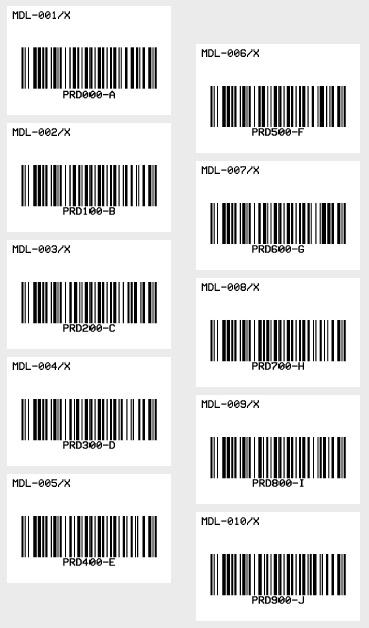
The following sample prints 10 labels. Each label has a TextItem that serializes a product model (MDL-001/X ... MDL-010/X) and a Code 128 BarcodeItem that serializes a product ID (PRD000-A, PRD100-B, PRD200-C, ..., PRD900-J).
VB
'Define a ThermalLabel object and set unit to inch and label size
Dim tLabel As New ThermalLabel(UnitType.Inch, 3, 2)
tLabel.GapLength = 0.2

'Define a TextItem object
Dim txt As New TextItem(0.1, 0.1, 2.8, 0.5, "MDL-001/X")
'set Mask info: serialize only the 3 digits, add 1 to the right-most digit
txt.Mask = "%%%%ddd%%"
txt.MaskIncrement = "1%%"
'set font
txt.Font.Name = Neodynamic.SDK.Printing.Font.NativePrinterFontA
txt.Font.Unit = FontUnit.Point
txt.Font.Size = 10

'Define a BarcodeItem object
Dim bc As New BarcodeItem(0.1, 0.57, 2.8, 1.3, BarcodeSymbology.Code128, "PRD000-A")
'set Mask info: add 1 to the first digit and 'B' (= +1) to the last letter
bc.Mask = "%%%d%%%A"
bc.MaskIncrement = "1%%%B"
'set barcode size
bc.BarWidth = 0.02
bc.BarHeight = 0.75
'set barcode alignment
bc.BarcodeAlignment = BarcodeAlignment.MiddleCenter
'set font
bc.Font.Name = Neodynamic.SDK.Printing.Font.NativePrinterFontA
bc.Font.Unit = FontUnit.Point
bc.Font.Size = 10

'Add items to ThermalLabel object...
tLabel.Items.Add(txt)
tLabel.Items.Add(bc)

'Create a WindowsPrintJob object
Using pj As New WindowsPrintJob()
    'Create PrinterSettings object
    Dim myPrinter As New PrinterSettings()
    myPrinter.Communication.CommunicationType = CommunicationType.USB
    myPrinter.Dpi = 203
    myPrinter.ProgrammingLanguage = ProgrammingLanguage.ZPL
    myPrinter.PrinterName = "Zebra  TLP2844-Z"

    'Set PrinterSettings to WindowsPrintJob
    pj.PrinterSettings = myPrinter
    'Set num of labels to generate
    pj.Copies = 10
    'Print ThermalLabel object...
    pj.Print(tLabel)
End Using
C#
// Define a ThermalLabel object and set unit to inch and label size
ThermalLabel tLabel = new ThermalLabel(UnitType.Inch, 3, 2);
tLabel.GapLength = 0.2;

// Define a TextItem object
TextItem txt = new TextItem(0.1, 0.1, 2.8, 0.5, "MDL-001/X");
// set Mask info: serialize only the 3 digits, add 1 to the right-most digit
txt.Mask = "%%%%ddd%%";
txt.MaskIncrement = "1%%";
// set font
txt.Font.Name = Neodynamic.SDK.Printing.Font.NativePrinterFontA;
txt.Font.Unit = FontUnit.Point;
txt.Font.Size = 10;

// Define a BarcodeItem object
BarcodeItem bc = new BarcodeItem(0.1, 0.57, 2.8, 1.3, BarcodeSymbology.Code128, "PRD000-A");
// set Mask info: add 1 to the first digit and 'B' (= +1) to the last letter
bc.Mask = "%%%d%%%A";
bc.MaskIncrement = "1%%%B";
// set barcode size
bc.BarWidth = 0.02;
bc.BarHeight = 0.75;
// set barcode alignment
bc.BarcodeAlignment = BarcodeAlignment.MiddleCenter;
// set font
bc.Font.Name = Neodynamic.SDK.Printing.Font.NativePrinterFontA;
bc.Font.Unit = FontUnit.Point;
bc.Font.Size = 10;

// Add items to ThermalLabel object...
tLabel.Items.Add(txt);
tLabel.Items.Add(bc);

// Create a WindowsPrintJob object
using (WindowsPrintJob pj = new WindowsPrintJob())
{
    // Create PrinterSettings object
    PrinterSettings myPrinter = new PrinterSettings();
    myPrinter.Communication.CommunicationType = CommunicationType.USB;
    myPrinter.Dpi = 203;
    myPrinter.ProgrammingLanguage = ProgrammingLanguage.ZPL;
    myPrinter.PrinterName = "Zebra  TLP2844-Z";

    // Set PrinterSettings to WindowsPrintJob
    pj.PrinterSettings = myPrinter;
    // Set num of labels to generate
    pj.Copies = 10;
    // Print ThermalLabel object...
    pj.Print(tLabel);
}
WindowsPrintJobis available on Windows only. On other platforms usePrintJoband send the commands fromGetNativePrinterCommands()yourself.
Common mistakes
- Setting only
Mask. WithoutMaskIncrementnothing is serialized. Always set both. - Mask or increment longer than the data. Data, mask and increment are always aligned from the right-most position. If the mask is longer than the data, only its right-most characters are used (
5with maskdddis incremented asd); if it is shorter, the remaining left positions are skipped. Keep them the same length to avoid surprises. - Wrong letter case.
HHHover0feorAAAoverabc: the data must belong to the alphabet selected by the placeholder (H/A/Nuppercase,h/a/nlowercase). A character outside the alphabet of its position (a letter under ad, a lowercase letter under anH) is left untouched and not incremented, so the value may look "stuck". Use the right placeholder case, or%for fixed positions. - Forgetting
%in the increment. Positions of the mask you don't want to change need a%in the increment (or a0/Azero value). A missing right-most character is padded as0, so"1%%"and"0001%%"mean the same. - Using
-,/or spaces inMask/MaskIncrement. Only letters, digits and%are valid. Use%to skip fixed separators. - Expecting
Copiesto be printer repeats. With Mask, every copy is a different label. - Barcode data that becomes invalid (hex letters in a numeric-only symbology, wrong length, check digits). Choose a symbology that accepts the whole alphabet you are serializing.
Masks or Counters?
| Counters | Data Masking | |
|---|---|---|
| Alphabet | decimal digits | decimal, hex, octal, alphabetic, alphanumeric |
| Which characters change | the right-most run of digits | the positions marked in the mask |
| Step | integer (positive or negative) | one increment character per position (no decrement) |
| Leading zeros | CounterUseLeadingZeros |
always kept (fixed width) |
| Wrap-around | the number just grows (99 → 100) |
wraps inside the mask (99 → 00) |