
Silverlight Barcode Builder - Create and print high quality vector-based Linear, Postal and 2D Barcodes
Product Barcode Professional for Silverlight Published 12/08/2010 Updated 12/08/2010
Requirements
Neodynamic Barcode Professional for Silverlight (any version)
Silverlight 4 or greater
Microsoft Visual Studio 2010
Microsoft Visual Basic 2010 Express Edition
Microsoft Visual C# 2010 Express Edition
This sample application illustrates how easily you can use Barcode Professional in Silverlight Applications for creating a very complete Barcode Builder. Barcode Professional for Silverlight supports most popular linear (1D), Postal, MICR and 2D barcodes and in this sample application you can use it to create a Barcode Builder featuring all symbologies provided by Barcode Professional for Silverlight like Code 39, Code 128, GS1-128, GS1 DataBar (RSS-14), EAN 13 & UPC, Postal (USPS, British Royal Mail, Australia Post, DHL, etc.), Data Matrix, QR Code, PDF 417, UPS MaxiCode, Micro QR Code, MICR E-13-B Characters, ALL EAN/UPC Composite Barcodes (CC-A, CC-B & CC-C) and many more barcode standards.
The Silverlight Barcode Builder sample demo features:
- A simple Silverlight Application which will allow the user to generates all barcode symbologies supported by Barcode Professional for Silverlight.
- Allows the user to rotate, zoom, print and save barcodes. Barcodes can be saved in JPEG, PNG, BMP and GIF formats thanks to ImageTools Library for Silverlight.
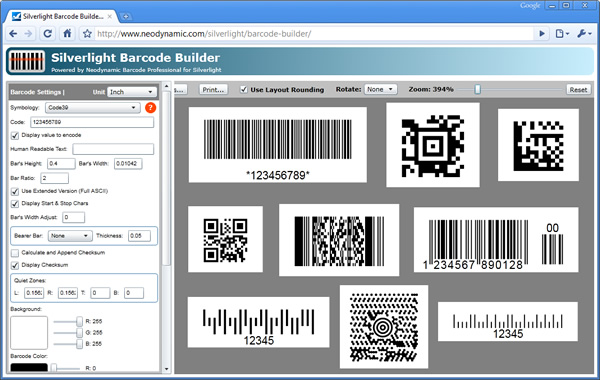
The Silverlight Barcode Builder sample application
Sample Files Download
The source code of Silverlight Barcode Builder is available in VB.NET and C#. You can get it when you download and install Barcode Professional for Silverlight
Need help? Contact Support
We provide best-in-class customer service and support directly from members of our dev team! If we are available when you contact us, you will get a response in few minutes; otherwise the maximum turnaround is 24hs in most cases.