Download JSPrintManager Client App for Free
JSPrintManager (JSPM) App is the client-side part of JSPrintManager Solution. It can be installed on any number of client machines without paying any fees. Download JSPM and read System Requirements for each available platform:
Terms & Conditions: By clicking the "Download" button, you agree to the the following Software Licensing Agreement & Privacy Policy...
JSPrintManager App - End User Licensing Agreement (EULA)
Copyright © 2004-2026, Neodynamic. All rights reserved.THIS SOFTWARE IS PROVIDED BY NEODYNAMIC "AS IS" AND ANY EXPRESS OR IMPLIED WARRANTIES, INCLUDING, BUT NOT LIMITED TO, THE IMPLIED WARRANTIES OF MERCHANTABILITY AND FITNESS FOR A PARTICULAR PURPOSE ARE DISCLAIMED. IN NO EVENT SHALL NEODYNAMIC BE LIABLE FOR ANY DIRECT, INDIRECT, INCIDENTAL, SPECIAL, EXEMPLARY, OR CONSEQUENTIAL DAMAGES (INCLUDING, BUT NOT LIMITED TO, PROCUREMENT OF SUBSTITUTE GOODS OR SERVICES; LOSS OF USE, DATA, OR PROFITS; OR BUSINESS INTERRUPTION) HOWEVER CAUSED AND ON ANY THEORY OF LIABILITY, WHETHER IN CONTRACT, STRICT LIABILITY, OR TORT (INCLUDING NEGLIGENCE OR OTHERWISE) ARISING IN ANY WAY OUT OF THE USE OF THIS SOFTWARE, EVEN IF ADVISED OF THE POSSIBILITY OF SUCH DAMAGE.
JSPrintManager App - Privacy Policy
- PERSONAL INFORMATION
JSPrintManager App does not log or share your personal information. It does not track you. It does not profile you. Period. - DEVICE INFORMATION
Each time a website tries to connect to JSPrintManager App, it will ask you for permission to expose the following information of your system to that website:- The list of installed Printers, Bluetooth (RFCOMM) / USB / HID devices & Scanners including information like device name, port name, and current status.
- The list of Serial Ports.
- The list of installed Fonts.
- The Media Access Control (MAC) address.
- The list of Users' name.


MS Edge & Internet Explorer (IE) Settings
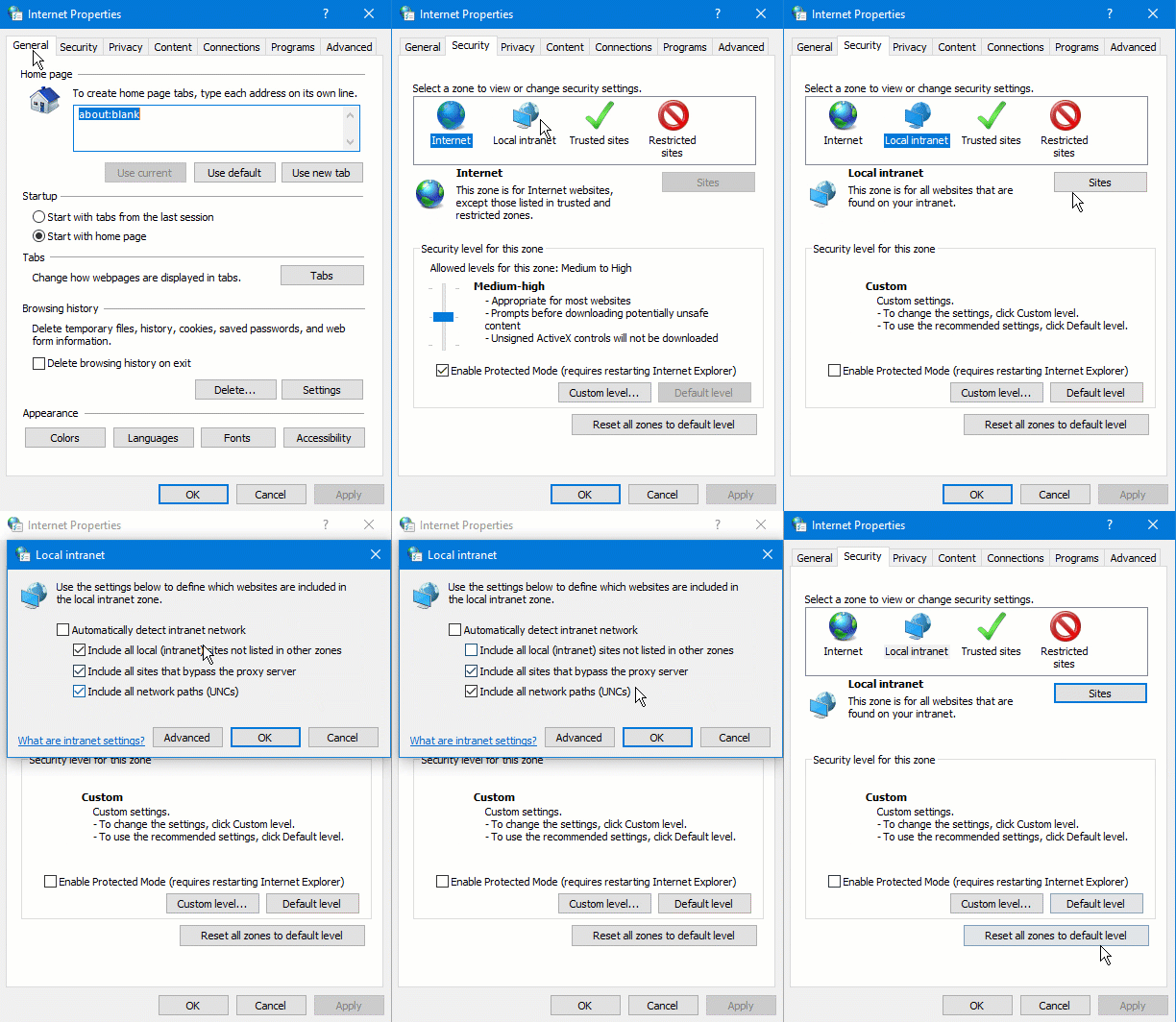
Internet Explorer (IE) or MS Edge users must allow websocket connection to localhost! Open Internet Explorer, then click ⚙ (Gear Icon) ⇨ Internet Options ⇨ Security ⇨ Local Intranet ⇨ Sites ⇨ Uncheck the first checkbox as shown below:
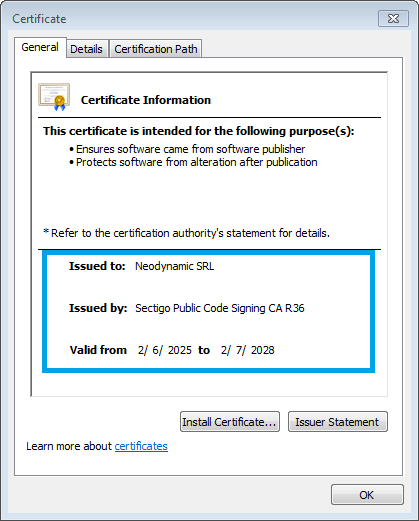
The installer package is digitally-signed with a Windows Authenticode Certificate issued by DigiCert, Inc. Install the package only if the Publisher is Neodynamic; otherwise contact us.
System Requirements
|
OS Windows XP Windows Vista Windows 7 Windows 8.x Windows 10 |
BROWSER Internet Explorer 10+ Microsoft Edge Mozilla Firefox 31+ Google Chrome 31+ Safari 6.0.3+ |
Debian-based Systems
RedHat-based Systems
GPG KEY The Packages are digitally-signed with GPG. Verify our packages by installing Public Neodynamic GPG KEY available at https://www.neodynamic.com/pub/NEODYNAMIC-JSPM-GPG-KEY.txt
System Requirements
|
OS Debian 8+ Ubuntu 12.04+ Linux Mint 13+ Fedora 20+ CentOS 7.0+ |
BROWSER Mozilla Firefox shipped with the OS or latest version Google Chrome latest version |
Version History
- Maintenance Release (2018-07-22)
jspm app patched to v1.0.1.0
- Fixed! Bug in Certificate installation.
INSTALLATION NOTE: After downloading the PKG package, open Finder and locate the file. Then right click on it and select Open...
System Requirements
|
OS Mac OS X 10.7+ / Intel |
BROWSER Safari shipped with the OS or latest version Mozilla Firefox latest version Google Chrome latest version |
Version History
- Maintenance Release (2018-07-22)
jspm app patched to v1.0.1.0
- Fixed! Bug in Certificate installation.
INSTALLATION NOTE: After downloading the DEB package, please install from Terminal: sudo dpkg -i jspm-1.0.0.0-armhf.deb
GPG KEY The Packages are digitally-signed with GPG. Verify our packages by installing Public Neodynamic GPG KEY available at https://www.neodynamic.com/pub/NEODYNAMIC-JSPM-GPG-KEY.txt
System Requirements
|
OS Raspbian Jessie or greater |
BROWSER Iceweasel / Mozilla Firefox, Chromium latest version |
Version History
- Maintenance Release (2018-07-22)
jspm app patched to v1.0.1.0
- Fixed! Bug in Certificate installation.