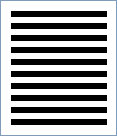
USPS Horizontal Bars Barcode
Also known as USPS BRM Horizontal Bars
This Barcode Symbology is supported by the following Neodynamic products:- Barcode Professional SDK for .NET Projects
- Barcode Professional for Windows Forms
- BarcodePro Web API for Docker
- Barcode Professional for WPF
- Barcode Professional for XAML WinRT Windows Store
- Barcode Professional for ASP.NET (Web Forms, MVC Razor, AJAX)
- Barcode Professional for Silverlight LOB
- Barcode Professional for Reporting Services (CRI & DLL for SSRS (RDL))
- Barcode Professional for .NET STANDARD
- Barcode Professional for Blazor
- ThermalLabel SDK for .NET
- Barcode Professional for .NET Compact Framework
Overview
 USPS Business Reply Mail (BRM) enables you to receive First-Class Mail back from customers while paying postage only on the pieces that your customers return. You may distribute cards, envelopes, self-mailers, and other types of mailpieces as BRM.
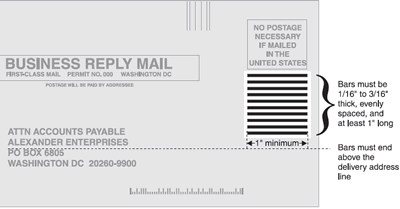
Six basic design elements are required on a BRM piece. One of these design elements is called Horizontal Bars. To help identify your mailpiece as BRM, you must print a series of horizontal bars below the "NO POSTAGE NECESSARY" endorsement on your BRM pieces. These bars must be uniform in length, thickness, and spacing. Each bar must be at least 1 inch long and 1/16 inch to 3/16 inch thick.
There must be at least a 1/2-inch clearance between the right edge of the ZIP Code in the delivery address and the left edge of the horizontal bars. The bottom bar in the series must be above (not on or below) the top of the delivery address line - the next-to-last line in the address, just above the line with the city, state, and ZIP Code
Size and location of Horizontal Bars
How to create USPS Horizontal Bars using Barcode Professional for
- Set the Symbology property to UspsHorizontalBars
- Set the UspsHorizontalBarsCount property
- Setting up dimensions and quiet zones:
- Set the BarWidth property to a value ranging from 0.0625 to 0.1875 (Value is expressed in Inches)
- Set the BarHeight property to 1 (Value is expressed in Inches)
- Set the QuietZoneWidth property (Value is expressed in Inches)
- Set the TopMargin and BottomMargin properties (Values are expressed in Inches)
- Set the Symbology property to UspsHorizontalBars
- Set the UspsHorizontalBarsCount property
- Setting up dimensions and quiet zones:
All values for barcode dimensions are expressed in INCHES by default. However, Barcode Professional supports other unit of measurement such as Millimeter, Centimeter, and Mils. For modifying the unit of measurement for barcoding, please set up the BarcodeUnit property as needed.
- Set the BarWidth property to a value ranging from 0.0625 to 0.1875 (Value is expressed in Inches)
- Set the BarHeight property to 1 (Value is expressed in Inches)
- Set the QuietZone property (Value is expressed in Inches)
Example of USPS Horizontal Bars images
UspsHorizontalBarsCount property = 10 will produce the following barcode image for USPS Horizontal Bars: