
This Symbology is also known as VICS Bill of Lading SCAC PRO, Voluntary Interindustry Commerce Solutions Bill of Lading SCAC PRO, SCAC Barcode, PRO Barcode, VICS SCAC, VICS PRO, SCAC/Pro Barcode, Standard Carrier Alpha Code, Carrier SCAC Barcode
This Barcode Symbology is supported by the following Neodynamic products: The VICS standard Bill of Lading (BOL) form features two barcodes, one for VICS BOL and one for carrier SCAC and PRO number. The SCAC/Pro number is determined by joining SCAC and Pro values. SCAC (Standard Carrier Alpha Code) is a four-letter alpha code identifying the carrier and assigned by the NMFTA (The National Motor Freight Traffic Association) while Pro Number is a unique number assigned by the carrier to identify a specific shipment.
(*) If the SCAC is less than four characters in length, then a dash character (-) should be used to extend the field to four characters.
(**) Due to space limitations, numeric characters are recommended for the PRO number. If alpha characters are used, the number of characters that fit in the available space on the Bill of Lading form is diminished considerably.
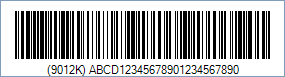
Code property = ABCD12345678901234567890 (SCAC = ABCD and PRO number = 12345678901234567890) will produce the following barcode image: