Royal TPG Post KIX 4-State Barcode
This Symbology is also known as Kix Barcode, Klantenindex (client index) Barcode, Dutch KIX 4-State Bar Code, Dutch KIX, TPG KIX, and TPGPOST KIX
This Barcode Symbology is supported by the following Neodynamic products:- Barcode Professional SDK for .NET Projects
- Barcode Professional for Windows Forms
- BarcodePro Web API for Docker
- Barcode Professional for WPF
- Barcode Professional for XAML WinRT Windows Store
- Barcode Professional for ASP.NET (Web Forms, MVC Razor, AJAX)
- Barcode Professional for Silverlight LOB
- Barcode Professional for Reporting Services (CRI & DLL for SSRS (RDL))
- Barcode Professional for .NET STANDARD
- Barcode Professional for Blazor
- ThermalLabel SDK for .NET
- Barcode Professional for .NET Compact Framework
Overview
 This Symbology is used by Royal Dutch TPG Post (Netherlands) for Postal code and automatic mail sorting. It provides information about the address of the receiver. It encodes alpha-numeric characters (0-9, A-Z). It comprises four types of bars (the four states), each of which has a distinct name, value and barcode symbol.
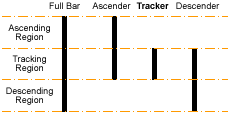
4-State Barcode Bars
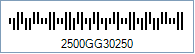
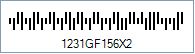
Sample of a Royal TPG Post KIX 4-State barcode
How to create Royal TPG Post KIX 4-State barcodes using Barcode Professional for
Note: Please refer to the Class Reference documentation for more information about the properties and methods stated in this document.
In order to get a Royal TPG Post KIX 4-State barcode image, please follow these steps:
- Set the Symbology property to RoyalTpgPostKix
- Setting up dimensions and quiet zones:
- Set the Postal4StateTrackerBarWidth property to a value ranging from 0.015 to 0.025 (Values are expressed in Inches)
- Set the Postal4StateTrackerBarHeight property to a value ranging from 0.04 to 0.06 (Values are expressed in Inches)
- Set the Postal4StateBarsSpacing property to a value ranging from 0.015 to 0.025 (Values are expressed in Inches)
- Set the QuietZoneWidth property to 0.08 (Value is expressed in Inches)
- Set the TopMargin and BottomMargin properties to 0.08 (Value is expressed in Inches)
- Set the Code property with the value to encode i.e. the KIX which is an acronym of "Klantenindex" (Dutch for "client index")
- Examples of KIX values that can be set to the Code property. See how you get the KIX value from a given address
- Address: Antwoordnummer 80430, 2130 VA HOOFDDORP
KIX: 2130VA80430 - Address: Havendijk 156-2, 1231 GF POSTDAM
KIX: 1231GF156X2 - Address: Havendijk 13 hs, 1231 FZ POSTDAM
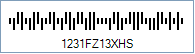
KIX: 1231FZ13XHS
- Address: Antwoordnummer 80430, 2130 VA HOOFDDORP
- Examples of KIX values that can be set to the Code property. See how you get the KIX value from a given address
Note: Please refer to the Class Reference documentation for more information about the properties and methods stated in this document.
In order to get a Royal TPG Post KIX 4-State barcode image, please follow these steps:
- Set the Symbology property to RoyalTpgPostKix
- Setting up dimensions and quiet zones:
All values for barcode dimensions are expressed in INCHES by default. However, Barcode Professional supports other unit of measurement such as Millimeter, Centimeter, and Mils. For modifying the unit of measurement for barcoding, please set up the BarcodeUnit property as needed.
- Set the Postal4StateTrackerBarWidth property to a value ranging from 0.015 to 0.025 (Values are expressed in Inches)
- Set the Postal4StateTrackerBarHeight property to a value ranging from 0.04 to 0.06 (Values are expressed in Inches)
- Set the Postal4StateBarsSpacing property to a value ranging from 0.015 to 0.025 (Values are expressed in Inches)
- Set the QuietZone property to 0.08 (Value is expressed in Inches)
- Set the Code property with the value to encode i.e. the KIX which is an acronym of "Klantenindex" (Dutch for "client index")
- Examples of KIX values that can be set to the Code property. See how you get the KIX value from a given address
- Address: Antwoordnummer 80430, 2130 VA HOOFDDORP
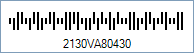
KIX: 2130VA80430 - Address: Havendijk 156-2, 1231 GF POSTDAM
KIX: 1231GF156X2 - Address: Havendijk 13 hs, 1231 FZ POSTDAM
KIX: 1231FZ13XHS
- Address: Antwoordnummer 80430, 2130 VA HOOFDDORP
- Examples of KIX values that can be set to the Code property. See how you get the KIX value from a given address
Royal TPG Post KIX 4-State barcode images generated based on the KIX values of point 3
Code property = 2130VA80430 will produce the following barcode image:
Code property = 1231GF156X2 will produce the following barcode image:
Code property = 1231FZ13XHS will produce the following barcode image: