
Semacode Barcode
Also known as URL Barcodes, Semacode Tag
This Barcode Symbology is supported by the following Neodynamic products:- Barcode Professional SDK for .NET Projects
- Barcode Professional for Windows Forms
- BarcodePro Web API for Docker
- Barcode Professional for WPF
- Barcode Professional for XAML WinRT Windows Store
- Barcode Professional for ASP.NET (Web Forms, MVC Razor, AJAX)
- Barcode Professional for Silverlight LOB
- Barcode Professional for Reporting Services (CRI & DLL for SSRS (RDL))
- Barcode Professional for .NET STANDARD
- Barcode Professional for Blazor
- ThermalLabel SDK for .NET
- Barcode Professional for Windows Phone
- Barcode Professional for .NET Compact Framework
Overview
 The fundamental concept of semacode is the URL barcode. A barcode is a machine readable visual tag, and a URL (Universal Resource Locators) is an internet address. Semacode Tag is the encoding of URLs into barcodes based on Data Matrix 2D Symbology.
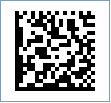
Sample of a Semacode barcode
How to create Semacode barcodes using Barcode Professional for
Note: Please refer to the Class Reference documentation for more information about the properties and methods stated in this document.
In order to get a Semacode barcode image, please follow these steps:
- Set the Symbology property to Semacode
- Setting up dimensions and quiet zones:
- Set the DataMatrixModuleSize property (Value is expressed in Inches)
- Set the QuietZoneWidth property (Value is expressed in Inches)
- Set the TopMargin and BottomMargin properties (Values are expressed in Inches)
- Set the Code property with the value to encode. Specify the URL string you want to encode through out Semacode
Note: Please refer to the Class Reference documentation for more information about the properties and methods stated in this document.
In order to get a Semacode barcode image, please follow these steps:
- Set the Symbology property to Semacode
- Setting up dimensions and quiet zones:
All values for barcode dimensions are expressed in INCHES by default. However, Barcode Professional supports other unit of measurement such as Millimeter, Centimeter, and Mils. For modifying the unit of measurement for barcoding, please set up the BarcodeUnit property as needed.
- Set the DataMatrixModuleSize property (Value is expressed in Inches)
- Set the QuietZone property (Value is expressed in Inches)
- Set the Code property with the value to encode. Specify the URL string you want to encode through out Semacode
Example of a Semacode barcode image
Code property = http://www.neodynamic.com will produce the following barcode image: