
Pharmacode Barcode
Also known as Pharmacode Laetus, Pharmaceutical Binary Code
This Barcode Symbology is supported by the following Neodynamic products:- Barcode Professional SDK for .NET Projects
- Barcode Professional for Windows Forms
- BarcodePro Web API for Docker
- Barcode Professional for WPF
- Barcode Professional for XAML WinRT Windows Store
- Barcode Professional for ASP.NET (Web Forms, MVC Razor, AJAX)
- Barcode Professional for Silverlight LOB
- Barcode Professional for Reporting Services (CRI & DLL for SSRS (RDL))
- Barcode Professional for .NET STANDARD
- Barcode Professional for Blazor
- ThermalLabel SDK for .NET
- Barcode Professional for .NET Compact Framework
Overview
 Pharmacode is a barcode standard, used in the pharmaceutical industry as a packing control system. The Pharmacode barcode is found extensively on the packaging of pharmaceutical products, usually on the flap of the box that contains the bottle, tube or sachets of pills within. It is designed to be readable despite printing errors. Pharmacode can represent only a single integer from 3 to 131070.
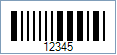
Sample of a Pharmacode Barcode
How to create Pharmacode barcodes using Barcode Professional for
Note: Please refer to the Class Reference documentation for more information about the properties and methods stated in this document.
In order to get a Pharmacode barcode image, please follow these steps:
- Set the Symbology property to Pharmacode
- Setting up dimensions and quiet zones:
- Set the PharmacodeThinBarWidth property to 0.02 or to a value ranging from 0.016 to 0.028 (Values are expressed in Inches)
- Set the PharmacodeThickBarWidth property to 0.06 or to a value ranging from 0.051 to 0.1 (Values are expressed in Inches)
- Set the PharmacodeBarsSpacing property to 0.04 or to a value ranging from 0.035 to 0.1 (Values are expressed in Inches)
- Set the BarHeight property to 0.31 (Values are expressed in Inches)
- Set the Code property with the value to encode. It must be a numeric value ranging from 3 to 131070. VERY IMPORTANT: Although any values in the last range are valid Pharmacodes, the following numbers MUST NOT BE USED because they will produce non-legible Pharmacode barcodes: 3, 6, 7, 14, 15, 30, 31, 62, 63, 126, 127, 254, 255, 510, 511, 1022, 1023, 2046, 2047, 4094, 4095, 8190, 8191, 16382, 16383, 32766, 32767, 65534, 65535, and 131070
Note: Please refer to the Class Reference documentation for more information about the properties and methods stated in this document.
In order to get a Pharmacode barcode image, please follow these steps:
- Set the Symbology property to Pharmacode
- Setting up dimensions and quiet zones:
All values for barcode dimensions are expressed in INCHES by default. However, Barcode Professional supports other unit of measurement such as Millimeter, Centimeter, and Mils. For modifying the unit of measurement for barcoding, please set up the BarcodeUnit property as needed.
- Set the PharmacodeThinBarWidth property to 0.02 or to a value ranging from 0.016 to 0.028 (Values are expressed in Inches)
- Set the PharmacodeThickBarWidth property to 0.06 or to a value ranging from 0.051 to 0.1 (Values are expressed in Inches)
- Set the PharmacodeBarsSpacing property to 0.04 or to a value ranging from 0.035 to 0.1 (Values are expressed in Inches)
- Set the BarHeight property to 0.31 (Values are expressed in Inches)
- Set the Code property with the value to encode. It must be a numeric value from 3 to 131070
Example of Pharmacode barcode images
Code property = 12345 will produce the following barcode image: